
What It Does
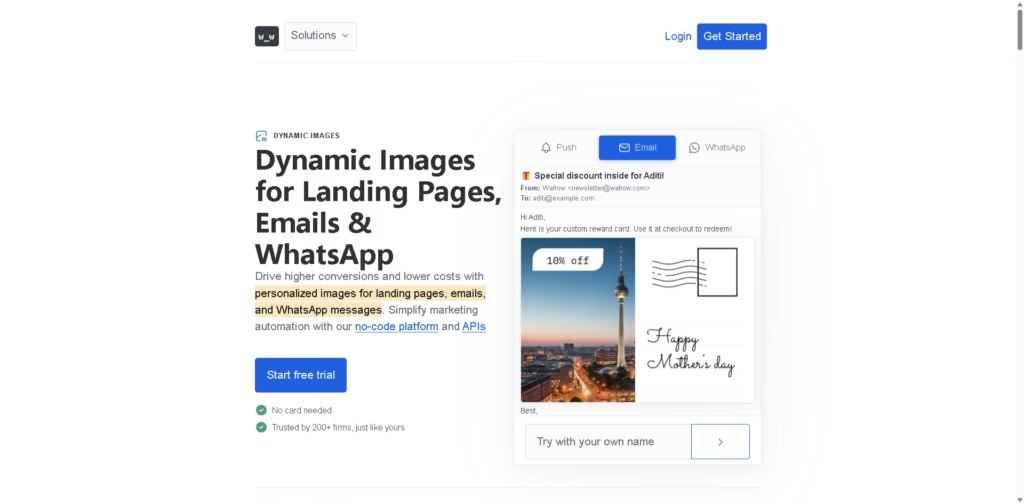
Wafrow is a dynamic image personalization platform for marketing teams that need to generate individualized visuals for landing pages, emails, WhatsApp, mobile push notifications, and other campaigns. Its no-code platform, REST API, webhooks, and marketing integrations let teams change template elements such as text, images, logos, offers, and opacity using customer or campaign data.
A typical workflow starts with creating a reusable image template, connecting a CRM or marketing platform through an integration or Zapier, and passing customer data into the template. For example, an ecommerce team can trigger a Shopify abandoned-cart workflow that inserts a customer’s name and personalized discount into an image, then deliver that dynamic image through an email platform such as Klaviyo or Mailchimp.
Quick Verdict
- Best for: Automating personalized marketing images across customer campaigns
- Skip if: You only need conventional static graphic-design software
- Key Advantage: Programmatic personalization across multiple marketing channels
- Top Alternative: Bannerbear
At a Glance
| Feature | Details |
|---|---|
| Category | Dynamic image personalization |
| Pricing Model | Freemium / Pay-As-You-Go |
| Free Tier | Yes |
| Platform | Web |
| API | Yes |
| Primary Strength | Automated personalized image generation |
| Integrations | 14 integrations |
| Delivery Channels | Email, WhatsApp, push, landing pages |
Pricing & Plans
- Free: Free forever. Includes 1,000 images/month, 1GB bandwidth/month, all 14 integrations, and self-serve support.
- Lifetime License: $99 one-time payment. Includes 10,000 images/month, 25GB bandwidth/month, all 14 integrations, MCP Server, and self-serve support.
- Pay-As-You-Go: $0.01 per image generated. Includes unlimited images, unlimited bandwidth, all 14 integrations plus custom webhooks, MCP Server, and self-serve plus dedicated support.
- Free Trial: The paid offering includes a 14-day free trial.
- All plans: Include unlimited image and PDF downloads, REST API and webhooks, URL-parameter image generation, 6,000+ fonts, multilingual character support, and a digital creative asset manager.
Note: Prices and plan limits may change. Check the official website for current pricing.
Key Features
- Dynamically modifies template layers using customer and campaign data.
- Generates personalized images through REST API requests and URL parameters.
- Connects marketing workflows through Zapier and 14 listed integrations.
- Supports dynamic images across email, WhatsApp, push, and landing pages.
- Provides live countdown images for email marketing campaigns.
- Generates personalized OG images from URLs for branded social sharing.
Best For
- Personalizing abandoned-cart email banners with customer-specific offers
- Automating dynamic visuals from CRM and ecommerce campaign data
- Creating personalized cold-email images for outbound campaigns
- Generating branded OG images automatically from website URLs
- Adding live countdown timers to promotional emails
Pros & Cons
Pros:
- Supports both no-code workflows and direct API implementation.
- Offers integrations with platforms including Shopify, HubSpot, Klaviyo, Mailchimp, and Zapier.
- Dynamic templates can modify individual visual elements programmatically.
- Includes a free plan with 1,000 generated images per month.
Cons:
- The platform is focused specifically on dynamic marketing images rather than full graphic design.
- Higher-volume workflows require the $99 lifetime option or pay-as-you-go pricing.
- The free plan has a 1GB monthly bandwidth allowance.
Alternatives & Comparisons
| Alternative | Best For | Key Difference vs. This Tool |
|---|---|---|
| Bannerbear | Automated image and video generation | Similar API-driven automation, with a broader focus on automated visual asset generation. |
| Abyssale | Automated advertising creative production | More focused on producing and scaling advertising creatives and banner variations. |
| Canva | General-purpose visual design | Provides a much broader manual design environment rather than specializing in programmatic dynamic images. |
Wafrow fits the market as a specialized automation layer for generating personalized visual assets from marketing data rather than as a general-purpose design editor. Choose it over the alternatives when your workflow depends on automatically changing individual image elements for each customer, campaign, or event.
Frequently Asked Questions
Does Wafrow require coding?
No. Wafrow provides a no-code platform and Zapier integration, while developers can use its REST API and webhooks for more customized workflows.
Which marketing platforms does Wafrow integrate with?
The supplied information lists integrations including Zapier, HubSpot, Customer.io, Apollo, Contentful, Firebase, Clay, Shopify, Kit, Braze, Salesforce, Mailchimp, Klaviyo, and ActiveCampaign.
Can Wafrow personalize email images?
Yes. Wafrow can dynamically insert customer-specific information into email images and supports email platforms such as Klaviyo, Mailchimp, HubSpot, and Braze.
Can Wafrow generate images for WhatsApp and push notifications?
Yes. Wafrow supports dynamic images for WhatsApp and mobile push notifications, including integrations and dynamic image URLs.
Is Wafrow suitable for developers?
Yes. Developers can use the REST API, webhooks, URL parameters, and MCP Server to integrate dynamic image generation into existing workflows.
ToolsPedia Rating
- Performance & Speed: 4.4/5.0
- Ease of Setup: 4.5/5.0
- Feature Depth: 4.3/5.0
- Value for Price: 4.5/5.0
- ToolsPedia Score: 4.4/5.0
Final Thoughts
Wafrow is best suited to teams that want to turn customer data into personalized visual assets without manually creating a separate image for every recipient. Its combination of templates, integrations, API access, and multi-channel delivery makes it particularly relevant for ecommerce, CRM, email, and growth-marketing workflows. Start with the free plan if your monthly volume is modest, then evaluate the API and integration workflow before moving to a paid tier.
















