
What It Does
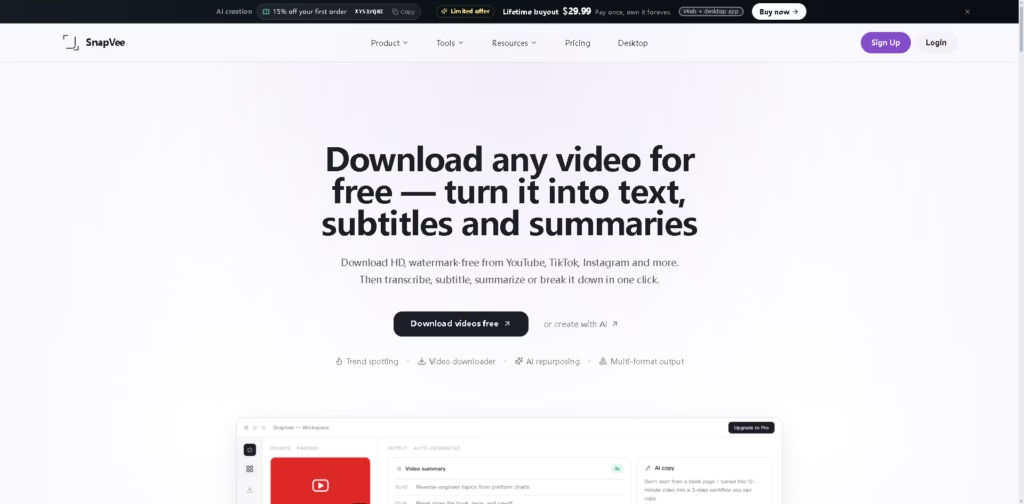
SnapVee is an AI content workspace that combines video downloading, transcription, subtitles, summaries, content analysis, social formatting, and AI image generation. SnapVee is designed for content creators, social media marketers, video editors, educators, and students who need to turn online media into reusable content.
Users can download supported public videos, convert them into transcripts or subtitles, summarize long content into chapters and key points, analyze comments and reviews, and generate visual assets. The platform also provides social formatting tools and desktop utilities for converting, compressing, clipping, merging, and processing media.
Quick Verdict
- Best for: Creators and marketers repurposing online videos into multi-format content.
- Skip if: You only need a basic video downloader or dedicated video editor.
- Key Advantage: Combines downloading, transcription, analysis, summaries, AI images, and social formatting.
- Top Alternative: Descript
At a Glance
| Category | Details |
|---|---|
| Category | AI Content Repurposing & Video Tools |
| Pricing Model | Freemium subscription |
| Free Tier | Yes |
| Platform | Web + Windows + macOS |
| API | Not specified |
| Primary Strength | End-to-end video repurposing workflow |
| AI Credits | Separate allowance for AI creation and analysis |
| Media Allowance | Separate allowance for transcription and summaries |
Pricing & Plans
Free – $0
One-time trial with:
- 30 media minutes
- Up to 30 minutes per video
- 20 AI credits
- 3 free downloads
- One free daily run for subtitles, summaries, and AI images without sign-in
- Five daily runs for desktop conversion, compression, clipping, merging, and de-watermarking
- Limited social trends
- Social post formatting
- Assets retained for 7 days
- Free allowance is valid for 7 days
Lite – $7.99/month
Billed yearly at $95.88.
- 600 media minutes/month
- 400 AI credits/month
- Full downloader
- Watermark-free 1080p+ downloads
- Unlimited desktop tool runs
- 5 trend searches/day
- Full social trends
- Trend picking, sourcing, analytics, summaries, and transcription
- Social post formatting
- Add-on packs available
- Assets retained forever
Pro – $13.99/month
Billed yearly at $167.88.
- 1,200 media minutes/month
- 1,200 AI credits/month
- Full downloader
- Watermark-free 1080p+ downloads
- Unlimited desktop tool runs
- 20 trend searches/day
- Full social trends
- Full trend, transcription, summary, and analytics pipeline
- Social post formatting
- Add-on packs available
- Assets retained forever
Studio – $32.99/month
Billed yearly at $395.88.
- 3,000 media minutes/month
- 3,000 AI credits/month
- Full downloader
- Watermark-free 1080p+ downloads
- Unlimited desktop tool runs
- 50 trend searches/day
- Full social trends
- Full trend, transcription, summary, and analytics pipeline
- Social post formatting
- Add-on packs available
- Assets retained forever
Yearly billing saves about 17%. Add-on packs can be purchased when additional media minutes or AI credits are needed.
Note: Prices and plan limits may change. Check the official website for current pricing.
Key Features
- Downloads supported videos in HD or 4K without watermarks.
- Converts videos and audio into editable transcripts and subtitles.
- Generates summaries, chapters, key points, and mind maps.
- Analyzes comments and reviews for sentiment, selling points, and red flags.
- Generates images using multiple AI image models.
- Formats content for multiple social media platforms.
- Provides desktop tools for conversion, compression, clipping, and merging.
Best For
- Creators turning long videos into short-form content ideas.
- Social media teams analyzing trends and repurposing media.
- Video editors sourcing reference footage, subtitles, and audio.
- Educators converting lectures into structured notes and summaries.
- Marketers analyzing comments, reviews, and audience sentiment.
Pros & Cons
Pros
- Combines many content-repurposing tools in one workspace.
- Supports both web and desktop workflows.
- Separate media and AI credit pools simplify allowance tracking.
- Offers transcription, summaries, subtitles, analysis, and image generation.
- Supports multiple major social platforms.
Cons
- AI features are limited by monthly credit allowances.
- Transcription and summary workloads consume separate media minutes.
- API availability is not specified.
- Advanced video editing is not positioned as a core feature.
Alternatives & Comparisons
| Alternative | Best For | Key Difference vs. SnapVee |
|---|---|---|
| Descript | Transcript-based video and podcast editing | More focused on editing video and audio through transcript-based workflows. |
| Notta | Transcription and meeting notes | More specialized in transcription and structured meeting documentation. |
| 4K Video Downloader | Video downloading | More focused on downloading media rather than AI-powered content repurposing. |
SnapVee sits between video downloading, AI content analysis, transcription, and social content creation rather than specializing in just one area. Choose SnapVee over alternatives when you want downloading, analysis, transcription, summaries, visual generation, and social formatting within one workflow.
Frequently Asked Questions
What does SnapVee use media minutes for?
Media minutes cover transcription, subtitles, video summaries, and viral breakdowns, with usage based on video length.
What are AI credits used for?
AI credits are used for features such as AI image generation, dubbing, and review analysis.
Can SnapVee download videos without watermarks?
Yes. Paid plans include watermark-free downloads at 1080p or higher, while the free plan includes three initial downloads.
Does SnapVee have a desktop app?
Yes. SnapVee provides desktop tools for Windows and macOS, including conversion, compression, clipping, merging, and watermark processing.
What happens when the monthly allowance runs out?
Users can purchase add-on media-minute or AI-credit packs, or upgrade to a higher subscription tier.
ToolsPedia Rating
| Criteria | Rating |
|---|---|
| Performance & Speed | 4.4/5.0 |
| Ease of Setup | 4.5/5.0 |
| Feature Depth | 4.7/5.0 |
| Value for Price | 4.6/5.0 |
| ToolsPedia Score | 4.6/5.0 |
Final Thoughts
SnapVee is a broad content-repurposing platform that brings video downloading, transcription, summaries, analysis, AI image creation, and social formatting into one workflow.
SnapVee’s strongest value comes from combining these tools rather than relying on a single specialized capability.
The free tier provides a practical way to evaluate the workflow before choosing between Lite, Pro, and Studio.
















