
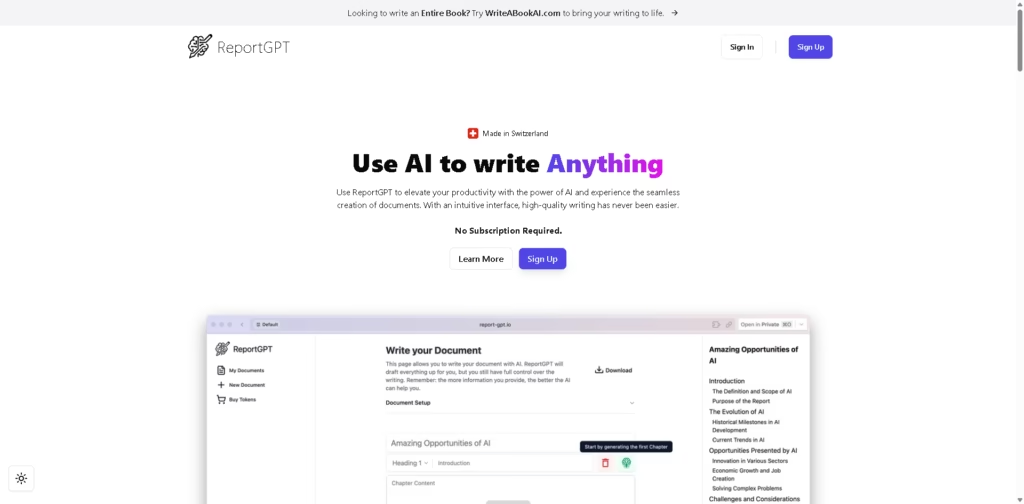
What It Does
ReportGPT is an AI document-writing platform designed to help users create structured reports, research papers, essays, business plans, technical documentation, proposals, and other long-form documents. Its workflow separates document planning from chapter generation, allowing users to review and modify the structure before generating content.
The platform is particularly useful when a document needs a defined structure and an exportable format rather than a simple chat response. For example, a researcher can create a paper, customize its chapter structure, generate sections individually, refine the content, run an AI-plagiarism check, and export the finished document as Word, LaTeX, or Markdown.
At a Glance
| Field | Details |
|---|---|
| Category | AI document writing |
| Primary Use | Structured reports and long-form documents |
| AI Model | GPT-5 available on paid plans |
| Languages | 15+ |
| Export Formats | Word, LaTeX, Markdown |
| Free Option | 1 free demo document |
| Pricing Model | One-time payments |
| AI Checks | AI-plagiarism checks included |
Key Features
- Creates customizable document structures before generating individual chapters.
- Generates content chapter by chapter from user-provided requirements.
- Allows sections and chapter headings to be added, removed, and reorganized.
- Learns from the user’s writing style for future documents.
- Runs AI-plagiarism checks on generated documents.
- Exports completed documents as Word, LaTeX, or Markdown.
- Supports 15+ languages for document creation.
Best For
- Structuring research papers before generating individual sections.
- Creating business plans from customizable document frameworks.
- Drafting technical documentation with organized chapters.
- Developing grant proposals and other structured applications.
- Producing essays and reports that require editable document structures.
Pros & Cons
| Pros | Cons |
| Uses a structured outline-first workflow instead of generating everything at once. | It is primarily designed around document generation rather than general conversational AI. |
| Users can customize the proposed structure before content generation. | Paid plans are document-based, which may be less suitable for frequent short-form use. |
| Supports Word, LaTeX, and Markdown exports. | AI-generated content still requires fact-checking and human editing. |
| One-time pricing avoids recurring subscription charges. | The provided information does not detail integrations with external research databases or reference managers. |
| A free demo allows users to test the workflow before paying. | The AI-plagiarism terminology does not establish guaranteed academic originality or acceptance by institutions. |
Alternatives & Comparisons
| Alternative | Best For | Key Difference |
| ChatGPT | Flexible AI-assisted writing | General-purpose conversational interface rather than a document-first workflow |
| Claude | Long-form drafting and editing | Stronger emphasis on conversational document work |
| Jenni AI | Academic and research writing | More specialized in academic writing workflows |
| Grammarly | Editing and writing improvement | Primarily focused on reviewing and improving existing text |
ReportGPT sits between general AI chatbots and specialized academic writing software, emphasizing structured document generation and export. Choose it when outline control, chapter-by-chapter generation, and one-time document pricing are more important than a general-purpose AI assistant.
Frequently Asked Questions
Does ReportGPT require a monthly subscription?
No. The listed paid plans use one-time payments, and the site explicitly states that users are not automatically charged.
What export formats does ReportGPT support?
ReportGPT supports Word, LaTeX, and Markdown exports.
Can I customize the document outline?
Yes. Users can add or remove sections, modify chapter headings, and customize the suggested structure before generating content.
Does ReportGPT support academic writing?
Yes. The platform specifically lists research papers and essays among its use cases, along with business, technical, and professional documents.
Can I use ReportGPT for free?
Yes. The free option provides one demo document with document-structure generation, chapter generation, and AI-plagiarism checks. The site also says users can use their own OpenAI API key without additional platform charges.
Overall Rating
| Category | Score |
| Performance | 8.5/10 |
| Ease of Use | 8.6/10 |
| Feature Set | 8.7/10 |
| Workflow Fit | 9.0/10 |
| Overall | 8.7/10 |
ReportGPT is a strong fit for structured long-form document creation, particularly when users want control over the outline and flexible export formats without a recurring subscription.
Final Verdict
- Best for: Users creating structured reports, research papers, proposals, essays, and other long-form documents.
- Avoid if you primarily need conversational brainstorming or a general-purpose AI assistant.
- Biggest strength: Its outline-first, chapter-by-chapter workflow gives users more structural control over generated documents.
- Best alternative: Jenni AI is a stronger option for users focused specifically on academic and research writing.
















