
What It Does
PixNova AI is Face Swap tool lets you instantly replace faces in photos, videos, and GIFs with surprising accuracy.
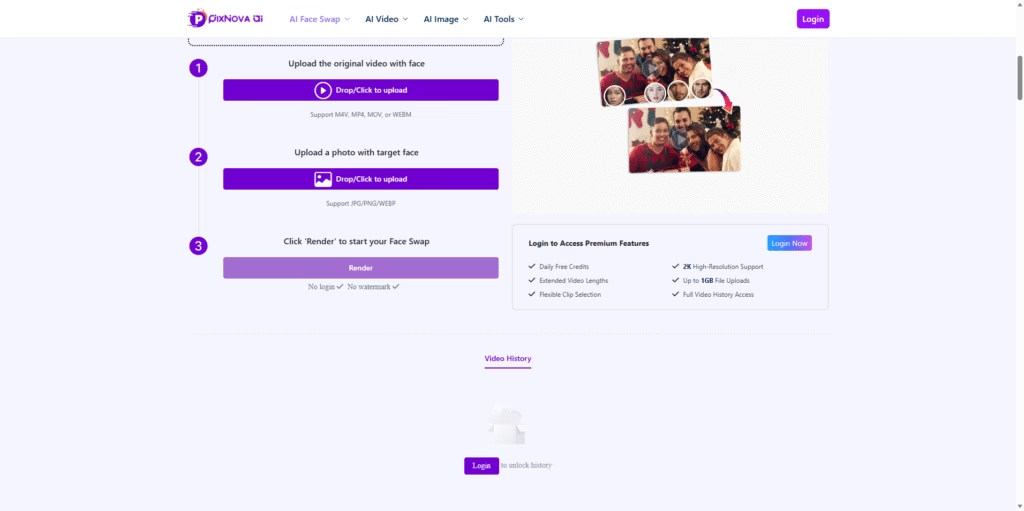
It’s designed for quick, fun, and high-quality swaps without watermarks, sign-ups, or editing skills. Just upload your media, choose a face, and let the AI do the magic.
Key Features
- Free, watermark-free face swaps: Swap faces in photos, videos, and GIFs without paying or creating an account.
- HD quality output: Supports up to 2K resolution for sharp, clean results.
- Video Face Swap: Works with MP4, MOV, WEBM, and more-no time limit mentioned.
- Multiple Face Swaps: Replace several faces in one image or video.
- Flexible upload support: Upload up to 1GB video files or images in JPG/PNG/WEBP.
- Clip selection tools: Choose specific parts of a video to swap.
- Trending templates: Instantly try face swaps with curated templates like superheroes, Christmas styles, fitness models, and more.
- AI Playground: Experiment with face swaps in a simple, clean interface.
- Premium perks (optional): Daily credits, extended video lengths, higher resolutions, and full video history.
Who Is PixNova AI Face Swap For?
- Creators & influencers: Make fun reels, memes, cosplay edits, and attention-grabbing short videos.
- Casual users: Quickly generate funny swaps to share with friends.
- Content makers: Enhance skits, reaction videos, or themed posts with consistent face swaps.
- Designers & marketers: Test looks, moods, or personas for campaigns without scheduling photoshoots.
- Early-stage filmmakers: Prototype scenes or concepts using quick face replacements.
Final Thoughts
PixNova AI is Face Swap stands out because it’s easy, fast, completely free, and doesn’t slap a watermark on your creations.
Whether you’re making fun edits, experimenting with characters, or crafting social-ready content, it gives you solid results with almost no learning curve.
If you want a powerful yet effortless face-swapping tool, PixNova AI is absolutely worth trying.















