
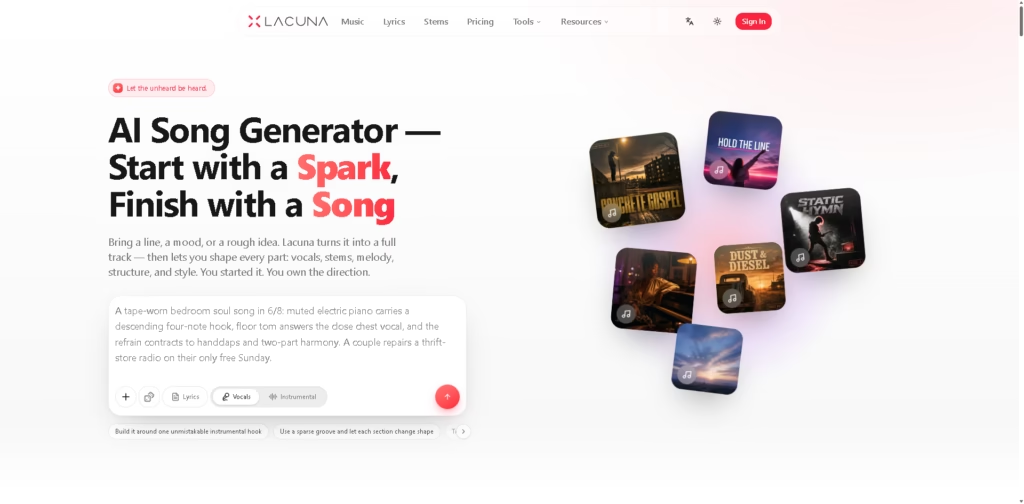
What It Does
Lacuna is a browser-based AI music creation platform for turning text ideas, lyrics, images, or audio into songs and then refining the result. Its workspace combines AI music generation with lyrics, stem separation, BPM and key analysis, MIDI editing, remixing, extending, and section-level replacement.
It is aimed at creators who want more control than a simple text-to-song generator provides, including independent musicians, video creators, podcasters, game developers, and small brands. A typical workflow is to describe a song, generate several versions, replace or extend a section, split the finished track into stems, and then continue editing the parts in a DAW.
At a Glance
| Field | Details |
|---|---|
| Category | AI music creation platform |
| Platform | Web browser |
| AI Music Generation | Text-to-song with vocals or instrumental output |
| AI Models | Multiple AI music models in one generator |
| Editing | Extend, remix, section replacement, lyrics rewriting |
| Stem Separation | Vocals, drums, bass, instrumental layers |
| MIDI | Online MIDI editor with melody generation and editing |
| API | AI Music API, SDK, MCP, and CLI toolkit |
Key Features
- Generates vocal or instrumental tracks from text descriptions.
- Let users extend, remix, or replace selected song sections.
- Separates generated or uploaded music into individual stems.
- Generates lyrics with rhyme and syllable assistance.
- Analyzes BPM, key, and tempo for created tracks.
- Provides browser-based MIDI editing with DAW export.
- Offers multiple AI music models within one generator.
Best For
- Turning rough musical ideas into complete song drafts.
- Creating custom background music for videos and podcasts.
- Generating multiple production directions from one musical concept.
- Separating vocals and instruments for further DAW editing.
- Building game, advertising, and branded music without traditional studio workflows.
Pros & Cons
| Pros | Cons |
| Combines generation, lyrics, stems, analysis, and MIDI tools. | The breadth of tools may be more than casual users need. |
| Supports section-level refinement instead of requiring complete regeneration. | Exact generation limits and pricing details are not provided in the supplied information. |
| Multiple AI models can be compared within one workflow. | Dedicated mobile-app support is not established by the supplied product information. |
| Includes developer options such as API, SDK, MCP, and CLI tools. | Users seeking a mature AI-DAW workflow may find alternatives with deeper editing ecosystems. |
Alternatives & Comparisons
| Alternative | Best For | Key Difference |
| Suno | Full AI song creation and advanced generative editing | Offers extensive song editing, stem extraction, audio uploads, and Suno Studio. |
| Udio | Detailed AI song generation and iterative remixing | Strong workflow for extending, remixing, replacing sections, and working from uploaded audio. |
| Stable Audio | AI-generated audio and instrumental content | Better suited to users focused on generated audio assets rather than an all-in-one songwriting workspace. |
Lacuna sits between a straightforward AI song generator and a broader AI-assisted music production workspace. Choose it when integrated lyrics, stems, music analysis, MIDI, multiple models, and developer tooling matter more than choosing the most established alternative.
Frequently Asked Questions
Is Lacuna better than Suno for music production?
Lacuna is particularly appealing if you want music generation combined with lyrics, stem splitting, BPM/key analysis, MIDI editing, and developer tools in one ecosystem. Suno has a more developed generative editing environment, including Song Editor, stem extraction, audio uploads, and Studio.
Does Lacuna support stem separation?
Yes. Lacuna provides browser-based stem separation and describes outputs including vocals, drums, bass, instrumental layers, and individual components that can be downloaded and reused.
Can Lacuna generate and edit lyrics?
Yes. Its lyrics tool includes AI lyric generation, rhyme assistance, and syllable counting, while the music workflow also supports rewriting lyrics during track refinement.
Can Lacuna work with a DAW?
Yes. Its MIDI editor can export MIDI to a DAW, while generated or separated audio can also be reused outside the browser. The supplied information also lists an API, SDK, MCP, and CLI toolkit for developer workflows.
Is Lacuna suitable for professional music production?
It can support parts of a professional workflow, particularly generation, stem extraction, MIDI work, and track analysis. However, users needing a full traditional DAW environment should still expect to finish detailed mixing, arrangement, and mastering work in dedicated production software.
Overall Rating
| Category | Score |
| Performance | 8.5/10 |
| Ease of Use | 8.6/10 |
| Feature Set | 9.2/10 |
| Workflow Fit | 9.0/10 |
| Overall | 8.8/10 |
Lacuna earns a strong overall score because it combines generation and post-generation music workflows instead of stopping at song creation.
Final Verdict
- Best for: Creators wanting AI song generation plus lyrics, stems, MIDI, and music analysis in one workspace.
- Avoid if you only need simple AI song generation without additional production tools.
- Biggest strength: Its unusually broad combination of generative and music-production features.
- Best alternative: Suno for users prioritizing mature generative editing and AI-assisted production workflows.
















