
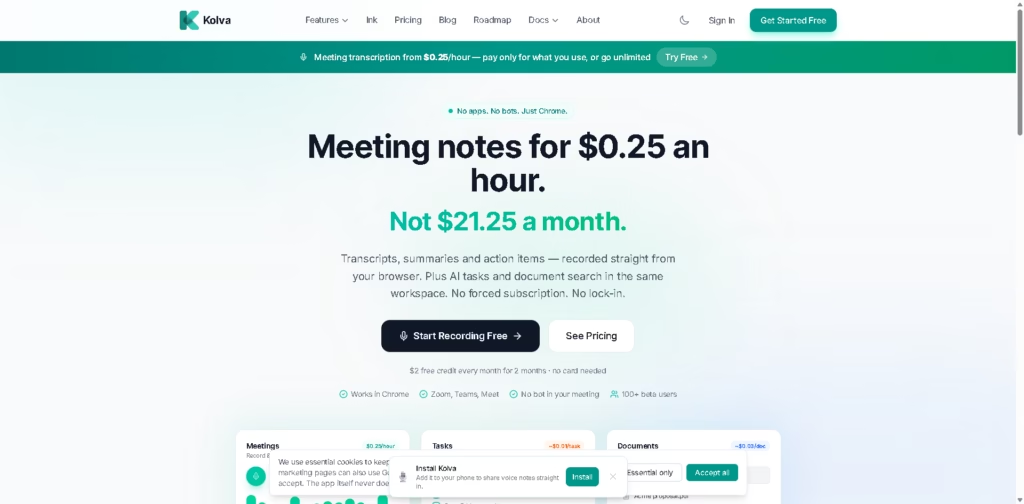
What It Does
Kolva is a browser-based AI productivity workspace that combines meeting transcription, task management, and document search with a pay-as-you-use pricing model. Instead of requiring a recurring subscription for occasional users, it charges for individual actions such as meeting transcription, AI task creation, and document searches while also offering an unlimited plan.
The platform is designed for professionals who spend time in online meetings but do not want a dedicated meeting bot or an expensive monthly subscription. A typical workflow is opening Kolva in Chrome, recording a Zoom or Google Meet session through browser audio, then receiving a transcript, AI summary, action items, and searchable notes in the same workspace.
At a Glance
| Field | Details |
|---|---|
| Category | AI meeting transcription and productivity workspace |
| Platform | Chrome web app |
| Meeting Platforms | Zoom, Microsoft Teams, Google Meet |
| Pricing Model | Pay-per-use or unlimited |
| Meeting Cost | About $0.25/hour |
| AI Features | Transcripts, summaries, tasks, document search |
| Free Credit | $2/month for 2 months |
| Primary Strength | Low-cost meeting transcription without a meeting bot |
Key Features
- Record meetings directly from Chrome without a meeting bot.
- Generate AI transcripts and summaries automatically.
- Extract action items from completed meetings.
- Break goals into AI-generated tasks.
- Search uploaded documents with AI.
- Store sensitive files in a PIN-protected vault.
Best For
- Transcribing occasional online meetings affordably.
- Creating action items after team calls.
- Searching meeting notes and PDFs together.
- Managing lightweight productivity workflows.
- Avoiding recurring transcription subscriptions.
Pros & Cons
| Pros | Cons |
|---|---|
| Pay-per-use pricing suits occasional meeting users | Chrome-focused workflow limits browser flexibility |
| No meeting bot joins calls | Requires sharing browser tab audio during recording |
| AI summaries and action items are included | Heavy meeting users may prefer mature enterprise platforms |
| Combines meetings, tasks, and document search | Some advanced collaboration features are less prominent |
Alternatives & Comparisons
| Alternative | Best For | Key Difference |
|---|---|---|
| Otter.ai | Frequent meeting transcription | Subscription-first pricing |
| Fireflies.ai | Team meeting automation | Bot-based meeting capture |
| Fathom | Sales and customer meetings | Stronger meeting assistant workflow |
| Granola | Personal meeting notes | Desktop-first note-taking approach |
Kolva occupies a distinctive niche by making AI meeting transcription inexpensive for people with relatively few monthly meetings. It is especially compelling for freelancers, consultants, and small teams who want transcripts and summaries without paying for unused subscription capacity.
Frequently Asked Questions
How much does Kolva charge for meeting transcription?
The platform advertises meeting transcription at about $0.25 per hour.
Does Kolva use a meeting bot?
No. Meetings are recorded through Chrome without adding a bot to the call.
Which meeting platforms work with Kolva?
It supports Zoom, Microsoft Teams, and Google Meet through Chrome.
Does Kolva include AI summaries?
Yes. AI summaries and action item extraction are included with meeting transcription.
Which meeting platforms work with Kolva?
It supports Zoom, Microsoft Teams, and Google Meet through Chrome.
Does Kolva include AI summaries?
Yes. AI summaries and action item extraction are included with meeting transcription.
Is there a free trial?
Yes. New users receive $2 in monthly credit for two months without needing a credit card.
Overall Rating
| Category | Score |
|---|---|
| Performance | 4.6/5 |
| Ease of Use | 4.8/5 |
| Feature Set | 4.5/5 |
| Workflow Fit | 4.7/5 |
| Overall | 4.7/5 |
Kolva stands out by combining affordable pay-per-use meeting transcription with useful AI productivity features, making it particularly attractive for people who do not spend dozens of hours in meetings every month.
Final Verdict
- Best for: Professionals who want low-cost AI meeting transcription without recurring subscription fees.
- Avoid if: You need enterprise-grade collaboration or cross-browser recording workflows.
- Biggest strength: Transparent pay-per-use pricing with transcripts, summaries, and action items included.
- Best alternative: Otter.ai for teams with frequent meetings that benefit from subscription-based collaboration features.
















