
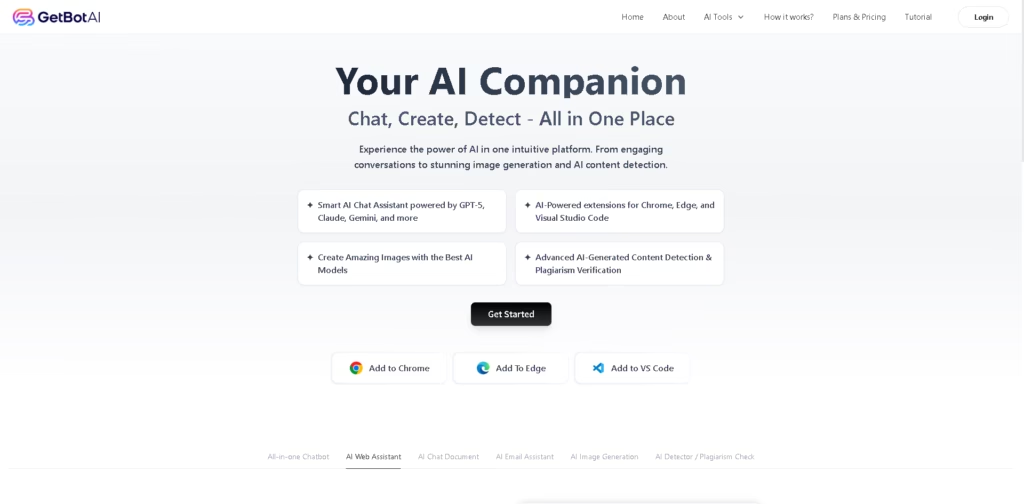
What It Does
GetBotAI is an AI copilot designed to bring multiple AI-powered tools into the browser and other supported environments. It combines multi-model chat, web assistance, document and email tools, image generation, transcription, summarization, and AI-content detection in one platform.
The service is aimed at users who want to switch between different AI workflows without opening separate applications. For example, a user can open GetBotAI in Chrome, compare responses from GPT, Claude, and Gemini, summarize a YouTube video, then generate an image without leaving the browser.
At a Glance
| Field | Details |
|---|---|
| Category | AI assistant and productivity platform |
| Supported Environments | Chrome, Edge, Visual Studio Code |
| AI Models | GPT-5, Claude 4.5, Gemini 2.5, DeepSeek |
| Chat | Multi-model and group chat |
| Content Tools | Audio, image, video, and text processing |
| Image Generation | AI image generation |
| Detection | AI-content detection and plagiarism verification |
| YouTube | YouTube summarizer |
Key Features
- Compares responses from multiple AI models through group chat.
- Generates images using supported AI image models.
- Converts audio, images, and videos into text.
- Summarizes YouTube videos for faster information consumption.
- Provides AI-assisted email and document workflows.
- Includes AI-generated content detection and plagiarism checking.
- Offers a dedicated AI coding feature through GetBot Code.
Best For
- Comparing answers from different AI models in one conversation.
- Summarizing YouTube videos without manually reviewing the entire video.
- Extracting text from images, audio recordings, and videos.
- Generating images while working inside a browser.
- Combining everyday AI productivity tasks in one interface.
Pros & Cons
| Pros | Cons |
| Combines several AI workflows in one platform. | The provided information does not specify pricing or usage limits. |
| Supports multiple major AI model families. | Individual model availability and limits may depend on the plan. |
| Works through browser extensions and a VS Code integration. | The source does not provide independent evidence for detector or plagiarism accuracy. |
| Includes multimodal tools for text, images, audio, and video. | The underlying technology used for several non-chat features is not specified. |
Alternatives & Comparisons
| Alternative | Best For | Key Difference |
| ChatGPT | General-purpose AI assistance | Broader standalone conversational ecosystem |
| Claude | Long-form writing and analysis | More focused on Anthropic’s model ecosystem |
| Gemini | Google-centered AI workflows | Stronger integration with Google’s ecosystem |
| Perplexity | AI-powered research and web search | More focused on web research and sourced answers |
GetBotAI sits between a general AI assistant and a browser productivity toolkit by combining several AI functions and model providers. Choose it when switching between models and specialized browser-based tools is more important than using one provider’s ecosystem.
Frequently Asked Questions
Which AI models does GetBotAI support?
The provided information lists GPT-5 and GPT-5-mini, Claude 4.5 models, Gemini 2.5 models, DeepSeek R1, and DeepSeek V3.
Does GetBotAI work inside a browser?
Yes. GetBotAI describes itself as an AI copilot for Chrome and provides Chrome and Edge extensions.
Can GetBotAI summarize YouTube videos?
Yes. YouTube summarization is listed among its features.
Can GetBotAI process audio, images, and videos?
Yes. The listed tools include audio-to-text, image-to-text, and video-to-text capabilities.
Does GetBotAI include plagiarism checking?
Yes. The platform lists AI-generated content detection and plagiarism verification, although the provided information does not establish independent accuracy benchmarks.
Overall Rating
| Category | Score |
| Performance | 4.2/5 |
| Ease of Use | 4.4/5 |
| Feature Set | 4.7/5 |
| Workflow Fit | 4.5/5 |
| Overall | 4.5/5 |
GetBotAI offers a broad collection of AI tools and model options, making it particularly useful for users who want multiple AI workflows accessible from one interface.
Final Verdict
- Best for: Users wanting multiple AI models and productivity tools accessible directly from their browser.
- Avoid if: You prefer a single AI provider with clearly defined model-specific capabilities and limits.
- Biggest strength: Its combination of multi-model chat, multimodal tools, extensions, and content utilities.
- Best alternative: ChatGPT is a stronger choice for users prioritizing a unified general-purpose AI ecosystem.
















