
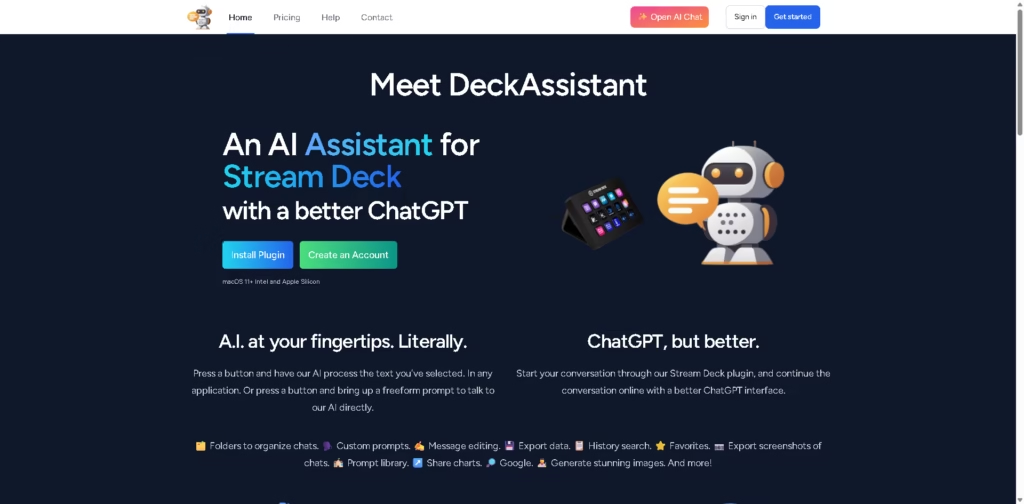
What It Does
DeckAssistant is an AI assistant built around Elgato Stream Deck. It lets users send selected text from any application to AI with a Stream Deck button or open a freeform prompt for direct conversations. It is designed for people who frequently use AI while working across desktop applications and want keyboard-style hardware shortcuts instead of repeated copy-paste workflows.
A typical workflow is to highlight text in an application, press a configured Stream Deck button, and have DeckAssistant process the selection using a predefined prompt. Users can also configure individual buttons for tasks such as correcting spelling and grammar, while conversations can continue in the web interface with features such as folders, custom prompts, history search, message editing, and data export.
Quick Verdict
- Best for: Stream Deck users who want one-button AI workflows
- Skip if: You do not use an Elgato Stream Deck
- Key Advantage: AI actions triggered directly from selected desktop text
- Top Alternative: ChatGPT
At a Glance
| Feature | Details |
|---|---|
| Category | AI Assistant |
| Pricing Model | Paid subscription |
| Free Tier | Free Trial Only |
| Platform | macOS 11+ |
| API | Not specified |
| Primary Strength | Stream Deck-powered AI workflows |
| Dynamic Field | Stream Deck Integration |
Pricing & Plans
- DeckAssistant: US$8.00/month with a 7-day free trial. Includes AI use in any application, unlimited chats, freeform chat workflows, and Stream Deck integration.
- The pricing page states that monthly and annual billing are available, but the supplied information does not specify the annual price.
Note: Prices and plan limits may change. Check the official website for current pricing.
Key Features
- Processes selected text from any desktop application through a Stream Deck button.
- Opens freeform AI prompts directly from Stream Deck.
- Supports custom prompts for dedicated AI actions.
- Provides folders for organizing AI conversations.
- Offers history search, favorites, message editing, and data export.
- Supports chat screenshot export and chart sharing.
Best For
- Triggering AI text processing without repeated copy-pasting.
- Creating dedicated Stream Deck buttons for recurring prompts.
- Correcting spelling and grammar from selected desktop text.
- Organizing longer AI conversations into folders.
- Continuing Stream Deck conversations through a web interface.
Pros & Cons
Pros:
- Turns Stream Deck buttons into dedicated AI workflow triggers.
- Works with selected text across desktop applications.
- Supports unlimited chats on the listed plan.
- Provides custom prompts and a freeform chat workflow.
Cons:
- Requires a Stream Deck for its primary hardware workflow.
- The supplied platform information specifies macOS 11+.
- API availability is not specified.
Alternatives & Comparisons
| Alternative | Best For | Key Difference vs. This Tool |
|---|---|---|
| ChatGPT | General-purpose AI conversations and content tasks | Provides direct AI access without requiring a Stream Deck workflow. |
| Text Blaze | Reusable text and shortcut-based workflows | Focuses on text snippets and automation rather than AI chat through Stream Deck. |
| Raycast | macOS productivity and AI shortcuts | Provides a broader macOS launcher and productivity workflow rather than a Stream Deck-centered interface. |
DeckAssistant occupies a specialized position for users who want physical Stream Deck controls connected to AI workflows. Choose it when one-button access to custom AI prompts is central to your desktop workflow.
Frequently Asked Questions
Does DeckAssistant work without a Stream Deck?
The supplied product information centers on its Stream Deck integration and does not specify a separate non-Stream-Deck desktop workflow.
What operating systems does DeckAssistant support?
The product page specifies macOS 11+ and mentions compatibility with both Intel and Apple Silicon Macs.
Can I create custom AI prompts?
Yes. DeckAssistant allows users to configure prompt buttons with their own prompts and titles.
Can DeckAssistant process selected text?
Yes. Users can select text in an application and press a configured Stream Deck button to have the AI process it.
Does DeckAssistant offer a free trial?
Yes. The listed plan includes a 7-day free trial.
ToolsPedia Rating
- Performance & Speed: 4.2/5.0
- Ease of Setup: 4.1/5.0
- Feature Depth: 4.3/5.0
- Value for Price: 3.9/5.0
- ToolsPedia Score: 4.1/5.0
Final Thoughts
DeckAssistant is focused on a specific workflow: putting repeatable AI actions directly onto Stream Deck buttons. Its selected-text processing, custom prompts, freeform chat, and conversation-management features make it relevant for Stream Deck users who frequently rely on AI. Start with the 7-day trial to confirm that its Stream Deck workflow fits your daily applications before subscribing.
















