
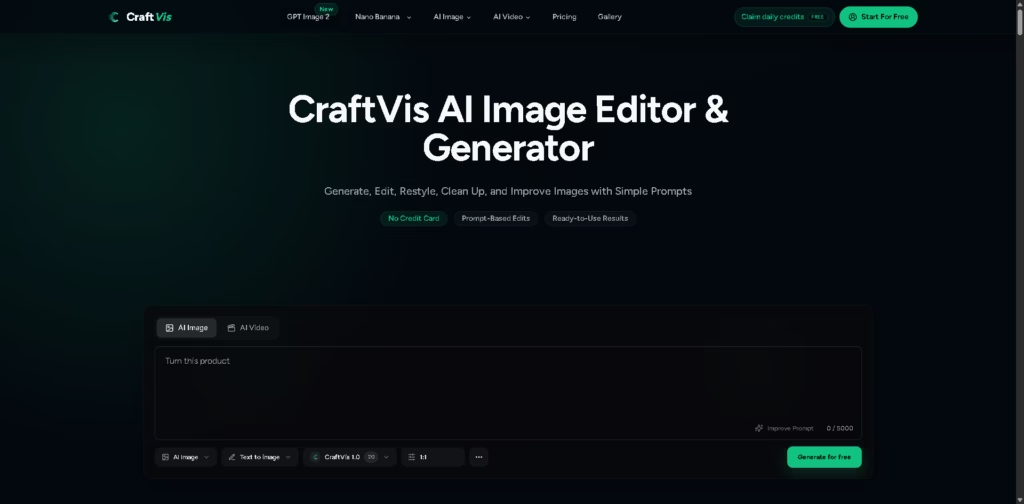
What It Does
CraftVis is an AI image generation and editing platform that lets users create or modify visuals with text prompts. Its documented workflows include background replacement, restyling, targeted edits, image variations, and turning rough drafts into more polished artwork.
The platform is designed for users who want conversational image editing rather than a traditional layer-based workflow. For example, a seller can upload a product photo, request a lifestyle background, generate variations, and use the preferred result for an e-commerce listing or campaign.
At a Glance
| Field | Details |
|---|---|
| Category | AI image generator and editor |
| Core Workflow | Text-to-image and prompt-based image editing |
| AI Models | GPT Image 2, Nano Banana, Nano Banana Pro, Nano Banana 2, Seedance 1.5 Pro, Seedream 5 Lite |
| Editing Capabilities | Restyling, background replacement, local edits, cleanup, variations |
| Free Access | Free plan with daily credits |
| Starter Price | $9.90/month |
| Creator Price | $24.90/month |
| Studio Price | $79.90/month |
Key Features
- Generates images from natural-language prompts.
- Edits existing images through conversational instructions.
- Replaces backgrounds while retaining the main subject.
- Restyles photos, artwork, and other existing visuals.
- Creates multiple variations from a source image.
- Offers several AI models within one platform.
- Provides templates for e-commerce, advertising, portraits, and posters.
Best For
- Creating polished e-commerce visuals from existing product photos.
- Replacing backgrounds without rebuilding an entire composition.
- Testing different advertising concepts from one source image.
- Restyling portraits, outfits, artwork, and social media graphics.
- Turning sketches and mockups into more finished visual concepts.
Pros & Cons
| Pros | Cons |
|---|---|
| Combines AI image generation and editing | Usage depends on a credit system |
| Prompt-based editing reduces manual editing steps | Results can vary depending on the model and prompt |
| Multiple AI models are available from one interface | Free usage is limited by daily credits |
| Paid plans include private generation and commercial use | Advanced manual editing controls are not documented |
| Useful templates cover several practical creative workflows | Cloud-storage duration varies by plan |
Alternatives & Comparisons
| Alternative | Best For | Key Difference |
|---|---|---|
| Adobe Firefly | AI-assisted creative production | More closely connected to Adobe’s professional creative ecosystem |
| Canva | AI-assisted design and content creation | Combines AI tools with templates and broader design features |
| Photoroom | E-commerce product imagery | More specifically focused on product photography workflows |
| Pixlr | Browser-based image editing | Provides conventional editing alongside AI features |
CraftVis occupies a middle ground between general AI image generators and prompt-based image editors, with an emphasis on modifying existing visuals. Choose it when conversational editing and access to multiple AI models matter more than advanced manual editing controls.
Frequently Asked Questions
What is CraftVis used for?
CraftVis is used to generate and edit images, including background changes, restyling, cleanup, product imagery, advertising concepts, portraits, and creative variations.
Can CraftVis edit an existing photo?
Yes. Users can upload an image and describe changes such as replacing a background, modifying colors, changing clothing, removing distractions, or altering the overall style.
Can CraftVis generate images from text?
Yes. CraftVis provides a text-to-image workflow where users describe the desired visual with a prompt.
Which AI models are available on CraftVis?
The supplied information lists GPT Image 2, Nano Banana, Nano Banana Pro, Nano Banana 2, Seedance 1.5 Pro, and Seedream 5 Lite. The FAQ also mentions Stable Diffusion and additional models.
Can CraftVis be used commercially?
The supplied information states that commercial use is included with the paid plans, subject to CraftVis’s terms. Users remain responsible for complying with applicable laws and third-party rights.
Is CraftVis free?
Yes. CraftVis offers free access with daily credits and states that no credit card is required to begin.
How much does CraftVis cost?
The listed subscriptions are Starter at $9.90/month, Creator at $24.90/month, and Studio at $79.90/month. They provide 4,000, 10,000, and 34,000 monthly credits, respectively.
Can CraftVis change only one part of an image?
Yes. Its documented workflows include targeted edits such as changing clothing color, removing objects, replacing backgrounds, modifying labels, and adjusting specific visual details.
Can CraftVis preserve the original composition?
The platform says its editing workflow can help retain the main subject, pose, product angle, layout, or composition while changing requested elements. Results will depend on the source image, prompt, and selected model.
Is CraftVis suitable for professional photo editing?
It can handle many everyday AI editing tasks, but the supplied information does not document professional features such as detailed layer management, masking systems, or other advanced manual controls.
Overall Rating
| Category | Score |
|---|---|
| Performance | 8/10 |
| Ease of Use | 9/10 |
| Feature Set | 8.5/10 |
| Workflow Fit | 8.5/10 |
| Overall | 8.5/10 |
CraftVis is a strong fit for prompt-driven image creation and practical edits, especially when users want to transform existing images without complex manual editing.
Final Verdict
- Best for: Creators, marketers, and sellers needing prompt-based image generation and editing.
- Avoid if: You require advanced layer, masking, or precision-editing controls.
- Biggest strength: Multiple AI models combined with practical conversational image-editing workflows.
- Best alternative: Photoroom for users primarily focused on e-commerce product photography.
















