
What It Does
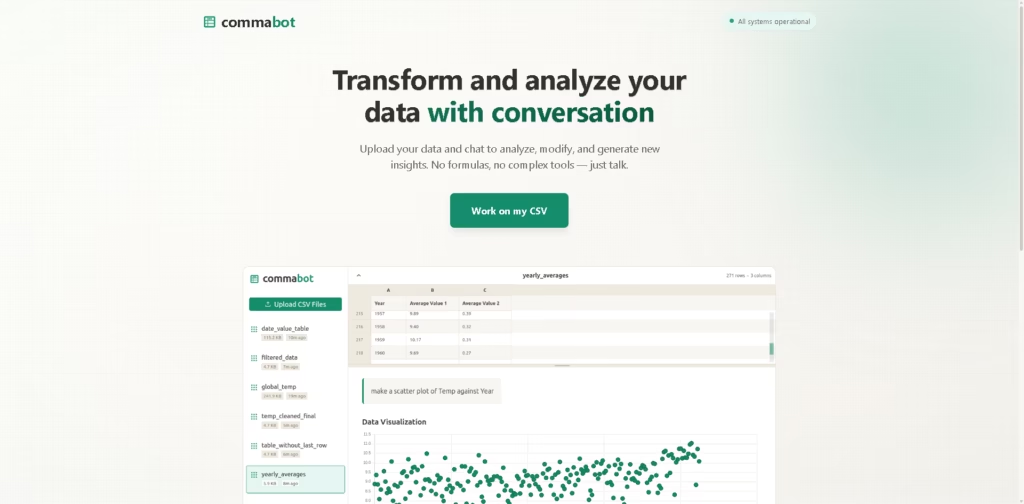
Commabot is an AI-powered CSV workspace that lets users upload spreadsheet data and interact with it through a chat interface. Instead of relying on spreadsheet formulas, users can ask questions in plain English, generate summaries, create charts, and transform CSV data through conversation.
The product is aimed at people who regularly work with exported business data such as sales reports, survey results, or financial records and want faster insights without building formulas manually. A typical workflow is uploading a sales CSV, asking which products performed best, cleaning inconsistent values, and generating a chart from the same conversation.
At a Glance
| Field | Details |
|---|---|
| Category | AI CSV analysis |
| Interface | Conversational chat workspace |
| Input Format | CSV |
| Query Method | Plain English |
| Core Functions | Data analysis, cleaning, transformation, charts, summaries |
| Best For | Quick analysis of exported spreadsheet data |
| Primary Strength | Formula-free CSV workflows |
Key Features
- Upload CSV files for conversational analysis.
- Ask questions using natural language prompts.
- Generate charts from uploaded datasets.
- Create summaries from spreadsheet data.
- Clean and transform CSV records.
- Modify datasets through chat interactions.
Best For
- Exploring sales reports without spreadsheet formulas.
- Summarizing survey responses quickly.
- Cleaning exported CSV datasets.
- Creating charts from business data.
- Finding trends through conversational queries.
Pros & Cons
| Pros | Cons |
|---|---|
| Natural language replaces many manual formulas | Focus appears limited to CSV workflows |
| Combines analysis, cleaning, and visualization | Advanced analytics features are not clearly documented |
| Quick exploratory workflow for exported data | Integration options are not prominently described |
| Lowers the barrier for spreadsheet analysis | Less suitable for enterprise BI needs |
Alternatives & Comparisons
| Alternative | Best For | Key Difference |
|---|---|---|
| ChatCSV | Conversational CSV analysis | More focused on question-answering |
| Rows AI | AI-powered spreadsheets | Built around spreadsheet editing |
| Microsoft Excel Copilot | Existing Excel workflows | Works inside Excel |
| Julius AI | Broader data analysis | Supports wider analytical workflows |
Commabot fits the growing category of conversational data analysis tools that simplify working with exported CSV files. It is a stronger fit than spreadsheet-first alternatives when the goal is quick conversational exploration instead of building complex spreadsheet workflows.
Frequently Asked Questions
Can Commabot analyze CSV files through chat?
Yes. The product centers on uploading CSV files and asking questions in plain English.
Does Commabot generate charts?
Yes. Chart generation is listed as one of its core capabilities.
Can Commabot clean CSV data?
Yes. The available product information includes cleaning and transformation tools for uploaded datasets.
Does Commabot require spreadsheet formulas?
No. The product is designed around conversational prompts instead of manual formulas.
Does Commabot integrate with other software?
The available product information does not clearly document supported integrations.
Overall Rating
| Category | Score |
|---|---|
| Performance | 4.4/5 |
| Ease of Use | 4.8/5 |
| Feature Set | 4.2/5 |
| Workflow Fit | 4.5/5 |
| Overall | 4.5/5 |
Commabot stands out for making CSV analysis accessible through conversation, although its broader integrations and advanced analytics remain less clearly documented.
Final Verdict
- Best for: Quick conversational analysis of CSV files without spreadsheet formulas.
- Avoid if: You need enterprise BI features or documented advanced integrations.
- Biggest strength: Natural language workflow for cleaning, summarizing, and visualizing CSV data.
- Best alternative: Excel Copilot for users already committed to Microsoft Excel.
















