
What It Does
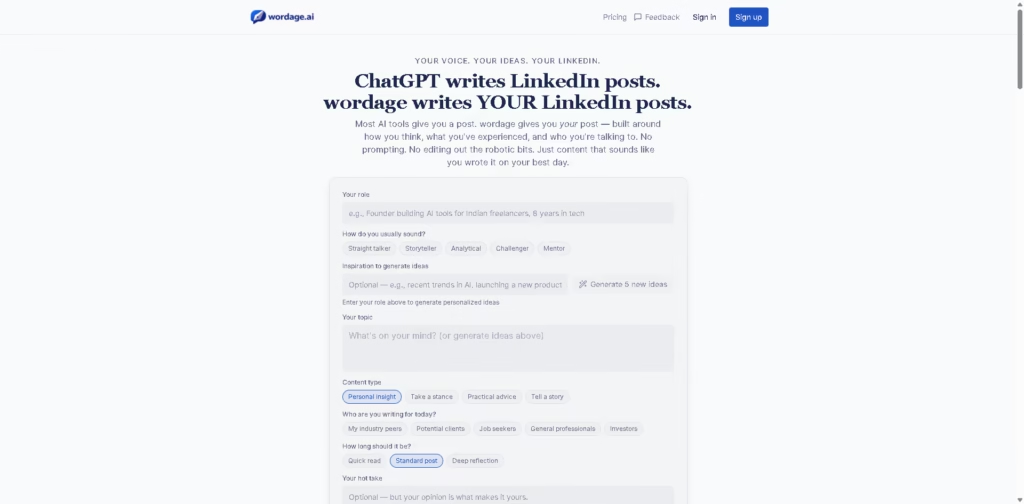
Wordage is an AI writing tool focused specifically on creating LinkedIn posts that reflect a user’s own perspective, experience, and writing style. Instead of starting with a generic prompt, users provide their role, preferred voice, topic, audience, content type, and optional source context.
The workflow is designed around keeping the user’s viewpoint in control while AI handles structure and clarity. For example, a founder can enter rough notes about a business lesson, select a storytelling style and target audience, then compare AI-generated drafts before refining the final LinkedIn post.
At a Glance
| Field | Details |
|---|---|
| Category | AI LinkedIn Writing Tool |
| Primary Platform | |
| AI Models | GPT, Gemini, Claude |
| Content Types | Personal insight, stance, advice, story |
| Voice Options | Straight talker, storyteller, analytical, challenger, mentor |
| Free Plan | 1 post per month |
| Paid Plans | Plus and Pro |
| Pricing | From $9.95/month, billed yearly |
Key Features
- Generates LinkedIn posts around the user’s perspective and experience.
- Uses multiple AI models to create alternative drafts.
- Supports different writing voices and content formats.
- Incorporates source links, notes, and writer context.
- Provides controls for quick, standard, or deep posts.
- Offers LinkedIn post preview before publishing.
- Includes draft history and reusable drafts on paid plans.
Best For
- Turning rough thoughts and lessons into structured LinkedIn posts.
- Developing opinion-driven content for professional audiences.
- Creating different drafts from the same idea.
- Maintaining a consistent personal voice across LinkedIn posts.
- Refining professional content without starting from a blank prompt.
Pros & Cons
| Pros | Cons |
| Designed specifically for LinkedIn content | Limited usefulness for platforms outside LinkedIn |
| Keeps user perspective central to the writing workflow | Free plan allows only one post per month |
| Supports GPT, Gemini, and Claude on Pro | Unlimited creation is subject to fair-use terms |
| Multiple drafts allow users to compare different framings | Advanced features require paid plans |
| Includes LinkedIn-specific preview and formatting controls | Claims about algorithm performance are not independently verified |
Alternatives & Comparisons
| Alternative | Best For | Key Difference |
| ChatGPT | Flexible AI writing | Broader writing capabilities with more manual prompting |
| Jasper | Marketing and business content | Broader content marketing workflows beyond LinkedIn |
| Copy.ai | Business and marketing writing | Focuses on wider marketing and sales content workflows |
| Taplio | LinkedIn content and growth | More focused on LinkedIn content creation and related workflows |
Wordage is positioned as a specialized LinkedIn writing assistant rather than a general-purpose AI copywriter. Choose it when maintaining a recognizable professional voice and turning personal viewpoints into LinkedIn posts are the main priorities.
Frequently Asked Questions
Is Wordage only for LinkedIn?
Yes. The product is specifically designed around creating and previewing LinkedIn posts.
Which AI models does Wordage use?
The Pro plan lists three AI models: GPT, Gemini, and Claude.
Can Wordage use my own ideas?
Yes. Its workflow is built around users providing rough notes, opinions, experiences, or lessons that AI then structures and clarifies.
Can I control the writing style?
Yes. Users can select voice preferences such as Straight Talker, Storyteller, Analytical, Challenger, and Mentor.
How many posts can I create for free?
The Free plan includes one post per month. Plus provides five posts per month, while Pro offers unlimited posts subject to fair use.
Overall Rating
| Category | Score |
| Performance | 8.5/10 |
| Ease of Use | 9.0/10 |
| Feature Set | 8.5/10 |
| Workflow Fit | 9.5/10 |
| Overall | 8.8/10 |
Wordage is a strong fit for professionals who want LinkedIn-specific writing assistance while keeping their own ideas and perspective at the center.
Final Verdict
- Best for: Founders and professionals turning personal insights into consistent LinkedIn content.
- Avoid if: You need a general AI writing tool for blogs, emails, or multiple social platforms.
- Biggest strength: Combines personal context, voice preferences, and multiple AI drafts for LinkedIn-focused writing.
- Best alternative: Taplio for users seeking a broader LinkedIn content and growth workflow.
















