
What It Does
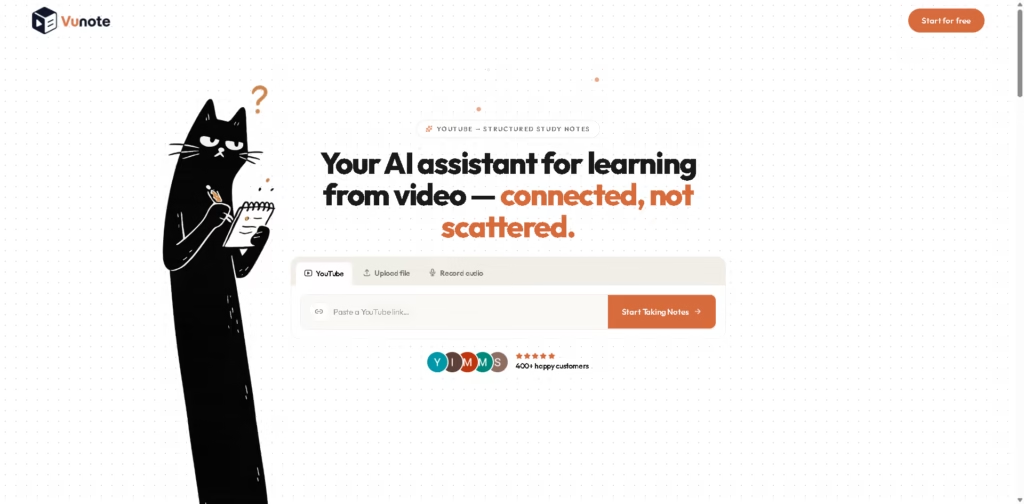
Vunote is an AI learning workspace that turns YouTube videos, playlists, uploaded videos, and audio into structured study notes. It is designed for students, educators, self-learners, and researchers who want to capture information from video without repeatedly pausing, rewinding, or manually organizing notes.
A typical workflow starts by pasting a YouTube video or playlist URL or uploading video or audio. Vunote creates timestamped notes and transcripts while the user watches, then lets them search the material, connect insights across multiple videos, generate mind maps, create recall cards or quizzes, and produce structured reports from selected notes.
Quick Verdict
- Best for: Turning educational videos into searchable study materials
- Skip if: You need more than the platform’s available project or AI-credit limits
- Key Advantage: Connects video notes with study and research tools
- Top Alternative: NotebookLM
At a Glance
| Feature | Details |
|---|---|
| Category | AI Learning & Note-Taking |
| Pricing Model | Freemium |
| Free Tier | Yes |
| Platform | Web |
| API | Yes |
| Primary Strength | Structured notes from learning videos |
| Input Sources | YouTube, video, and audio |
| AI Credits | 500 free credits initially |
Pricing & Plans
- Free: 500 AI credits once when signing up. Credits do not refill monthly. Manual notes, bookmarks, and exports do not use credits.
- Pro: $9/month. Includes 3,000 AI credits/month, up to 8 projects, unlimited videos per project, unlimited video length, video and audio uploads, quizzes, flashcards, full AI workspace assistant, and Word, PDF, and Markdown export.
- Plus: $29/month. Includes 12,000 AI credits/month, up to 20 projects, unlimited videos per project, unlimited video length, priority transcript processing, limited premium AI transcription fallback, project insights extraction, AI report generation, quizzes, flashcards, and PDF, Markdown, and JSON export.
- Ultra: $49/month. Includes 60,000 AI credits/month, unlimited projects and videos, the fastest transcript queue, GPT-5 and Claude Opus access, unlimited premium AI transcription fallback, custom export templates, API access, and priority support.
- Cancellation: Paid plans can be canceled at any time according to the supplied pricing information.
Note: Prices and plan limits may change. Check the official website for current pricing.
Key Features
- Creates timestamped notes and transcripts from YouTube videos and uploaded media.
- Connects multiple videos so users can compare and organize related insights.
- Generates mind maps from collected learning notes.
- Creates recall cards, quizzes, and summaries from existing notes.
- Generates structured AI research reports from selected notes.
- Provides AI chat grounded in notes and transcripts.
Best For
- Creating study notes from online lectures
- Reviewing long tutorials without repeatedly replaying videos
- Connecting information across multiple educational videos
- Turning video notes into quizzes and recall cards
- Building research reports from collected video sources
Pros & Cons
Pros:
- Supports YouTube links, playlists, video uploads, and audio files.
- Timestamped notes connect written information with the relevant video moment.
- Multiple learning outputs can be generated from the same notes.
- Ultra includes API access and advanced AI models.
Cons:
- The free 500 AI credits are a one-time allocation rather than a monthly allowance.
- Pro is limited to 8 projects, while Plus is limited to 20 projects.
- API access is listed only with the Ultra plan.
Alternatives & Comparisons
| Alternative | Best For | Key Difference vs. This Tool |
|---|---|---|
| NotebookLM | Researching and querying supplied sources | Focuses on source-grounded research and AI-generated study outputs from uploaded sources. |
| Otter.ai | Transcribing and organizing spoken content | Primarily centers on transcription, meeting notes, and conversation capture. |
| Readwise Reader | Saving and reviewing online reading and media | Combines content collection and highlighting across broader reading workflows. |
Vunote fits the AI learning and video-note market by connecting video transcription with timestamped notes, study materials, mind maps, and research outputs.
Choose Vunote when YouTube and video-based learning are central to your workflow, and you want multiple study outputs from the same notes.
Frequently Asked Questions
Can Vunote take notes from YouTube videos?
Yes. Users can paste YouTube video or playlist URLs to create a learning workspace with notes and transcripts.
Can Vunote generate quizzes and flashcards?
Yes. Vunote can generate quizzes and recall cards from the notes created from learning materials.
Does Vunote support multiple videos?
Yes. Vunote supports multiple videos within projects and can connect insights across lectures and other related videos.
Does Vunote offer API access?
Yes. API access is listed as an Ultra-plan feature.
Does Vunote have a free plan?
Yes. New users receive 500 AI credits once, with no credit card required. Manual notes, bookmarks, and exports do not consume AI credits.
ToolsPedia Rating
These scores are editorial assessments based on the published feature set and pricing information, not hands-on testing.
- Performance & Speed: 4.2/5.0
- Ease of Setup: 4.4/5.0
- Feature Depth: 4.5/5.0
- Value for Price: 4.0/5.0
- ToolsPedia Score: 4.3/5.0
Final Thoughts
Vunote is particularly focused on turning video-based learning into reusable notes, transcripts, quizzes, flashcards, mind maps, and reports. Its project limits and AI-credit system vary substantially between plans, while API access is reserved for Ultra. Start with the 500 free credits to assess whether its video-learning workflow matches your needs before subscribing.
















