
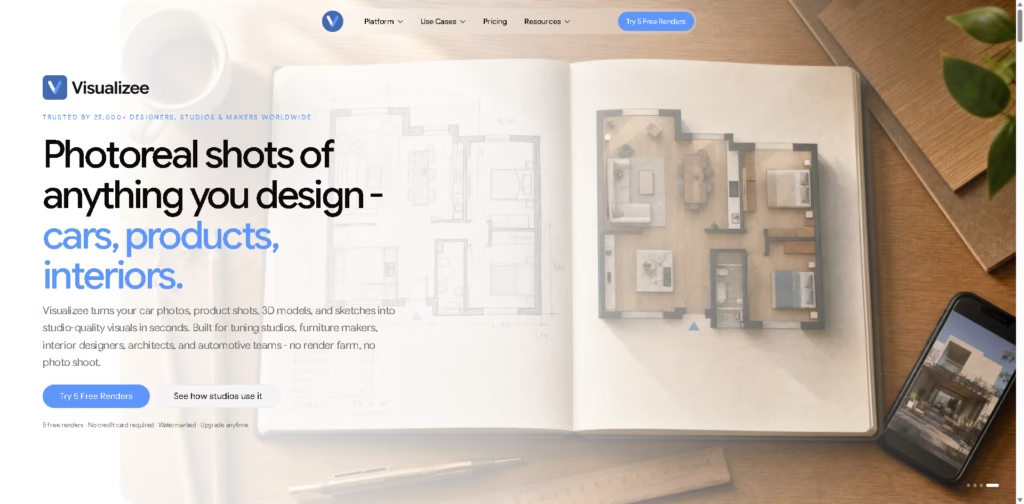
What It Does
Visualizee is an AI visualization platform designed for architects, interior designers, furniture makers, automotive teams, product designers, and other visual professionals. It converts photos, sketches, moodboards, floor plans, and 3D-model screenshots into photorealistic images and videos.
The platform’s central workflow is built around Vizzy, a conversational AI interface. Users can upload a visual reference or start with a text description, then describe the desired materials, lighting, environment, styling, or scene in natural language. Visualizee handles the prompt-building process and generates or edits the result.
Beyond basic image generation, the platform supports region-based edits, style matching, material variations, image upscaling, batch generation, and video creation. Visualizee emphasizes preserving the underlying design rather than simply generating a visually similar image, making it more relevant to professional visualization workflows than general-purpose AI image generators.
Quick Verdict
- Best for: Architects, interior designers, automotive studios, product designers, and other professionals who need fast design visualizations
- Skip if: You only need casual AI image generation or simple artistic effects
- Key Advantage: Design-focused AI rendering with conversational editing and multiple professional workflows
- Top Alternative: LookX AI
At a Glance
| Feature | Details |
|---|---|
| Category | AI Design Visualization / AI Rendering |
| Pricing Model | Freemium / Credit-Based Subscription |
| Free Tier | Yes, 5 free renders |
| Platform | Web |
| Primary Interface | Conversational AI / Vizzy |
| Image Output | HD, 4K, up to 32 MP |
| Video | Yes, included through credit-based plans |
| Commercial Use | Available on paid plans |
| Batch Generation | Up to 16 images |
| Languages | 140+ languages supported |
| Specialist Personas | 14 |
| Specialist Skills | 30 domain-specific skills + 5 shared skills |
Pricing & Plans
Visualizee uses a credit-based system, with subscriptions providing credits that can be used for image and video generation. The platform also offers five free renders to new users without requiring a credit card.
- Free: 5 renders. Outputs are watermarked and intended for personal use only. Commercial delivery, client work, and listings require a paid plan.
- Hobby: $15/month. Includes 7,500 credits and 90+ renders, image generation and editing, watermark-free commercial use, and up to 15 Nano Banana Pro renders.
- Pro: $35/month. Includes 19,250 credits, 240+ renders, 275 seconds of video, 4K-quality images, priority processing, premium models, and 15% off credit packages.
- Max: $80/month. Includes 48,000 credits, 600+ renders, 685 seconds of video, batch rendering of up to 16 images, 4K images and video, 32 MP print-ready output, and 30% off credit packages.
- Agency: Custom pricing for multi-seat studios, with shared workflows, onboarding, and team billing.
Annual billing is available with a stated 25% saving.
Note: Prices and plan limits may change. Check the official website for current pricing.
Key Features
AI Image Rendering
Visualizee can turn sketches, photographs, screenshots, moodboards, and other visual inputs into photorealistic design presentations. This is particularly useful for architectural, interior, automotive, furniture, and product visualization.
Conversational AI With Vizzy
Instead of requiring users to write detailed prompts manually, Vizzy allows them to describe their desired result in natural language. The platform says it can understand requests in more than 140 languages and automatically handle prompt engineering.
Design Preservation
A major focus of Visualizee is maintaining important characteristics of the source design. The platform specifically positions the system for preserving elements such as automotive body lines, furniture proportions, cabinet geometry, and floor-plan structure while changing materials, lighting, colors, or environments.
Region Editing
Users can edit a specific marked area of an image without necessarily changing the entire composition. This can be useful when adjusting individual materials, furniture elements, finishes, or other localized details.
Material Variations
Visualizee can create multiple versions of the same design with different materials or finishes. For example, a designer can present different wood finishes, furniture materials, vehicle wraps, or color options while maintaining a consistent design and camera angle.
Batch Generation
The Max plan supports generating up to 16 images at once. This can reduce repetitive work when a project requires several variations.
Style Matching
The platform supports matching a render’s visual style to a reference image, which can help maintain consistency across presentations.
32 MP Upscaling
Visualizee offers high-resolution upscaling up to 32 MP, making the output more suitable for larger presentations and print-oriented workflows.
AI Video Generation
The platform can create videos as part of its image-and-video workflow. Pro and Max plans include video credits, allowing users to generate motion-based visualizations such as walkthrough-style presentations.
Specialist Personas
Visualizee says Vizzy automatically selects from 14 specialist personas, including architecture, interior design, automotive design, product photography, furniture design, hospitality, real estate, landscape architecture, and others.
This specialization is intended to make the generated results more appropriate for professional design contexts than a generic image generator.
Best For
- Architects creating early-stage architectural visualizations
- Interior designers presenting different materials, lighting, or room concepts
- Furniture designers showing products in different environments
- Automotive and tuning studios creating vehicle concepts and modification previews
- Product designers producing photorealistic product presentations
- Real-estate professionals creating visual concepts for properties
- Marketing teams that need design-focused promotional imagery
- Studios that need multiple visual variations without maintaining a traditional rendering pipeline
- Designers who prefer describing changes conversationally instead of writing complex AI prompts
Pros & Cons
Pros:
- Designed specifically around professional design and visualization workflows.
- Supports images, sketches, photos, moodboards, and other visual inputs.
- Conversational interface reduces the need for manual prompt engineering.
- Supports both image and video generation.
- Includes region editing, style matching, and material variation workflows.
- Batch generation can produce up to 16 variations.
- Paid plans include commercial licensing and watermark-free output.
- High-resolution output can reach 32 MP.
- Five free renders are available without a credit card.
- Supports multiple professional disciplines through specialist personas.
Cons:
- The free tier is limited to personal use and adds a watermark.
- Credit consumption can make the actual cost per project difficult to estimate before testing.
- The platform is more specialized than general-purpose AI image generators, so it may be unnecessary for simple creative image generation.
- Advanced features such as 4K output, premium models, batch rendering, and larger video allowances require higher-tier plans.
- Commercial work requires a paid plan rather than the free tier.
Alternatives & Comparisons
| Alternative | Best For | Key Difference vs. Visualizee |
|---|---|---|
| LookX AI | Architecture and interior visualization | Strong focus on architectural AI workflows and design ideation |
| Midjourney | General creative image generation | Broader artistic generation but less focused on design-specific workflows |
| Interior AI | Interior redesign and room visualization | More focused on interior transformation than multi-industry visualization |
| RoomGPT | Quick room redesigns | Simpler room-focused workflow with less professional visualization depth |
| Rendair AI | AI-assisted architectural rendering | More directly focused on AI rendering workflows for architectural projects |
Visualizee is most compelling when design fidelity and professional visualization workflows matter. General-purpose tools such as Midjourney can be useful for creative concept generation, but Visualizee is structured more specifically around professional design inputs, material changes, regional edits, and presentation-ready renders.
For architecture and interiors specifically, LookX AI is a particularly relevant alternative. Users primarily interested in simple room transformations may find Interior AI or RoomGPT easier and more focused.
Frequently Asked Questions
What is Visualizee used for?
Visualizee is used to create and edit photorealistic visualizations from sketches, photos, 3D-model screenshots, floor plans, moodboards, and text descriptions. Its main target users include architects, interior designers, automotive studios, furniture makers, product designers, and other creative professionals.
Do I need SketchUp or other 3D software to use Visualizee?
Not necessarily. Visualizee says users can begin with a photo, hand-drawn sketch, moodboard, or text prompt. However, the platform can also work with screenshots from tools such as SketchUp and other design workflows.
Does Visualizee offer a free plan?
Yes. New users receive five free renders without providing a credit card. The free renders are watermarked and limited to personal use.
Can Visualizee be used commercially?
Yes. Paid plans provide watermark-free output with a commercial license. The free renders are intended for personal use and are not licensed for client work, listings, or commercial delivery.
How much does Visualizee cost?
The paid plans start at $15 per month for Hobby, followed by $35/month for Pro and $80/month for Max. An Agency option is available with custom pricing. Annual billing offers a stated 25% discount.
Does Visualizee generate videos?
Yes. Video generation is part of the platform. The Pro plan includes 275 seconds of video credits, while the Max plan includes 685 seconds.
Can Visualizee preserve my original design?
Design preservation is one of the platform’s main selling points. Visualizee says it is designed to preserve important design characteristics while changing materials, colors, environments, lighting, and other visual properties. Actual preservation quality can vary depending on the source image, complexity, and requested modification.
Can I generate multiple design variations?
Yes. Visualizee supports material and design variations, and the Max plan can batch-render up to 16 images at once.
What resolution does Visualizee support?
The platform advertises HD and 4K output, with upscaling available up to 32 MP. 4K and higher-resolution capabilities depend on the applicable paid plan.
ToolsPedia Rating
- Performance & Speed: 4.5/5.0
- Ease of Setup: 4.5/5.0
- Feature Depth: 4.7/5.0
- Value for Price: 4.2/5.0
- Professional Use: 4.7/5.0
- ToolsPedia Score: 4.5/5.0
Final Thoughts
Visualizee is best understood as a professional AI visualization platform rather than a general-purpose image generator. Its strongest differentiator is the combination of conversational AI, design-focused workflows, source-image preservation, material variations, localized editing, high-resolution output, and video generation.
The five free renders provide a useful way to test the workflow before committing to a subscription, although the watermark and personal-use restriction make the free tier unsuitable for client delivery. The $15 Hobby plan is a reasonable entry point for independent creators, while Pro and Max are better suited to studios with recurring visualization requirements.
Visualizee is worth considering if your work involves architecture, interiors, furniture, automotive design, product visualization, or similar professional applications. For casual image generation or purely artistic experimentation, a general-purpose AI image generator may offer a simpler and potentially more appropriate workflow.
















