
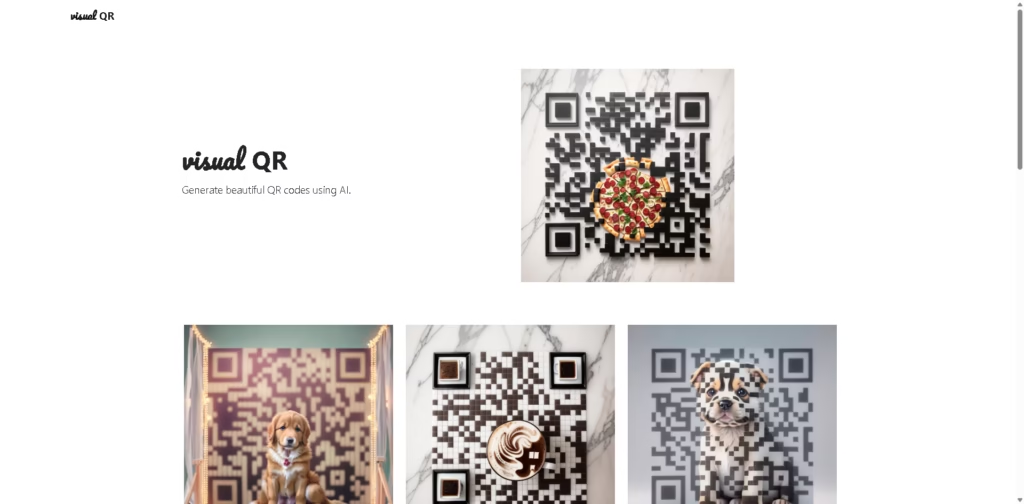
What It Does
Visual QR is an AI-powered QR code generator designed to create visually styled QR codes rather than relying on standard black-and-white patterns. Its stated purpose is to combine QR code generation with AI-based visual customization.
The available vendor description is minimal, so the exact customization controls, supported QR data types, export formats, integrations, pricing, and compatibility cannot be independently established from the provided information. A practical workflow would be creating a QR code for a destination and using AI to produce a more visually distinctive version for a digital or printed asset.
At a Glance
| Field | Details |
|---|---|
| Category | AI QR code generator |
| Primary Function | Generate visually styled QR codes |
| AI Use | AI-generated QR code visuals |
| Main Output | QR codes |
| Primary Strength | Focus on visual QR code generation |
Key Features
- Generates QR codes with AI-assisted visual styling.
- Focuses on creating visually distinctive QR code designs.
- Combines QR generation with AI-based image creation.
- Provides an alternative to conventional plain QR code designs.
Best For
- Creating branded-looking QR codes for digital assets.
- Experimenting with visually distinctive QR code designs.
- Producing QR visuals for marketing materials.
- Creating QR codes where appearance matters alongside scannability.
- Testing AI-generated approaches to QR code design.
Pros & Cons
| Pros | Cons |
| AI-focused approach to QR code creation | Vendor description provides a few technical details |
| Emphasizes visual customization | Supported QR formats are not specified |
| Potentially useful for design-led QR workflows | Export options and integrations are not specified |
| More visually focused than basic QR generators | Scanning reliability of generated designs is not documented |
Alternatives & Comparisons
| Alternative | Best For | Key Difference |
| QR Code Monkey | Custom QR codes and static QR generation | Offers established QR customization options |
| Canva | Designing QR codes within broader visual projects | QR generation is part of a larger design platform |
| Adobe Express | QR creation alongside marketing designs | Combines QR generation with broader creative tools |
| Bitly | QR codes connected with link management | More focused on links, tracking, and campaign management |
Visual QR occupies a niche between conventional QR generators and AI-assisted visual design tools. Choose it when AI-generated appearance is the main attraction, but consider alternatives when analytics, integrations, or detailed QR controls are priorities.
Frequently Asked Questions
Is Visual QR an AI QR code generator?
Yes. The vendor describes Visual QR specifically as a tool for generating beautiful QR codes using AI.
Does Visual QR provide QR code analytics?
This is not established by the supplied vendor description, so analytics should not be assumed.
Can Visual QR generate branded QR codes?
Its AI-generated visual focus suggests it is intended for more distinctive QR designs, but specific branding controls are not documented.
What integrations does Visual QR support?
No integrations are specified in the provided information.
Is a visual QR code better than a standard QR code generator?
It may be more suitable when visual appearance is important. A conventional generator may be preferable when users need documented formats, tracking, or mature customization controls.
Overall Rating
| Category | Score |
| Performance | 7/10 |
| Ease of Use | 8/10 |
| Feature Set | 6/10 |
| Workflow Fit | 7/10 |
| Overall | 7/10 |
Visual QR is useful for design-focused QR creation, but limited published product information makes a higher-confidence assessment difficult.
Final Verdict
- Best for: Users who want AI-generated QR codes with a stronger visual design focus.
- Avoid if: You require documented analytics, integrations, or advanced QR management features.
- Biggest strength: Its core differentiator is combining QR generation with AI-driven visual design.
- Best alternative: QR Code Monkey for users prioritizing established QR customization options.
















