
What It Does
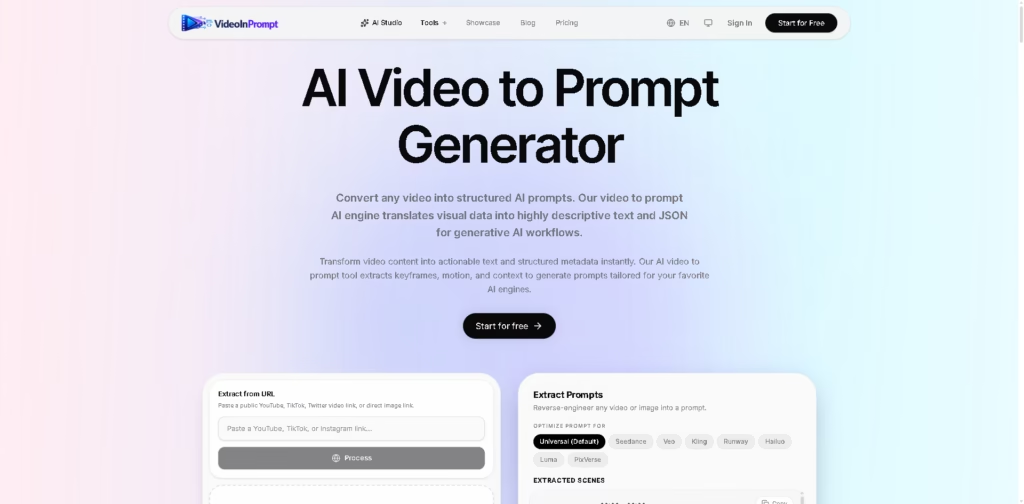
VideoInPrompt is an AI video-to-prompt tool that analyzes videos and converts visual content into structured prompts and metadata. It is designed for creators, marketers, developers, and AI engineers who want to reverse-engineer video scenes into prompts for generative AI workflows.
Users can upload MP4, MOV, or WEBM files, or provide supported public video URLs such as YouTube, TikTok, and Twitter. The tool extracts scenes, camera movement, shot types, subjects, motion, and visual context, then generates prompts optimized for models such as Seedance, Veo, Kling, Runway, Hailuo, Luma, and PixVerse.
Quick Verdict
- Best for: Creators and marketers turning existing videos into reusable AI prompts.
- Skip if: You need a general-purpose video editor rather than video analysis and prompt generation.
- Key Advantage: Converts video content into structured prompts with scene, motion, and camera details.
- Top Alternative: Image or video analysis tools from general-purpose AI platforms.
At a Glance
| Feature | Details |
|---|---|
| Category | AI Video Analysis / Prompt Generator |
| Pricing Model | Freemium subscription + credit packs |
| Free Tier | 10 credits, 15-second maximum video, 50MB file limit |
| Platform | Web |
| API | Available according to the site’s API-related positioning, but specific API details are not provided |
| Primary Strength | Structured video-to-prompt extraction |
Pricing & Plans
VideoInPrompt uses credits for video processing. 1 credit equals 10 seconds of video processing.
Free
$0/forever
- Maximum 15 seconds per video
- 10 free credits
- 50MB maximum file size
- Basic AI models
Starter
$12/month
- 100 credits/month
- Standard AI models
- Full video processing
- 2GB maximum file size
Pro
$39/month
- 400 credits/month
- Premium AI models
- Advanced styles and storyboards
- 10GB maximum file size
- Highest queue priority
Credit Packs
| Credits | Price | Validity |
|---|---|---|
| 100 | $10 | Never expires |
| 300 | $25 | Never expires |
| 700 | $50 | Never expires |
Purchased credits can be used for extraction and generation and do not expire.
Note: Prices and plan limits may change. Check the official website for current pricing.
Key Features
- Converts uploaded videos into structured AI prompts.
- Extracts camera movements, shot types, scenes, and visual context.
- Accepts public YouTube, TikTok, and Twitter video URLs.
- Supports MP4, MOV, and WEBM uploads.
- Optimizes prompts for multiple AI video generation models.
- Provides structured text and JSON-style metadata for workflows.
Best For
- Creators reverse-engineering cinematic video styles.
- Marketers analyzing advertisements and product videos.
- Social media teams studying short-form video formats.
- AI developers building prompt-based generation workflows.
- Real estate teams analyzing property showcase videos.
Pros & Cons
Pros
- Supports both uploaded videos and public video URLs.
- Extracts cinematography details instead of relying only on transcription.
- Supports multiple popular AI video-generation targets.
- Purchased credit packs never expire.
Cons
- Free videos are limited to 15 seconds.
- API capabilities and technical documentation are not specified in the provided information.
- Advanced features require paid credits or subscriptions.
Alternatives & Comparisons
| Tool | Video Analysis | Prompt Generation | Structured Output |
|---|---|---|---|
| VideoInPrompt | Yes | Yes | Yes |
| ChatGPT | Video analysis capabilities vary by available workflow | Yes | Yes |
| Google Gemini | Video understanding capabilities | Yes | Yes |
VideoInPrompt is focused specifically on converting video content into prompts and structured visual descriptions rather than serving as a general AI assistant. It is most suitable when the primary workflow involves extracting cinematic or visual instructions from existing videos.
Frequently Asked Questions
Can VideoInPrompt analyze YouTube or TikTok videos?
Yes. The tool allows users to paste supported public YouTube, TikTok, and Twitter video URLs for processing.
What video formats can I upload?
The upload interface supports MP4, MOV, and WEBM files.
How are VideoInPrompt credits calculated?
One credit represents 10 seconds of video processing.
Which AI video models can receive optimized prompts?
The tool lists Seedance, Veo, Kling, Runway, Hailuo, Luma, and PixVerse as optimization targets.
Do purchased credits expire?
No. Purchased credit packs are described as never expiring.
ToolsPedia Rating
- Performance & Speed: 4.3/5.0
- Ease of Setup: 4.4/5.0
- Feature Depth: 4.3/5.0
- Value for Price: 4.2/5.0
- ToolsPedia Score: 4.3/5.0
Final Thoughts
VideoInPrompt provides a focused workflow for turning existing videos into detailed prompts, scene descriptions, and structured visual information. Its support for multiple video-generation models makes it useful for creators who want to study and recreate visual styles with AI. The free tier provides a way to test short clips before moving to monthly credits or non-expiring credit packs.
















