
What It Does
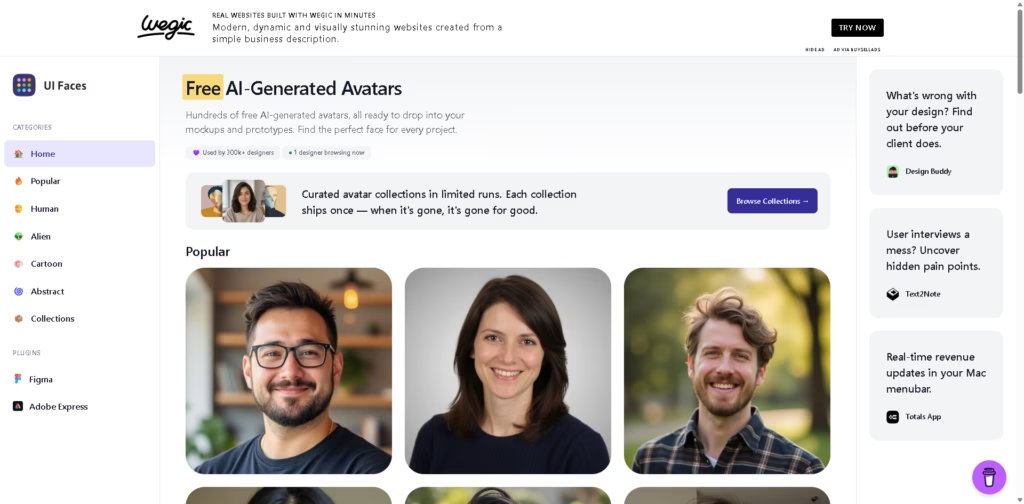
UI Faces is a web-based library of AI-generated avatars designed for UI mockups, prototypes, presentations, and design concepts. Instead of creating profile photos manually, designers can browse curated avatar categories and download ready-to-use images.
The platform focuses on placeholder profile images rather than AI image generation from prompts. A typical workflow is selecting avatars that match a project’s visual style, downloading them, and placing them into a Figma or Adobe Express mockup within minutes.
At a Glance
| Field | Details |
|---|---|
| Category | AI avatar library |
| Platform | Web |
| Plugins | Figma, Adobe Express |
| Cost | Free avatars available |
| Main Categories | Human, Popular, Cartoon, Alien, Abstract |
| Audience | UI and UX designers |
| Primary Strength | Ready-to-use avatars for mockups |
Key Features
- Browse hundreds of AI-generated avatar profiles.
- Download free avatars for design mockups.
- Filter avatars by Human, Cartoon, Alien, and Abstract categories.
- Access curated limited-run avatar collections.
- Use Figma and Adobe Express plugins.
- Find avatars without creating custom AI prompts.
Best For
- Filling user profiles in UI mockups.
- Creating realistic app and website prototypes.
- Designing presentation mockups with placeholder users.
- Building wireframes without stock photo searches.
- Maintaining consistent avatar styles across projects.
Pros & Cons
| Pros | Cons |
|---|---|
| Free avatar downloads available. | Not a custom AI avatar generator. |
| Multiple visual styles to choose from. | Limited to available avatar collections. |
| Figma plugin streamlines design workflow. | Less suitable for creating branded characters. |
| Quick browsing without prompt writing. | Primarily focused on design mockups. |
Alternatives & Comparisons
| Alternative | Best For | Key Difference |
|---|---|---|
| DiceBear | Programmatic avatars | Generates avatars from customizable styles. |
| Generated Photos | Realistic AI faces | Larger focus on photorealistic people. |
| Humaaans | Illustrated mockups | Uses editable illustrations instead of AI faces. |
| Blush | Custom illustrations | Offers customizable illustrated characters. |
UI Faces occupies a practical niche between stock photos and fully customizable avatar generators. It works best when designers need realistic placeholder profiles quickly, so they can provide unique characters for every project.
Frequently Asked Questions
Is UI Faces free?
Yes. The platform offers free AI-generated avatars for download.
Does UI Faces work with Figma?
Yes. It provides a dedicated Figma plugin.
Can I generate custom avatars with prompts?
No. The platform focuses on browsing and downloading pre-generated avatars.
What avatar styles are available?
Human, Popular, Cartoon, Alien, and Abstract categories are available.
Is UI Faces suitable for app prototypes?
Yes. It is designed specifically for UI mockups and prototype workflows.
Overall Rating
| Category | Score |
|---|---|
| Performance | 9.0/10 |
| Ease of Use | 9.8/10 |
| Feature Set | 8.3/10 |
| Workflow Fit | 9.4/10 |
| Overall | 9.1/10 |
UI Faces earns a strong overall rating by making high-quality placeholder avatars easy to find and integrate into design workflows, even though it is not a full AI avatar creation platform.
Final Verdict
- Best for designers creating UI mockups and prototypes with realistic profile images.
- Avoid if you need fully customizable AI-generated characters.
- Biggest strength is fast access to curated avatar libraries and Figma integration.
- The best alternative is DiceBear for customizable generated avatars.
















