
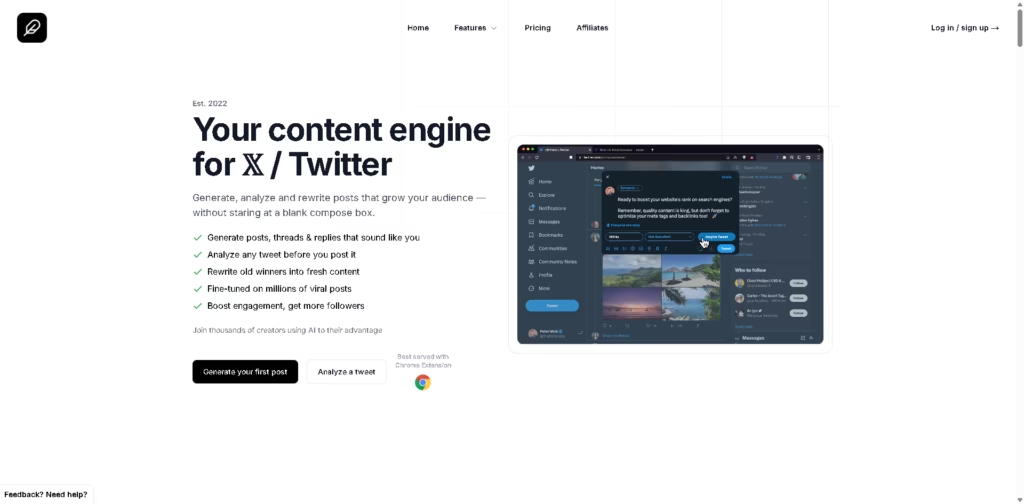
What It Does
Tweet AI is an AI-powered writing assistant built specifically for X (formerly Twitter). Instead of functioning as a general-purpose AI writer, it focuses on helping creators, marketers, founders, and agencies produce higher-performing posts through content generation, tweet analysis, rewriting, thread creation, and reply suggestions.
The platform combines content creation with pre-publication analysis, allowing users to generate ideas, evaluate engagement potential, and refresh older posts from a single dashboard. A Chrome extension also helps users create AI-assisted replies directly while browsing X.
A typical workflow starts with entering a rough idea, generating a tweet or thread, checking its engagement score with the Tweet Analyzer, refining weak areas, and publishing or scheduling the improved content.
At a Glance
| Feature | Details |
|---|---|
| Category | AI Writing Assistant for X (Twitter) |
| Primary Platform | X (Twitter) |
| Browser Extension | Chrome Extension |
| Core Features | Tweet generation, analysis, rewriting, threads, replies |
| AI Personalization | Custom writing tones |
| Free Plan | Yes |
| Team Support | Business and Enterprise plans |
| Content Types | Tweets, threads, replies, fake tweet previews |
Key Features
- Generate tweets from simple ideas using personalized writing tones.
- Score drafts before publishing with engagement-focused tweet analysis.
- Create structured Twitter threads from single-topic prompts.
- Rewrite older posts into fresh variations for reposting.
- Generate AI-assisted replies directly inside X using Chrome.
- Preview realistic tweet screenshots with the Fake Tweet Generator.
- Batch-create content for consistent publishing.
Best For
- Creating Twitter content without starting from a blank page.
- Improving tweets before publishing for higher engagement.
- Repurposing successful posts into fresh content.
- Building educational or promotional Twitter threads quickly.
- Scaling audience engagement through AI-assisted replies.
Pros & Cons
| Pros | Cons |
|---|---|
| Purpose-built for X content creation | Limited to Twitter-focused workflows |
| Combines writing and tweet analysis | No built-in publishing or scheduling mentioned |
| Personalized writing tone improves consistency | Limited collaboration in lower-tier plans |
| Chrome extension streamlines reply generation | Primarily useful for active X users |
| Includes free plan for testing features | Few integrations beyond Chrome are listed |
Alternatives & Comparisons
| Alternative | Best For | Key Difference |
|---|---|---|
| Hypefury | Scheduling and Twitter growth | Stronger publishing automation |
| Typefully | Writing and scheduling threads | More advanced publishing workflow |
| Taplio | LinkedIn content creation | Focuses on LinkedIn rather than X |
| SocialBee | Multi-platform social media management | Supports multiple social networks instead of only X |
Tweet AI fits users who primarily create content for X and want AI assistance throughout the writing process rather than only generating text. Choose it over broader social media tools if tweet optimization, reply generation, and thread creation are your highest priorities.
Frequently Asked Questions
Does Tweet AI publish posts directly to X?
The provided information highlights content creation and analysis tools but does not explicitly mention direct publishing.
Can Tweet AI generate Twitter threads?
Yes. The Thread Maker expands a single idea into a structured thread or listicle.
Does Tweet AI help improve existing tweets?
Yes. The Tweet Analyzer scores drafts, while the Rewriter refreshes older posts.
Is there a free version?
Yes. A free plan offers limited daily access with access to all core features.
Can multiple team members use Tweet AI?
Yes. Business and Enterprise plans support unlimited seats for teams.
Overall Rating
| Category | Rating |
|---|---|
| Performance | 4.7/5 |
| Ease of Use | 4.8/5 |
| Feature Set | 4.6/5 |
| Workflow Fit | 4.8/5 |
| Overall | 4.7/5 |
Tweet AI delivers a focused toolkit for X creators by combining content generation, tweet analysis, rewriting, and engagement optimization in one platform.
Final Verdict
- Best for: Creators and marketers focused primarily on growing on X (Twitter).
- Avoid if: You need multi-platform social media management and scheduling.
- Biggest strength: Combines tweet creation, optimization, and rewriting in one workflow.
- Best alternative: Typefully for publishing workflows or Hypefury for scheduling-focused automation.
















