
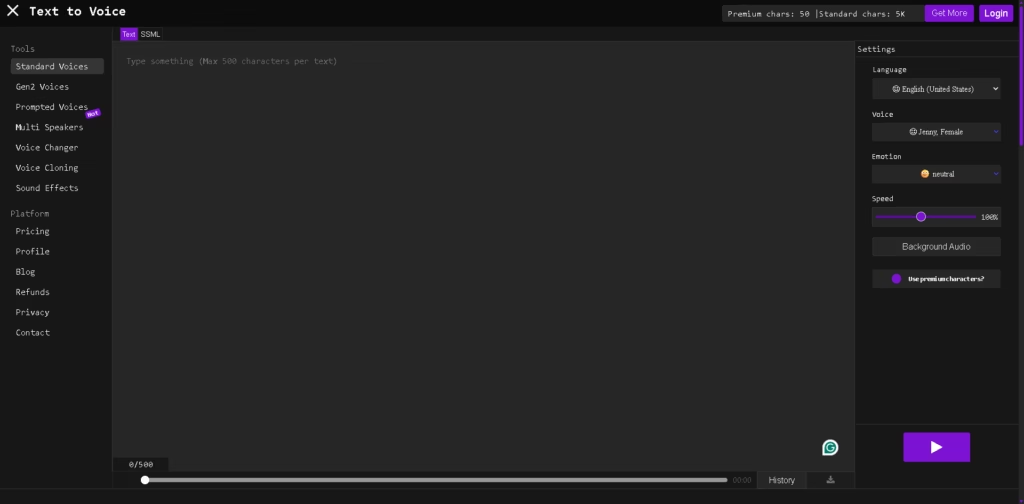
What It Does
TextToVoice.online is a browser-based text-to-speech tool that converts written text into downloadable MP3 voiceovers. It supports a broad selection of languages, regional variants, voices, speech styles, speed controls, and optional background audio.
TTextToVoice.online is aimed primarily at users who need quick voiceovers for videos, social media, narration, or general audio generation without installing desktop software. A typical workflow is to paste a script, choose a language and voice, select an available emotion or style, generate the speech, and then download the resulting MP3.
At a Glance
| Field | Details |
|---|---|
| Category | Text-to-speech / AI voice generation |
| Platform | Web browser |
| Output | MP3 |
| Languages | Multiple languages and regional variants |
| Voice Controls | Voice, gender, accent, speed, emotion/style |
| Premium Voices | Available for supported voices and languages |
| Free Usage | Free standard generation; daily premium characters are provided |
| Advanced Tools | Gen2 Voices, Multi Speakers, Voice Changer, Voice Cloning, Sound Effects |
Key Features
- Converts typed or pasted text into downloadable MP3 speech.
- Supports numerous languages, accents, and regional language variants.
- Offers selectable voice genders, voice options, and speech speeds.
- Provides emotional styles including cheerful, sad, angry, whispering, and newscast.
- Includes Gen2 voices designed for more expressive, context-aware speech.
- Provides optional background audio during voice generation.
- Includes separate voice cloning, voice changer, multi-speaker, and sound-effect tools.
Best For
- Creating short voiceovers for TikTok, Instagram, Facebook, and similar videos.
- Generating narration without recording your own voice.
- Testing different accents, voices, speeds, and emotional delivery.
- Producing downloadable MP3 narration from scripts or written content.
- Creating quick multilingual voiceovers directly from a browser.
Pros & Cons
| Pros | Cons |
| Broad language and regional voice selection | Premium and emotion features have character restrictions |
| MP3 downloads are available after generation | Advanced emotion support is not available for every voice |
| Multiple speech styles and emotional options | The service does not document a public API in the supplied product information |
| Browser-based workflow requires no desktop installation | Voice and feature availability vary by language and voice |
Alternatives & Comparisons
| Alternative | Best For | Key Difference |
| ElevenLabs | High-end expressive voice generation and developer workflows | Offers extensive voice options, APIs, cloning, streaming, and advanced emotional control. |
| NaturalReader | Reading documents and accessibility-focused listening | Adds document uploads, webpages, OCR, mobile apps, and reading tools. |
| TTSMaker | Free multilingual TTS and downloadable audio | Offers free generation, SRT export, pause controls, and stated commercial usage rights. |
TextToVoice.online fits best as a straightforward browser TTS service with many voice and emotion choices. Choose it when quick MP3 generation and broad language selection matter more than advanced production controls or developer integrations.
Frequently Asked Questions
Does TextToVoice.online support emotional speech?
Yes, but emotional availability depends on the selected voice and language. Available styles include options such as cheerful, sad, angry, whispering, excited, and newscast.
Can TextToVoice.online generate MP3 files?
Yes. After speech generation finishes, the interface provides a download option for the generated voiceover as an MP3 file.
Are premium voices completely free?
Premium voice generation uses premium characters. The supplied information states that users receive 1,000 premium characters daily, with additional characters available for purchase.
Does it have voice cloning?
Yes. Voice Cloning is listed as a separate tool on the platform, alongside Voice Changer, Multi Speakers, and Sound Effects.
Is there an API for developers?
An API is not documented in the supplied product information, so TextToVoice.online is better evaluated as a browser-based tool unless API availability is independently confirmed.
Overall Rating
| Category | Score |
| Performance | 8/10 |
| Ease of Use | 8.5/10 |
| Feature Set | 8/10 |
| Workflow Fit | 8.5/10 |
| Overall | 8.1/10 |
TextToVoice.online is a capable choice for quick multilingual voiceover creation, although users needing deeper production controls or developer tooling may find more specialized platforms stronger.
Final Verdict
- Best for: Fast browser-based voiceovers with multilingual voices, accents, and selectable emotional styles.
- Avoid if you need a clearly documented developer API or an advanced professional audio-production workflow.
- Biggest strength: Combines broad language selection with voice, speed, emotion, and downloadable MP3 controls.
- Best alternative: ElevenLabs is stronger for advanced voice control, APIs, cloning, streaming, and production workflows.
















