
What It Does
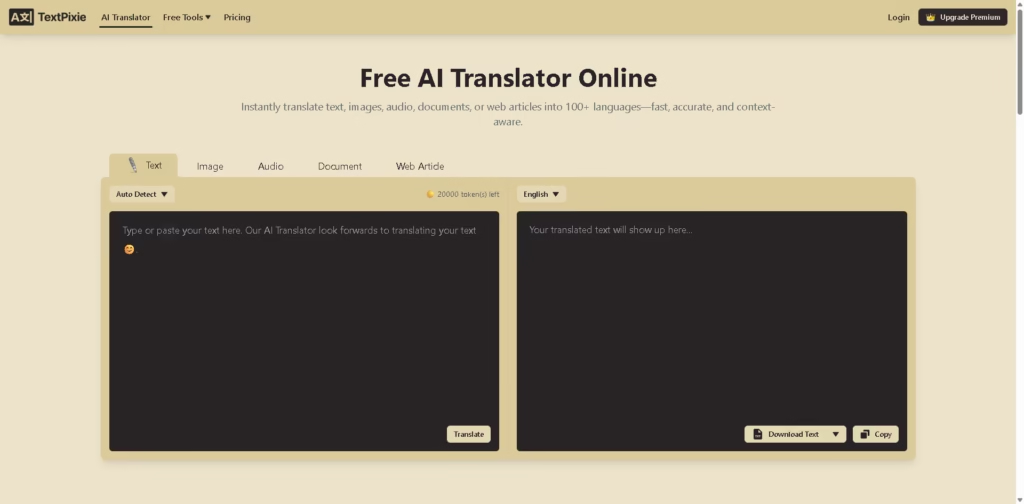
TextPixie is an AI translation platform for translating text, images, audio, documents, and web articles into 100+ languages. It is designed for users who need to translate different types of content from one interface, with a focus on preserving meaning and context across translations.
A typical workflow is to choose a content type, select the target language, upload or enter the source content, and start the translation. For example, a user can upload an image containing foreign-language text and use TextPixie’s image translation capability to produce the translated content without manually retyping the source.
Quick Verdict
- Best for: Translating text, images, and audio across 100+ languages
- Skip if: You need large-scale translation beyond the free plan’s daily limits
- Key Advantage: Supports multiple content formats in one translator
- Top Alternative: Google Translate
At a Glance
| Feature | Details |
|---|---|
| Category | AI Translation |
| Pricing Model | Freemium |
| Free Tier | Yes |
| Platform | Web |
| API | Not specified |
| Primary Strength | Multiformat translation |
| Languages Supported | 100+ |
Pricing & Plans
- Free: $0. Includes 20,000 text translation tokens per day, 5 image translations per day, 5 minutes of audio translation per day, up to 2,000 characters per text translation, and up to 1 minute per audio translation. Display ads are included.
- Premium: $7.90/month. Includes 1.5 million translation tokens per month, unlimited characters per text translation, 1,000 image translations per month, 1,000 minutes of audio translation per month, asynchronous audio transcription and translation, and no display ads.
Note: Prices and plan limits may change. Check the official website for current pricing.
Key Features
- Translates text into more than 100 languages.
- Translates images containing text into selected target languages.
- Converts and translates audio content with time-based limits.
- Supports document and web article translation workflows.
- Preserves meaning and context during AI-powered translations.
- Provides translation through a mobile- and desktop-friendly web interface.
Best For
- Translating everyday text between multiple languages
- Translating text contained inside images
- Converting short audio recordings into translated content
- Translating web articles for multilingual reading
- Handling mixed translation tasks from one web platform
Pros & Cons
Pros
- Supports text, image, audio, document, and web article translation.
- Free users receive daily allowances for text, image, and audio translation.
- Premium removes the text character limit.
- Premium includes substantial monthly image and audio allowances.
Cons
- Free image translation is limited to 5 images per day.
- Free audio translation is limited to 5 minutes per day.
- API availability is not specified in the provided information.
Alternatives & Comparisons
| Alternative | Best For | Key Difference vs. TextPixie |
|---|---|---|
| Google Translate | General-purpose multilingual translation | Broader established translation ecosystem and additional translation workflows |
| DeepL | Context-focused text translation | Primarily known for high-quality text and document translation |
| iTranslate | Mobile translation workflows | Places greater emphasis on dedicated mobile translation experiences |
TextPixie fits the AI translation market as a multi-format web translator that combines text, image, audio, document, and web article translation. Choose TextPixie when you specifically want these different content types available through one translation service with a free daily allowance.
Frequently Asked Questions
What types of content can TextPixie translate?
TextPixie supports text, images, audio, documents, and web articles.
How many languages does TextPixie support?
TextPixie states that it supports more than 100 languages.
How much can I translate for free?
The Free plan provides 20,000 text translation tokens per day, 5 image translations per day, and 5 minutes of audio translation per day.
What is the difference between TextPixie’s Free and Premium plans?
The Premium plan increases translation allowances, removes the text character limit, provides asynchronous audio transcription and translation, and removes display ads.
Can I use TextPixie on mobile devices?
Yes. TextPixie states that its interface works on both mobile and desktop devices.
ToolsPedia Rating
- Performance & Speed: 4.2/5.0
- Ease of Setup: 4.6/5.0
- Feature Depth: 4.3/5.0
- Value for Price: 4.4/5.0
- ToolsPedia Score: 4.4/5.0
Final Thoughts
TextPixie is a practical option for users who need more than conventional text translation because it supports images, audio, documents, and web articles alongside standard text. Its free plan is suitable for light translation workloads, while the Premium plan expands usage considerably for users with recurring translation needs. Start with the free plan to evaluate your typical translation volume before deciding whether Premium is necessary.
















