
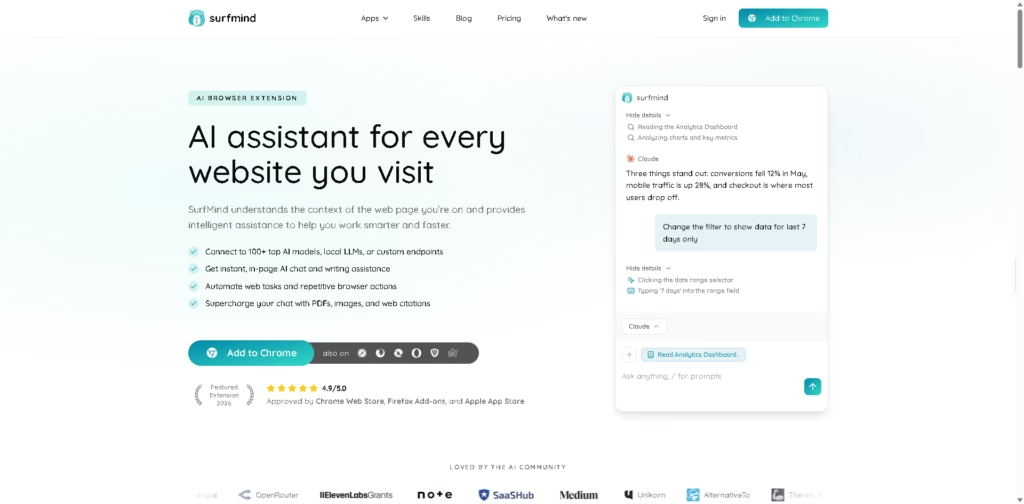
What It Does
SurfMind is an AI browser extension that adds contextual AI assistance directly to the websites you browse. It can analyze page content, summarize information, assist with writing, work with documents and images, and connect to more than 100 AI models, local LLMs, or custom OpenAI-compatible endpoints.
Its main advantage is keeping research and AI assistance inside the browser instead of requiring constant tab switching. For example, while researching a topic across several articles, you can ask SurfMind to summarize individual pages, compare information across tabs, and draft notes using the collected context.
At a Glance
| Field | Details |
|---|---|
| Category | AI browser assistant |
| Supported Browsers | Chrome, Firefox, Safari, Edge, Opera, Brave, Arc |
| AI Models | 100+ models, local LLMs, custom endpoints |
| Core Interface | Persistent browser sidebar |
| Research | Multi-page research chat |
| File Support | PDFs, documents, images |
| Local AI | Supported |
| Mobile | Safari extension for iPhone and iPad |
Key Features
- Provides page-aware AI assistance using the content of the current website.
- Connects to 100+ AI models, local LLMs, and custom OpenAI-compatible endpoints.
- Summarizes articles, reports, threads, and other long-form web content.
- Combines information from multiple pages or browser tabs in one conversation.
- Lets users chat with PDFs, documents, screenshots, diagrams, and images.
- Automates browser tasks through its browser agent.
- Connects approved tools and workflows through MCP servers.
Best For
- Summarizing lengthy articles without leaving the current webpage.
- Comparing information across multiple sources during online research.
- Drafting emails, reports, notes, and posts using webpage context.
- Explaining technical documentation, code, or complex research material.
- Switching between different AI models while keeping one browser workflow.
Pros & Cons
| Pros | Cons |
| Works directly inside the browser through a persistent sidebar. | Getting the most flexibility may require configuring AI providers or endpoints. |
| Supports multiple model providers instead of locking users into one model. | Browser-agent automation can introduce additional complexity compared with basic AI chat. |
| Multi-page research keeps information from several sources in one conversation. | The number of supported models does not guarantee identical capabilities across providers. |
| Supports local and custom models for users who want greater control over AI routing. | Advanced MCP and custom-model features are more technical than standard browser assistants. |
| Handles webpages, documents, and images in the same workflow. | Some privacy characteristics depend on the AI provider selected by the user. |
Alternatives & Comparisons
| Alternative | Best For | Key Difference |
| Monica | General-purpose AI assistance across the web | Broader AI productivity suite with browser integration |
| HARPA AI | Browser automation and AI-powered web workflows | More heavily focused on automation and browser actions |
| Merlin | AI writing and assistance across websites | Simpler multi-model browser assistant experience |
| Sider | AI sidebar and webpage assistance | Strong emphasis on integrated AI tools and sidebar workflows |
SurfMind is positioned as a model-flexible browser layer that combines page context, research, files, automation, and custom AI providers. Choose it when you want control over which AI model handles your browser tasks rather than relying on a single provider.
Frequently Asked Questions
Does SurfMind require an AI API key?
The supplied information specifically highlights support for custom providers and OpenAI-compatible endpoints, but does not establish that every setup requires an API key.
Can SurfMind use local AI models?
Yes. SurfMind explicitly supports local LLMs and custom endpoints, allowing users to choose where their AI processing occurs.
Which browsers support SurfMind?
The supplied site lists Chrome, Firefox, Safari, Edge, Opera, Brave, and Arc support. Safari is also available on iPhone and iPad.
Can SurfMind compare multiple webpages?
Yes. Its multi-page research chat can reference several pages or tabs within a single conversation.
Is SurfMind suitable for private research?
SurfMind states that it acts as a bridge between users and their chosen AI provider. However, the privacy characteristics of a workflow can depend on the provider and model configuration being used.
Overall Rating
| Category | Score |
| Performance | 8.7/10 |
| Ease of Use | 8.6/10 |
| Feature Set | 9.2/10 |
| Workflow Fit | 9.1/10 |
| Overall | 8.9/10 |
SurfMind scores highly for browser-native research and model flexibility, with its strongest value coming from combining multiple AI workflows in one interface.
Final Verdict
- Best for: Researchers, writers, students, and developers who want contextual AI directly inside their browser.
- Avoid if: You only need a basic standalone chatbot without browser integrations or model customization.
- Biggest strength: Multi-model AI, page context, files, and research tools work within the same browser workflow.
- Best alternative: HARPA AI for users who prioritize browser automation over model flexibility.
















