
What It Does
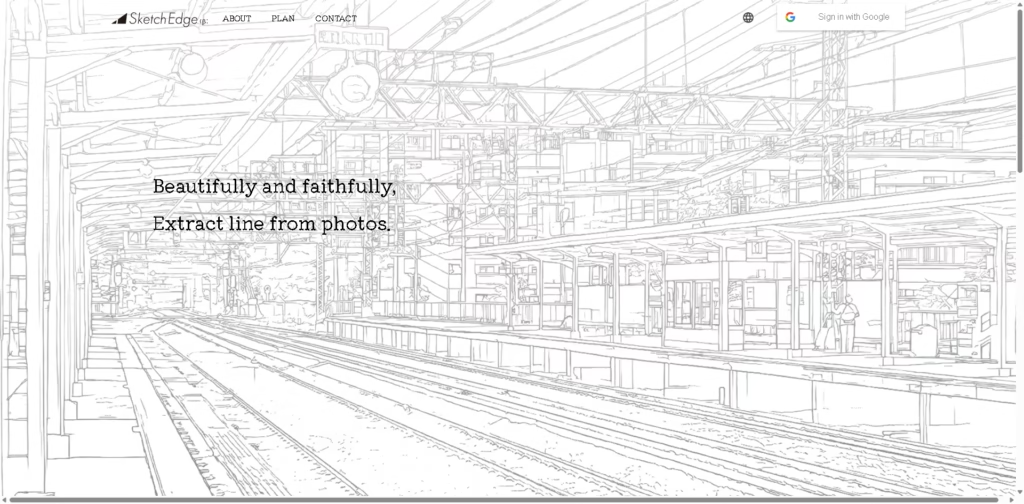
SketchEdge is an AI-powered line drawing extraction tool that converts photos and images into natural-looking line drawings. It is designed for creators who need usable line references for design work, manga backgrounds, and other visual material-reference workflows.
A typical workflow is straightforward: a user provides a photo or image, SketchEdge analyzes its contours, and the service generates a line drawing that preserves important outlines while using softer, more hand-drawn-looking lines. The resulting drawing can then serve as a reference for design or illustration work. At a Glance
| Feature | Details |
|---|---|
| Category | AI Image-to-Line-Art Tool |
| Pricing Model | Freemium |
| Free Tier | Yes |
| Platform | Web |
| API | Not specified |
| Primary Strength | Natural-looking photo line extraction |
Pricing & Plans
- Free: $0/month. First-time users receive 10 tickets during the beta period.
- Pro: $6/month. Includes up to 100 regular conversions per day and 20 high-quality conversions per day. This plan is limited to general users and small businesses with fewer than 20 employees at a given time.
- Enterprise: Price not specified. Details are undecided.
Note: Prices and plan limits may change. Check the official website for current pricing.
At a Glance
| Feature | Details |
|---|---|
| Category | AI Line Drawing Extraction |
| Pricing Model | Not specified |
| Free Tier | Not specified |
| Platform | Web |
| API | Not specified |
| Primary Strength | Natural-looking line extraction |
Key Features
- Extracts line drawings directly from photos and images.
- Uses AI to identify and reproduce image contours.
- Produces soft lines intended to resemble hand-drawn artwork.
- Supports photo-based references for design workflows.
- Targets manga background and material-reference creation.
Best For
- Converting photographs into line-art references
- Creating manga background references from photos
- Preparing visual material references for design projects
- Extracting contours from complex photographic images
- Developing hand-drawn-style line references from source images
Pros & Cons
Pros:
- Focuses specifically on photo-to-line-drawing extraction.
- AI processing is designed to capture contours accurately.
- Output is intended to retain a natural, hand-drawn appearance.
- Useful for design and manga-related reference workflows.
Cons:
- Pricing information is not specified in the provided source.
- API availability is not specified.
- The provided information does not identify additional image-editing capabilities.
Alternatives & Comparisons
| Alternative | Best For | Key Difference vs. This Tool |
|---|---|---|
| Adobe Photoshop | Professional image editing and line-art workflows | Provides a much broader image-editing environment |
| Clip Studio Paint | Manga and illustration production | Offers a dedicated drawing and manga-production workspace |
| Photopea | Browser-based image editing | Provides broader editing tools directly in a web browser |
SketchEdge occupies a specialized position focused on extracting natural-looking line drawings from photographs rather than providing a complete illustration or image-editing suite. Choose it when the primary requirement is converting photos into hand-drawn-like line references rather than manually editing or illustrating the source image.
Frequently Asked Questions
What does SketchEdge do with a photo?
SketchEdge extracts line drawings from photos and images by identifying their contours and rendering them as line art.
Is SketchEdge designed for manga workflows?
Yes. The official description specifically identifies manga backgrounds as one intended use case.
Does SketchEdge create hand-drawn-looking lines?
Yes. The service describes its output as natural line drawings with soft lines intended to resemble human drawing.
Does SketchEdge provide an API?
API availability is not specified in the provided product information.
How is SketchEdge different from Photoshop?
SketchEdge focuses specifically on AI-powered line extraction, while Photoshop is a general-purpose image-editing application with a much broader toolset.
ToolsPedia Rating
- Performance & Speed: 3.8/5.0
- Ease of Setup: 4.2/5.0
- Feature Depth: 3.0/5.0
- Value for Price: 3.0/5.0
- ToolsPedia Score: 3.6/5.0
Rating note: Pricing, processing speed, and several product capabilities are not specified in the supplied source, so those dimensions are scored conservatively rather than inferred.
Final Thoughts
SketchEdge is a narrowly focused AI tool for turning photographs and images into natural-looking line drawings, with particular relevance to design and manga reference workflows.
Its specialized approach can be useful when conventional image-editing software would require more manual work, but users seeking a full illustration or editing environment should consider broader alternatives.
The sensible next step is to try SketchEdge with a representative photo and assess whether its extracted contours match your intended drawing style.
















