
What It Does
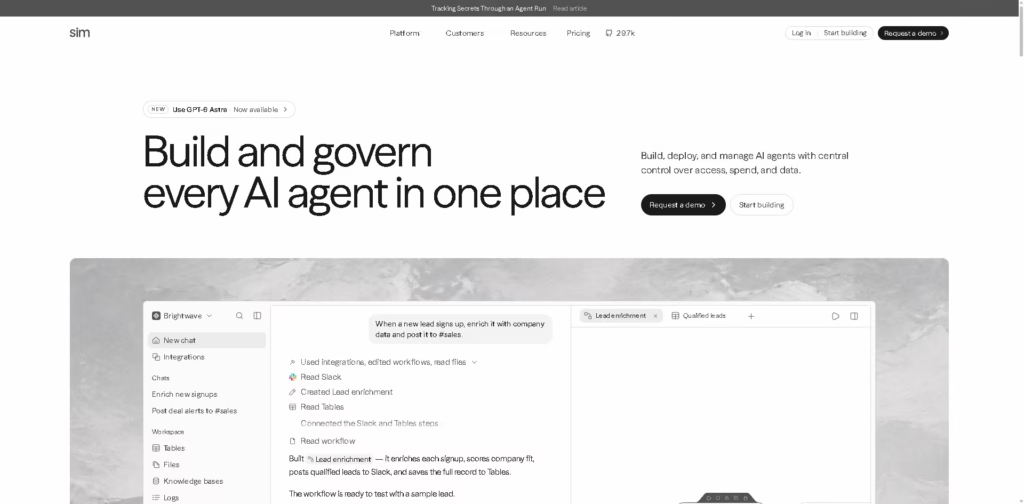
Sim is an open-source AI workspace for building, deploying, and managing AI agents. It provides a visual canvas, conversational building, code-based development, integrations, knowledge bases, tables, files, logs, and centralized controls for access, spending, data, and deployment.
A typical workflow can start with a team creating an agent through Sim’s visual canvas or code. The agent can connect to models and integrations, use synced knowledge or structured tables, execute tasks through configured workflows, and have each run monitored through detailed logs showing execution status, timing, and cost.
Quick Verdict
- Best for: Building and governing AI agents across team workflows
- Skip if: You need a simple automation tool without agent-building infrastructure
- Key Advantage: Agent development and centralized governance
- Top Alternative: n8n
At a Glance
| Feature | Details |
|---|---|
| Category | AI Agent Development Platform |
| Pricing Model | Freemium |
| Free Tier | Yes |
| Platform | Web, Self-Hosted |
| API | Yes |
| Primary Strength | AI agent development and governance |
| Integrations | Hundreds of integrations |
| LLM Support | Major LLM providers |
Pricing & Plans
- Free: $0 forever. Includes 1,000 one-time credits, 1 workspace, 10 concurrent executions, 50 synchronous runs/minute, 200 asynchronous runs/minute, 30 API endpoints, 5 GB file storage, up to 5 tables, 50,000 rows per table, and 30-day log retention.
- Pro: $25/user/month, billed monthly. Includes 6,000 credits/month plus 2,000 weekly refresh credits, 3 workspaces, 50 concurrent executions, 150 synchronous runs/minute, 1,000 asynchronous runs/minute, 100 API endpoints, 50 GB storage, up to 100 tables, 100,000 rows per table, and unlimited log retention.
- Max: $100/user/month, billed monthly. Includes 25,000 credits/month plus 4,000 weekly refresh credits, unlimited workspaces, 200 concurrent executions, 300 synchronous runs/minute, 2,500 asynchronous runs/minute, 200 API endpoints, 500 GB storage, up to 1,000 tables, and 500,000 rows per table.
- Enterprise: Custom pricing. Includes custom credits, unlimited workspaces, up to 1,000 customizable concurrent executions, custom execution and API limits, custom storage and table limits, and unlimited log retention.
- Annual billing: The pricing page states that annual billing provides a 15% discount.
Note: Prices and plan limits may change. Check the official website for current pricing.
Key Features
- Visual, conversational, or code-based tools let teams build and deploy AI agents.
- Workflows connect models, integrations, and blocks into agent execution logic.
- Knowledge Base provides agents with synced information from connected sources.
- Tables store structured data that agents can read and update between runs.
- Logs trace agent executions block by block, including failures and performance.
- Enterprise controls manage access, spending, data retention, and agent activity.
Best For
- Building AI agents through visual workflows or code
- Connecting multiple business systems to autonomous agent workflows
- Giving agents persistent knowledge and structured operational data
- Monitoring agent runs, execution times, failures, and costs
- Managing AI access and spending across organizational teams
Pros & Cons
Pros:
- Combines agent building, deployment, monitoring, and governance in one workspace.
- Supports hundreds of integrations and major LLM providers.
- Self-hosting is available through Docker or Kubernetes.
- The free plan provides a substantial set of execution, storage, and workflow limits.
Cons:
- Free credits are described as 1,000 one-time credits rather than a recurring monthly allocation.
- Higher-scale execution, storage, and workspace limits require paid plans.
- Enterprise-specific governance capabilities such as SSO, SOC 2 compliance, and self-hosting are not included on the Free plan.
Alternatives & Comparisons
| Alternative | Best For | Key Difference vs. This Tool |
|---|---|---|
| n8n | Workflow automation with AI capabilities | Sim centers its platform around building and managing AI agents |
| Make | Visual business automation | Sim emphasizes agent workflows, knowledge, logs, and governance |
| Zapier | No-code app automation | Sim provides deeper infrastructure for agent development and deployment |
Sim fits the AI automation market as an open-source workspace that combines agent creation with deployment, observability, and organizational governance.
Choose Sim when your workflows require dedicated AI agents, multiple models or integrations, and centralized control over how those agents operate.
Frequently Asked Questions
Is Sim open source?
Yes. Sim describes itself as an open-source AI workspace, and its website links to its GitHub repository.
Does Sim offer a free plan?
Yes. The Free plan costs $0 and includes 1,000 one-time credits, one workspace, execution limits, 5 GB file storage, and other core capabilities.
Can Sim connect to external applications?
Yes. Sim states that it supports hundreds of integrations and lists integrations including Slack, GitHub, Gmail, Notion, Salesforce, Jira, Linear, Supabase, and Stripe.
Can Sim be self-hosted?
Yes. Sim supports self-hosting and states that organizations can run it in their own cloud using Docker or Kubernetes.
Does Sim provide API access?
Yes. API endpoints are included across the listed plans, with the number increasing from 30 on Free to 100 on Pro and 200 on Max. Enterprise limits are customizable.
ToolsPedia Rating
- Performance & Speed: 4.3/5.0
- Ease of Setup: 4.0/5.0
- Feature Depth: 4.7/5.0
- Value for Price: 4.3/5.0
- ToolsPedia Score: 4.4/5.0
Final Thoughts
Sim combines AI agent development, workflow orchestration, knowledge management, execution monitoring, and organizational controls in one platform. Its open-source approach, self-hosting option, broad integration support, and scalable execution limits make it relevant for teams building multiple production AI agents.
Start with the Free plan to evaluate agent-building and workflow capabilities before moving to Pro or higher tiers for greater execution, storage, and team capacity.
















