
What It Does
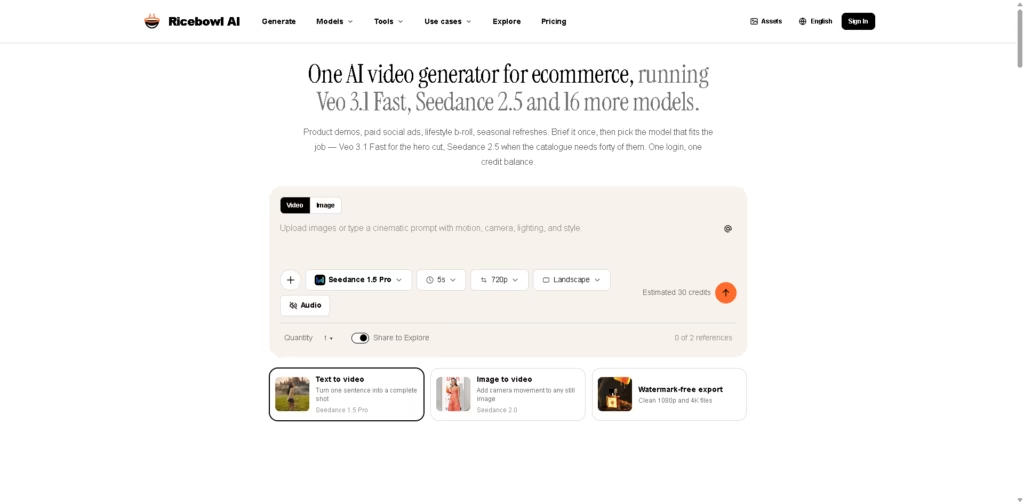
Ricebowl AI is a web-based AI video generation platform focused on ecommerce and marketing workflows. It lets users create videos from text prompts or existing product images, while providing access to 18 video models through a single credit balance. The platform is aimed at ecommerce teams, marketers, and creators producing product demos, paid social ads, lifestyle footage, and other promotional video assets.
A typical workflow starts with a product photo or a written shot description. The user selects an AI video model based on the desired output and credit cost, generates up to four variants from a submission, then downloads the finished video for use on a product page, social campaign, email, or other marketing channel.
Quick Verdict
- Best for: Producing ecommerce product videos across multiple AI models.
- Skip if: You need a full video editor rather than a generation-focused platform.
- Key Advantage: 18 video models under one credit system.
- Top Alternative: Kling AI
At a Glance
| Feature | Details |
|---|---|
| Category | AI Video Generator |
| Pricing Model | Credit-Based |
| Free Tier | Yes |
| Platform | Web |
| API | Yes |
| Primary Strength | Multi-model e-commerce video generation |
| AI Models | 18 video models |
| Key Integrations | Not specified |
Pricing & Plans
- Free: 30 credits for new accounts, with no card required and no watermark.
- Starter Monthly: $29.90/month for 1,000 credits. Includes 1080p output, no watermark, and commercial use.
- Standard Monthly: $49.90/month for 2,000 credits. Includes 1080p output, no watermark, and commercial use.
- Advanced Monthly: $89.90/month for 5,000 credits. Includes 1080p output, no watermark, and commercial use.
- Annual billing: The vendor states that annual billing saves 30%, but the supplied data does not specify the resulting annual prices.
- Credit requirements vary substantially by model, from 30 credits for Seedance 1.5 Pro to 315 credits for Seedance 2.5 at the listed base rates.
- Credits reset every billing month on paid monthly plans.
- Failed generations automatically refund their credits.
- Paid plans include commercial use.
Note: Prices and plan limits may change. Check the official website for current pricing.
Key Features
- Generates videos from text descriptions with camera, lighting, motion, and style instructions.
- Converts existing product photos into animated video clips.
- Provides access to 18 video generation models through one account and credit balance.
- Generates up to four variants from a submitted video prompt.
- Supports 16:9 and 9:16 video formats for product pages and social advertising.
- Exports videos up to 4K resolution without watermarks.
Best For
- Creating product demonstration videos from existing ecommerce photography.
- Producing multiple paid-social video variations for product campaigns.
- Generating lifestyle b-roll without arranging a conventional product shoot.
- Scaling video production across large ecommerce product catalogues.
- Creating seasonal promotional videos from existing product assets.
Pros & Cons
Pros:
- One credit balance provides access to 18 different video models.
- Existing product images can be converted into moving video shots.
- Four generated variants can reduce repeated generation attempts.
- Paid plans provide watermark-free exports and commercial usage rights.
Cons:
- Credit consumption varies significantly between models, making output volume harder to predict.
- Monthly credits reset rather than carrying forward.
- The supplied information does not specify native integrations with ecommerce or marketing platforms.
Alternatives & Comparisons
| Alternative | Best For | Key Difference vs. This Tool |
|---|---|---|
| Kling AI | Cinematic AI video generation | Ricebowl combines Kling with 17 other video models in one workspace. |
| Runway | Broader AI video creation | Runway is positioned as a broader creative production platform rather than a model aggregation service. |
| Canva | Marketing design and content workflows | Canva covers broader design and editing workflows, while Ricebowl focuses on AI video generation. |
Ricebowl AI sits between standalone AI video generators and broader creative suites by aggregating multiple generation models around ecommerce workflows. Choose it when model variety, product-image-to-video generation, and a shared credit system matter more than having a comprehensive video editing environment.
Frequently Asked Questions
Can Ricebowl AI turn existing product photos into videos?
Yes. Ricebowl AI supports image-to-video generation, allowing users to upload product photos such as packshots, model shots, and flat lays and generate moving clips from them.
How many AI video models does Ricebowl AI support?
Ricebowl AI lists 18 video models, including Veo 3.1, Veo 3.1 Fast, Veo 3.1 Pro, Kling 3 variants, Seedance models, PixVerse V6, and others.
Does Ricebowl AI have an API?
Yes. Ricebowl AI provides APIs for generating videos and modifying generation parameters programmatically.
Are Ricebowl AI videos watermarked?
The supplied product information states that videos can be exported without watermarks, including on paid plans. The free account is also advertised as having no watermark.
Which Ricebowl AI plan is suitable for higher-volume generation?
The Advanced Monthly plan provides 5,000 credits for $89.90/month. The actual number of videos depends on the selected model because individual models have different credit costs.
ToolsPedia Rating
- Performance & Speed: 4.0/5.0
- Ease of Setup: 4.3/5.0
- Feature Depth: 4.5/5.0
- Value for Price: 4.1/5.0
- ToolsPedia Score: 4.2/5.0
Final Thoughts
Ricebowl AI is primarily valuable for ecommerce teams that need frequent product videos and want to switch between multiple AI generation models without maintaining separate accounts and credit systems. Its image-to-video workflow, four-variant generation, API access, and watermark-free exports make it particularly suitable for repeatable marketing production. Start with the 30 free credits to compare the available models against your specific product-video requirements before committing to a paid plan.
















