
What It Does
Rewrait is a desktop AI writing assistant for rewriting and polishing text directly inside the apps where users write. It supports selected-text rewriting, custom writing styles, voice dictation, a blank Canvas workspace, and integrations with common workplace environments such as Slack, Gmail, Notion, Teams, VS Code, and browser fields. It is available for macOS 14.6+ and Windows 10+.
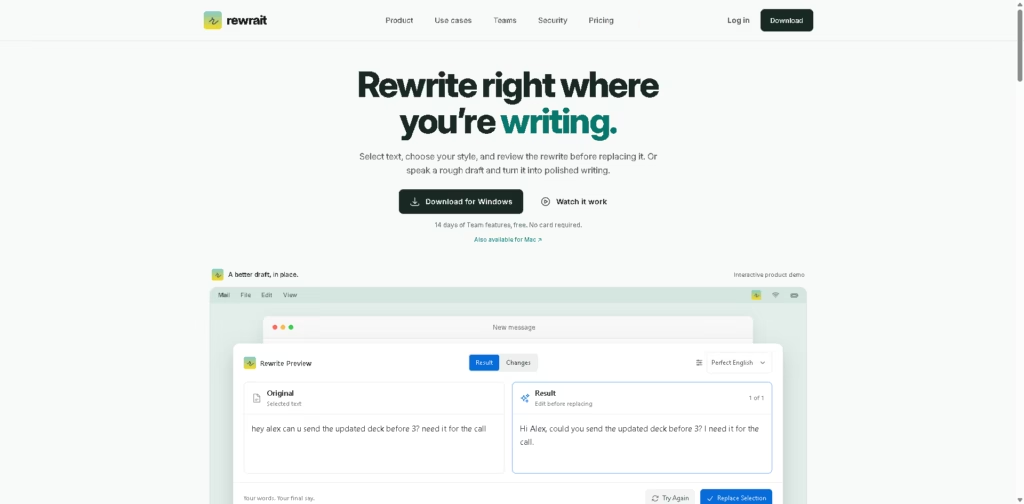
A typical workflow is to select a draft in an editable field, trigger Rewrait with a menu option or keyboard shortcut, and review the original and rewritten versions side by side. Users can edit the result before replacing the selected text, or use Instant mode for direct replacement. Voice users can also dictate a rough draft, choose a rewrite or transcript, and insert the result into the source application.
Quick Verdict
- Best for: Rewriting and polishing text directly inside desktop applications
- Skip if: You need a completely free tool with high monthly rewrite limits
- Key Advantage: In-app rewriting with review and custom writing styles
- Top Alternative: Grammarly
At a Glance
| Feature | Details |
|---|---|
| Category | AI Writing Assistant |
| Pricing Model | Freemium |
| Free Tier | Yes |
| Platform | Mac, Windows |
| API | Pro and Team |
| Primary Strength | In-app text rewriting |
| Dynamic Field 1 | Voice Dictation |
| Dynamic Field 2 | Team Writing Styles |
Pricing & Plans
- Free: $0 forever. Includes 30 rewrites per month, up to 1,000 characters per rewrite, starter and personal styles, community styles, and basic dictation.
- Pro: $12/month when billed annually ($144/year), or $15 billed monthly. Includes unlimited rewrites subject to a fair-use limit of 10 requests per minute per person, 10,000 characters per rewrite, premium AI models, rewrite variants, multilingual voice dictation, personal styles, multi-step workflows, and API access.
- Team: $20/seat/month when billed annually, or $25/seat/month when billed monthly. Annual billing starts at 2 seats, with $480 billed yearly for 2 seats. Includes Pro features plus shared styles and workflows, company context from Notion, Confluence, and Google Docs, owner-managed seats and billing, and a no-training guarantee on team text.
- 14-day trial: Every new account starts with Team features for 14 days without requiring a card. After the trial, the account moves to the Free plan unless upgraded.
- Trial capacity: The Team trial supports up to 10 workspace seats.
Note: Prices and plan limits may change. Check the official website for current pricing.
Key Features
- Rewrites selected text directly inside supported desktop applications.
- Provides side-by-side previews before replacing the original text.
- Supports custom writing styles and reusable rewrite instructions.
- Converts spoken rough drafts into editable text or rewritten drafts.
- Provides rewrite variants including Warmer, Shorter, and More Direct.
- Connects team writing styles to approved Notion, Confluence, and Google Docs context.
Best For
- Polishing emails and workplace messages without switching applications.
- Rewriting Slack, Gmail, Teams, and browser-based text.
- Creating consistent writing styles for recurring communication.
- Turning spoken ideas into polished written drafts.
- Applying shared company writing rules across team workflows.
Pros & Cons
Pros:
- Works directly within many common writing applications.
- Lets users review and edit AI rewrites before replacing original text.
- Supports custom personal styles and multi-step workflows.
- Team plans provide shared styles and company context integrations.
Cons:
- Free users are limited to 30 rewrites per month.
- The Free plan limits each rewrite to 1,000 characters.
- Some protected or unusual text fields may require manual copying of results.
Alternatives & Comparisons
| Alternative | Best For | Key Difference vs. This Tool |
|---|---|---|
| Grammarly | General writing assistance and proofreading | Offers broader grammar, spelling, and writing assistance alongside rewriting. |
| Wordtune | Rewriting and adjusting written tone | Focuses heavily on rewriting and alternative phrasing. |
| LanguageTool | Grammar and multilingual writing correction | Places greater emphasis on grammar, spelling, and language correction. |
Rewrait fits the AI writing assistant market around in-place rewriting, voice drafting, customizable styles, and team writing guidance. Choose it when reviewing and replacing text directly inside your existing desktop workflow is more important than having a broader proofreading platform.
Frequently Asked Questions
Does Rewrait work on both Mac and Windows?
Yes. Rewrait supports macOS 14.6 or later and Windows 10 or later.
Can Rewrait rewrite text inside Gmail or Slack?
Yes. The vendor lists Gmail and Slack among the applications where Rewrait can work with editable text.
Does Rewrait have a free plan?
Yes. The Free plan provides 30 rewrites per month with a 1,000-character limit per rewrite.
What is the difference between Rewrite Selection and Instant?
Rewrite Selection opens a preview where users can compare and edit the result before replacing the selected text. Instant uses the selected writing style and replaces the text directly.
Does Rewrait offer API access?
Yes. API access is included with Pro and Team plans and is not included with the Free plan.
ToolsPedia Rating
- Performance & Speed: 4.2/5.0
- Ease of Setup: 4.2/5.0
- Feature Depth: 4.4/5.0
- Value for Price: 4.1/5.0
- ToolsPedia Score: 4.2/5.0
Final Thoughts
Rewrait is built around a practical desktop workflow where users can select, rewrite, review, and replace text without leaving the application they are using. Its voice dictation, custom styles, API access, and team context features extend the product beyond basic rewriting. Start with the free plan or 14-day Team trial to determine whether its in-app workflow fits your writing routine.
















