
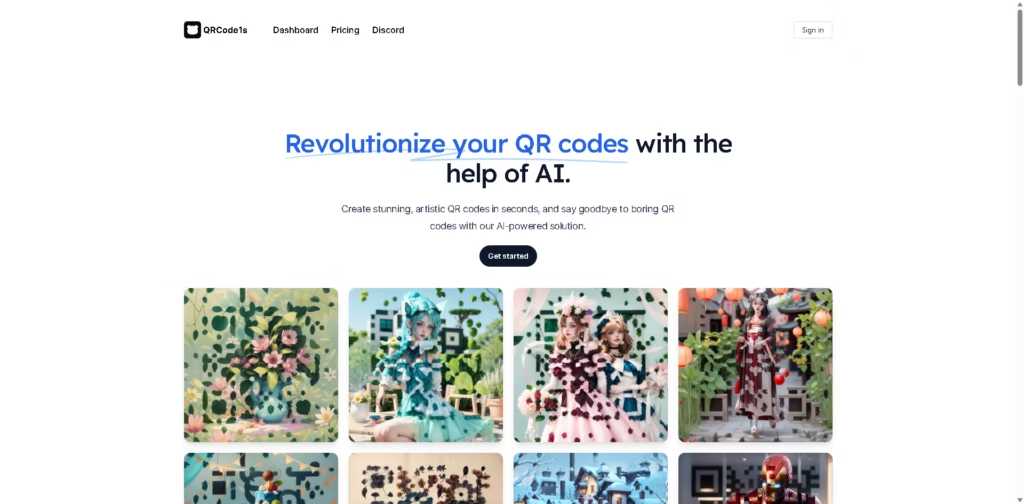
What It Does
QRCode1s is an AI-powered QR code generator focused on creating artistic QR codes from either an existing QR code or user-provided content. Instead of requiring users to work with conventional QR designs, it uses prompts and AI generation to produce more visually distinctive results.
The workflow takes three steps: upload a QR code or enter content, describe the desired look with a prompt, and wait for the artistic QR code to generate. For example, a restaurant could start with an ordering QR code, provide a visual prompt matching its brand style, and generate an artistic version for menus or packaging.
At a Glance
| Field | Details |
|---|---|
| Category | AI QR code generator |
| Creation Methods | Upload an existing QR code or enter content |
| AI Control | Text prompts |
| Free Account | 10 generations |
| Free Account Limitation | Watermark and public mode |
| Pro Account | 1,000 generations |
| Pro Price | $9.90 promotional price, listed from $19.90 |
| Pro Benefits | No watermark and private mode |
Key Features
- Transforms existing QR codes into artistic designs using AI.
- Generates artistic QR codes from user-provided content.
- Accepts text prompts to guide QR code appearance.
- Supports multiple commercial and personal QR code use cases.
- Free accounts include 10 uses with a watermark and public mode.
- Pro accounts provide 1,000 uses without watermarks or public mode.
Best For
- Turning existing QR codes into branded artistic designs.
- Creating QR visuals from custom content and prompts.
- Designing QR codes for restaurant ordering materials.
- Creating distinctive QR codes for product packaging.
- Producing personalized QR designs for business cards and invitations.
Pros & Cons
| Pros | Cons |
| Supports both existing QR codes and new content | Free account includes a watermark |
| Prompt-based AI generation gives users creative control | Free account uses public mode |
| 1,000 uses included with the listed Pro plan | Pro pricing is presented as an early promotional price |
| Supports a wide range of practical QR scenarios | No detailed information is provided about integrations or analytics |
Alternatives & Comparisons
| Alternative | Best For | Key Difference |
| AIQRHub | Simple AI-generated artistic QR codes | Uses preset styles alongside its AI generation workflow |
| QR Code Monkey | Conventional QR customization | More focused on standard QR customization |
| Canva | QR codes within broader design projects | Combines QR creation with a full visual design editor |
| Bitly | QR codes and link management | Emphasizes link management and campaign tracking |
QRCode1s is best positioned for users who want prompt-driven artistic QR generation, particularly when starting with an existing QR code or custom content. Choose it over simpler generators when creative control and artistic presentation matter more than traditional QR management features.
Frequently Asked Questions
Can QRCode1s transform an existing QR code?
Yes. Users can upload an existing QR code and use AI to transform it into an artistic design.
Can I create a QR code without uploading one?
Yes. QRCode1 says users can enter any content they want instead of starting with an existing QR code.
How do I control the artistic style?
Users enter a prompt describing what they want, which the AI uses when generating the artistic QR code.
What does the free QRCode1s account include?
The Free Account provides 10 uses and includes a watermark and public mode.
What does the Pro account provide?
The listed Pro Account provides 1,000 uses, no watermark, and private mode. The page currently shows $9.90 as an early price, reduced from $19.90.
Overall Rating
| Category | Score |
| Performance | 8/10 |
| Ease of Use | 8.5/10 |
| Feature Set | 8/10 |
| Workflow Fit | 8.5/10 |
| Overall | 8.2/10 |
QRCode1s stands out for combining prompt-based AI generation with flexible starting options, although information about integrations, analytics, and technical QR controls is limited.
Final Verdict
- Best for: Users who want prompt-driven artistic QR codes for branding, packaging, menus, and promotional materials.
- Avoid if: You need advanced analytics, integrations, or conventional QR management tools.
- Biggest strength: Users can transform existing QR codes or generate designs from content using custom prompts.
- Best alternative: AIQRHub for a simpler artistic QR workflow based on preset styles.
















