
What It Does
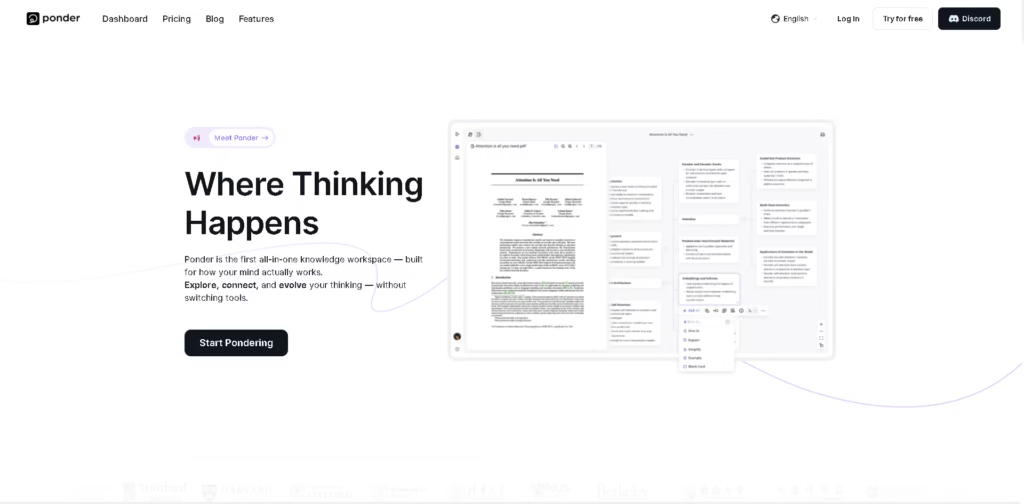
Ponder is an AI-powered knowledge workspace designed for research, learning, analysis, and structured thinking. It combines source management, visual knowledge mapping, AI conversations, note-taking, and content creation in one workspace.
Users can start with a question, files, or existing knowledge, then import PDFs, videos, text, and web pages. Ponder can connect ideas on an infinite canvas, analyze multiple sources, support AI conversations, and turn the resulting insights into reports, mind maps, or Markdown.
Quick Verdict
- Best for: Researchers, students, analysts, and knowledge workers managing complex information.
- Skip if: You only need a basic note-taking or standalone mind-mapping tool.
- Key Advantage: Combines AI research, visual mapping, source analysis, and knowledge organization in one workspace.
- Top Alternative: NotebookLM
At a Glance
| Feature | Details |
|---|---|
| Category | AI Research & Knowledge Management |
| Pricing Model | Freemium and paid subscriptions |
| Free Tier | Yes, 50 credits/day |
| Platform | Web |
| API | Not specified |
| Primary Strength | AI-powered research and visual knowledge mapping |
| Input Sources | PDFs, videos, text, web pages, and files |
| Export Formats | Reports, mind maps, slides, docs, and Markdown |
Pricing & Plans
- Free: $0/month. Includes 50 credits refreshed daily, limited advanced model access, limited file uploads, external source fetching, and mind map, document, and slide creation/export.
- Casual: $14/month. Includes 1,100 credits/month, all advanced models, unlimited file uploads, external source fetching, exports, and credit top-ups.
- Plus: $24/month. Includes 2,500 credits/month, all advanced models, 25% off credit top-ups, unlimited file uploads, exports, and priority AI access during peak times.
- Pro: $42/month. Includes 2,500? Note: The supplied pricing page lists 2,500 credits/month for Plus and does not separately show a credit amount for Pro. Pro includes all advanced models, 40% off credit top-ups, unlimited uploads, exports, top-priority AI access, and early access to advanced features.
- Yearly billing: Casual $168/year, Plus $288/year, and Pro $504/year, based on the supplied pricing page.
Note: Prices and plan limits may change. Check the official website for current pricing.
Key Features
- Imports PDFs, videos, text, web pages, and other files.
- Builds visual knowledge maps on an infinite canvas.
- Analyzes and compares information across multiple sources.
- Supports AI conversations grounded in users’ knowledge.
- Exports thinking into reports, mind maps, slides, docs, and Markdown.
- Fetches and saves external sources using AI.
Best For
- Researchers synthesizing information from multiple papers and sources.
- Students organizing complex course materials into connected knowledge.
- Analysts comparing sources and identifying relationships between information.
- Knowledge workers turning reports and data into structured insights.
- Writers developing research-backed ideas and reusable knowledge assets.
Pros & Cons
Pros
- Combines research, visual mapping, notes, and AI interaction.
- Supports multiple source types, including PDFs, videos, text, and web pages.
- Free plan provides 50 credits refreshed daily.
- Paid plans offer unlimited file uploads and access to advanced models.
Cons
- Advanced model access is limited on the Free plan.
- AI usage is based on credits.
- API availability is not specified.
- Higher-tier pricing may be less suitable for occasional users.
Alternatives & Comparisons
| Alternative | Best For | Key Difference vs. This Tool |
|---|---|---|
| NotebookLM | AI-assisted research with source documents | Focuses strongly on source-grounded research and document interaction |
| Obsidian | Connected notes and personal knowledge management | Provides a flexible local-first knowledge management environment |
| Miro | Visual collaboration and whiteboarding | Focuses more broadly on visual collaboration and team whiteboards |
Ponder combines AI research, source analysis, visual mapping, and knowledge organization in a single workspace.
It fits users who want their research process and structured thinking to remain connected rather than split across separate tools.
Frequently Asked Questions
What is Ponder?
Ponder is an AI knowledge workspace for researching, organizing, connecting, and developing information and ideas.
What files can Ponder use?
Ponder supports sources including PDFs, videos, text, web pages, and other uploaded files.
Does Ponder have a free plan?
Yes. The Free plan costs $0/month and provides 50 credits refreshed daily, along with limited access to advanced models and file uploads.
Can Ponder create mind maps?
Yes. Ponder provides AI-powered mind mapping and lets users create and export mind maps.
Can work created in Ponder be exported?
Yes. The supplied pricing information lists exports for mind maps, documents, and slides. The platform also describes Markdown export.
ToolsPedia Rating
- Performance & Speed: 4.2/5.0
- Ease of Setup: 4.3/5.0
- Feature Depth: 4.5/5.0
- Value for Price: 4.3/5.0
- ToolsPedia Score: 4.3/5.0
Editorial assessment based on the published feature set and pricing information provided, not hands-on testing.
Final Thoughts
Ponder brings research, source analysis, visual mapping, and AI-assisted thinking into one workspace. Its daily free credits make it accessible for lighter use, while paid plans expand model access, file uploads, and AI usage. Users with research-heavy workflows can start with the Free plan and compare their credit needs before upgrading.
















