
What It Does
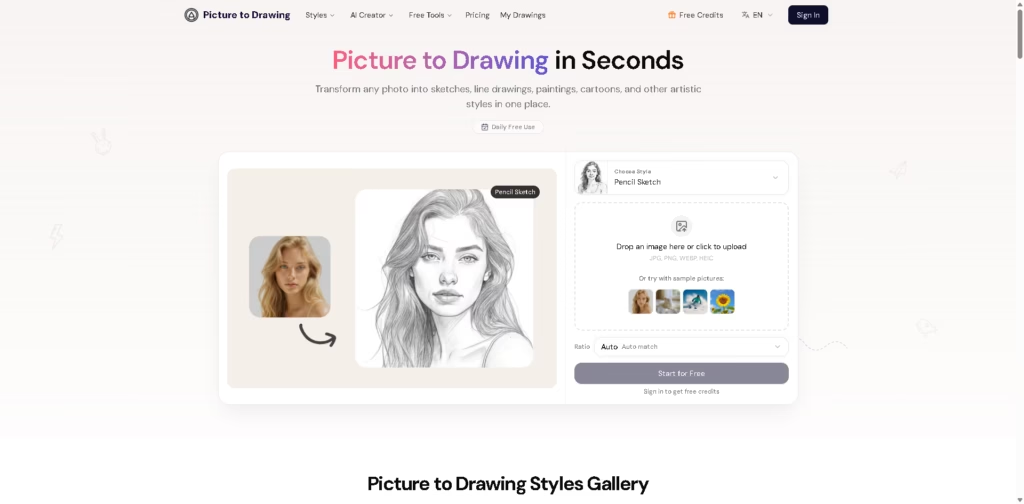
Picture to Drawing is an AI-powered web tool that converts uploaded photos into sketches, line drawings, paintings, cartoons, anime-style images, caricatures, and other artistic treatments. Picture to Drawing is primarily suited to users who want to transform existing photos into stylized artwork without manually drawing or editing them.
A typical workflow is straightforward: upload a JPG, PNG, WEBP, or HEIC image, select a style such as Pencil Sketch, Line Drawing, Watercolor, Anime, or Cartoon, choose an aspect ratio, and generate the result. Users can then download the artwork in high resolution, while paid plans add batch conversion, faster generation, watermark-free output, and commercial-use rights.
Quick Verdict
- Best for: Converting photos into multiple drawing and artistic styles
- Skip if: You need a full-featured photo editor or advanced manual controls
- Key Advantage: Large range of dedicated artistic styles
- Top Alternative: Fotor
At a Glance
| Feature | Details |
|---|---|
| Category | AI Photo-to-Art / Image Stylization |
| Pricing Model | Credit-Based / Subscription |
| Free Tier | Yes |
| Platform | Web |
| API | Not specified |
| Primary Strength | Wide range of photo-to-art styles |
| Input Formats | JPG, PNG, WEBP, HEIC |
| Aspect Ratios | Auto, 1:1, 3:4, 4:3, 9:16, 16:9 |
Pricing & Plans
- Basic: $8.99/month when billed annually ($107.88/year), compared with a listed $12.99 monthly price. Includes 3,000 credits/year, 1,500 image generations, no watermark, 2x faster generation, batch photo-to-sketch, HD downloads, and commercial-use rights.
- Standard: $13.99/month when billed annually ($167.88/year), compared with a listed $19.99 monthly price. Includes 4,800 credits/year, 2,400 image generations, no watermark, 2x faster generation, batch photo-to-sketch, HD downloads, commercial-use rights, and priority customer support.
- Premium: $27.99/month when billed annually ($335.88/year), compared with a listed $39.99 monthly price. Includes 12,000 credits/year, 6,000 image generations, no watermark, 2x faster generation, batch photo-to-sketch, HD downloads, commercial-use rights, and priority customer support.
- Free use: The tool advertises one free daily trial, with sign-in required to receive free credits.
Note: Prices and plan limits may change. Check the official website for current pricing.
Key Features
- Converts photos into pencil sketches, line drawings, paintings, cartoons, anime, and caricatures.
- Supports JPG, PNG, WEBP, and HEIC image uploads.
- Provides dedicated styles including Van Gogh, Simpsons, Chibi, Pixar 3D, and pixel art.
- Offers aspect-ratio controls for common portrait, landscape, and social formats.
- Provides batch photo-to-sketch conversion on paid plans.
- Supports HD downloads and commercial use on paid plans.
Best For
- Turning portraits into pencil sketches for gifts and personal artwork
- Creating stylized social media images from ordinary photographs
- Producing photo-based illustrations for marketing materials
- Converting landscapes and flowers into watercolor-style artwork
- Creating multiple artistic variations for creative portfolios
Pros & Cons
Pros:
- Covers drawing, painting, cartoon, anime, and caricature workflows in one service.
- Accepts four common image formats, including HEIC.
- Offers aspect-ratio presets for different output formats.
- Paid plans include batch processing, HD downloads, and commercial-use rights.
Cons:
- The provided information does not specify an API.
- Advanced manual editing controls are not described.
- Full commercial-use rights are listed with paid plans rather than the free workflow.
Alternatives & Comparisons
| Alternative | Best For | Key Difference vs. This Tool |
|---|---|---|
| Fotor | Broad AI photo editing and stylization | Offers photo-to-sketch plus a wider general-purpose editing and AI toolset. |
| insMind | Prompt-driven image transformation | Combines photo-based transformations with text-guided image generation and editing. |
| Picsart | Sketch effects and broader creative editing | Provides sketch effects alongside a larger creative editing ecosystem and SketchAI workflow. |
Picture to Drawing fits the market as a focused photo-to-art service rather than a broad image editor, with a particularly large selection of named artistic styles. Choose it when your main requirement is repeatedly converting existing photos into drawing, painting, cartoon, or anime-style artwork rather than performing extensive manual edits.
Frequently Asked Questions
Is Picture to Drawing better than Fotor for photo-to-sketch conversion?
Picture to Drawing is more specifically centered on photo-to-art transformations, while Fotor combines sketch conversion with a broader collection of AI editing and image-generation features.
Can Picture to Drawing convert photos into cartoon and anime styles?
Yes. Its listed styles include cartoon, anime, Chibi, Simpsons, Shounen Anime, Shoujo Anime, JoJo’s Bizarre Adventure, Pixar 3D, and other stylized options.
Does Picture to Drawing support batch conversion?
Yes. Batch photo-to-sketch conversion is included in the Basic, Standard, and Premium paid plans.
Can generated artwork be used commercially?
Commercial-use rights are explicitly included with the paid Basic, Standard, and Premium plans.
Can I use Picture to Drawing without paying?
Yes. The service advertises daily free use and states that users can receive one free daily trial, with sign-in required for free credits.
ToolsPedia Rating
- Performance & Speed: 4.2/5.0
- Ease of Setup: 4.6/5.0
- Feature Depth: 4.3/5.0
- Value for Price: 4.0/5.0
- ToolsPedia Score: 4.3/5.0
Final Thoughts
Picture to Drawing is a focused option for users who primarily want to turn existing photos into sketches, paintings, cartoons, anime, and other predefined artistic styles. Its combination of numerous styles, aspect-ratio controls, free daily use, and paid batch processing makes it more suitable for repeated photo-to-art workflows than for conventional image editing. Start with the free daily use to determine whether its available styles match your preferred visual results before choosing a paid plan.
















