
What It Does
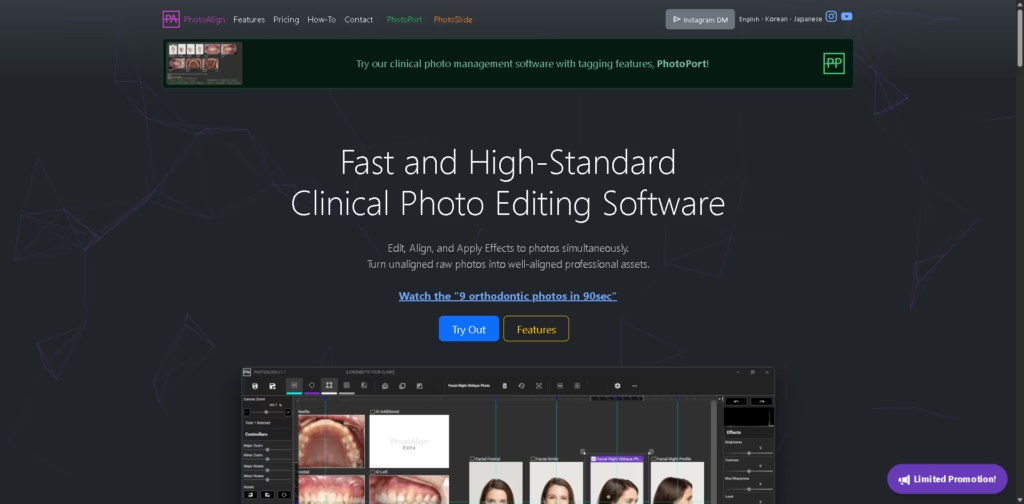
PhotoAlign is a Windows-based clinical photo editing and standardization software designed primarily for orthodontic and dental practices. It helps clinicians align, crop, rotate, enhance, and organize multiple patient photos simultaneously, reducing the manual work involved in preparing standardized clinical image sets.
Unlike general photo editors, PhotoAlign focuses on clinical photography workflows. It includes AI-assisted photo allocation, batch editing, template-based layouts, and integration with WEBCEPH, while bundling PhotoPort for patient photo management.
Example workflow: An orthodontist imports nine intraoral and facial photos, lets AI place them into the correct templates, fine-tunes alignment, applies color adjustments, saves all images with renamed filenames, and uploads them directly to WEBCEPH.
At a Glance
| Field | Details |
|---|---|
| Category | Clinical Photo Editing Software |
| Primary Users | Orthodontists and dental clinics |
| Platform | Windows 10 & 11 (64-bit) |
| AI Features | Automatic photo allocation and positioning |
| Integration | WEBCEPH |
| Batch Editing | Yes |
| Bundled Software | PhotoPort |
| Data Privacy | AI processing remains on the local device |
Key Features
- AI automatically assigns clinical photos to template positions.
- Batch crop, rotate, resize, and edit multiple images.
- Clinical templates standardize orthodontic photo sets.
- LiveWatch imports new camera photos automatically.
- Export layouts as PDF or JPG.
- Direct integration with WEBCEPH patient records.
- Local AI processing keeps clinical images on-device.
Best For
- Standardizing orthodontic clinical photography.
- Preparing patient records for treatment documentation.
- Batch editing large clinical photo sets.
- Organizing patient images with consistent naming.
- Uploading edited photos into WEBCEPH workflows.
Pros & Cons
| Pros | Cons |
|---|---|
| Designed specifically for orthodontic photography workflows | Windows only |
| AI reduces manual photo placement | Internet required for authentication |
| Batch editing significantly improves efficiency | Primarily suited for dental and orthodontic practices |
| Local AI processing supports data privacy | Some planned features remain on the roadmap |
| Includes PhotoPort for photo management | No macOS version available |
Alternatives & Comparisons
| Alternative | Best For | Key Difference |
|---|---|---|
| Adobe Lightroom Classic | Professional photo editing | Broader editing tools without orthodontic workflows |
| Capture One Pro | Professional image management | Optimized for photographers rather than clinical documentation |
| ImageJ | Medical image analysis | Focuses on scientific measurement instead of workflow automation |
| SmileSnap | Dental patient communication | Emphasizes consultations rather than clinical photo editing |
PhotoAlign occupies a specialized niche for orthodontic clinical photography rather than general image editing. It is the stronger choice when standardized patient photo documentation and workflow efficiency are higher priorities than advanced creative editing.
Frequently Asked Questions
Does PhotoAlign support batch photo editing?
Yes. Multiple photos can be edited, aligned, and saved simultaneously.
Can PhotoAlign integrate with WEBCEPH?
Yes. It can create patient records and upload edited images directly to WEBCEPH.
Does AI process images in the cloud?
No. According to the vendor, AI processing remains on the local device and images do not leave the computer.
Which operating systems are supported?
PhotoAlign supports 64-bit versions of Windows 10 and Windows 11.
Is PhotoPort included?
Yes. PhotoAlign Studio includes both PhotoAlign and PhotoPort under one plan.
Overall Rating
| Category | Score |
|---|---|
| Performance | 9.2/10 |
| Ease of Use | 8.9/10 |
| Feature Set | 9.1/10 |
| Workflow Fit | 9.5/10 |
| Overall | 9.2/10 |
PhotoAlign delivers a highly focused clinical photography workflow with automation, batch editing, and orthodontic-specific tools that general photo editors do not provide.
Final Verdict
- Best for: Orthodontic and dental clinics needing standardized clinical photo workflows.
- Avoid if: You need a general-purpose photo editor or macOS compatibility.
- Biggest strength: AI-assisted batch alignment and editing for clinical photography.
- Best alternative: Adobe Lightroom Classic for broader professional photo editing workflows.
















