
What It Does
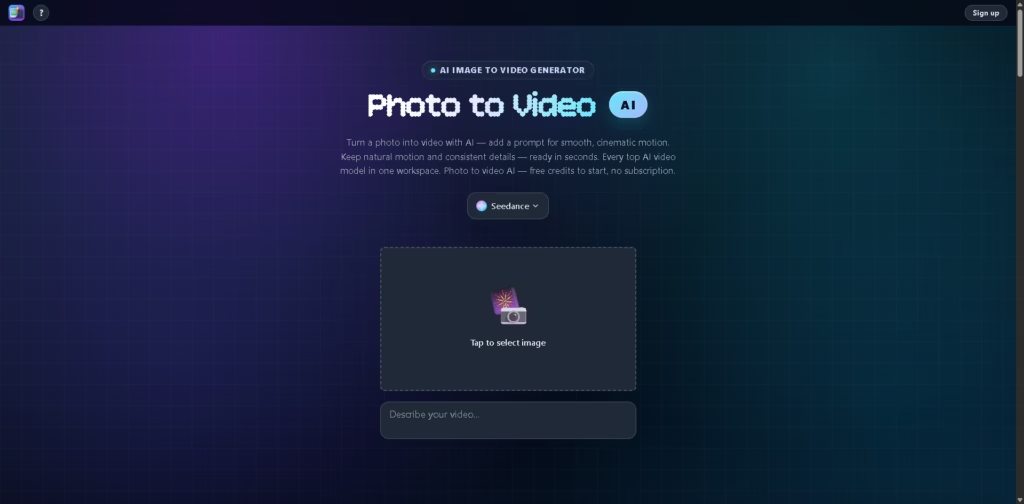
Photo to Video AI is a web-based AI image-to-video generator that turns photos, illustrations, and product images into short animated videos.
Photo to Video AI is designed for creators, marketers, product sellers, and other users who want to add motion to still images without using a traditional video timeline.
A typical workflow starts by uploading an image and describing the desired motion with a prompt. Users can direct camera movement, select options such as lens, depth of field, and pacing, add reference images, choose an AI video model, generate the clip, and export the resulting video.
Quick Verdict
- Best for: Turning still images into AI-generated video clips
- Skip if: You need timeline-based video editing
- Key Advantage: Multiple AI video models in one workspace
- Top Alternative: Runway
At a Glance
| Feature | Details |
|---|---|
| Category | AI Image-to-Video Generator |
| Pricing Model | Credit-Based |
| Free Tier | Yes |
| Platform | Web |
| API | Not specified |
| Primary Strength | Multiple AI video models |
| AI Video Models | Seedance, Wan, MiniMax H3, Kling, Vidu, Hailuo, Veo, Sora 2, others |
| Reference Images | Up to 8 |
Key Features
- Converts a single image into an AI-generated video with prompted motion.
- Provides camera controls including push-ins, close-ups, orbits, and locked frames.
- Supports up to eight reference images for maintaining visual consistency.
- Animates portraits with movements such as blinking, smiling, and turning.
- Creates 360-degree subject rotations from a single image.
- Provides multiple AI video models within one generation workspace.
Best For
- Animating product photos for online listings and showcases
- Creating motion clips from portraits and headshots
- Adding camera movement to artwork and illustrations
- Producing multi-shot sequences with reference-image guidance
- Comparing different AI video models for the same image
Pros & Cons
Pros:
- Supports several AI video generation models in one workspace.
- Accepts both images and prompts for directing generated motion.
- Reference images can help maintain shape, color, and composition.
- Includes specialized workflows for portraits, products, backgrounds, and 360-degree spins.
Cons:
- The vendor does not specify API availability in the provided information.
- No timeline editing is included in the stated workflow.
- Exact credit costs and generation allowances are not provided in the supplied data.
Alternatives & Comparisons
| Alternative | Best For | Key Difference vs. This Tool |
|---|---|---|
| Runway | AI video creation and editing | Offers a broader AI video creation and editing environment |
| Kling AI | AI video generation | Focuses on its own generation platform rather than aggregating multiple models |
| Luma AI | Generative video and creative content | Provides its own generative media tools rather than a multi-model workspace |
Photo to Video AI is positioned as a multi-model image-to-video workspace focused specifically on turning still visuals into motion.
Choose it when comparing multiple video models from one interface is more useful than having a broader video editing environment.
Frequently Asked Questions
Can I use Photo to Video AI without a subscription?
Yes. The vendor states that the service provides free credits to start and does not require a subscription.
How many reference images can I upload?
The vendor states that users can upload up to eight reference images to guide the generated video.
Which AI video models are available?
The listed models include Seedance, Seedance 2, MiniMax H3, Kling, Vidu, Hailuo, Happy Horse, Agnes, LTX 2.5, Grok Imagine, Veo, and Sora 2.
Can I animate product images?
Yes. The platform includes a 360-degree spin workflow designed to rotate a product or subject from a single image.
Does Photo to Video AI include video timeline editing?
No. The vendor specifically states that Photo to Video AI’s workflow does not include timeline editing.
ToolsPedia Rating
- Performance & Speed: 4.0/5.0
- Ease of Setup: 4.3/5.0
- Feature Depth: 4.4/5.0
- Value for Price: 4.1/5.0
- ToolsPedia Score: 4.2/5.0
Final Thoughts
Photo to Video AI is a focused option for converting still images into animated clips while giving users access to multiple AI video models.
Its reference-image support and motion controls make Photo to Video AI particularly relevant for product visuals, portraits, artwork, and multi-shot concepts.
Start with the available free credits and compare the model outputs before spending additional credits.
















