
What It Does
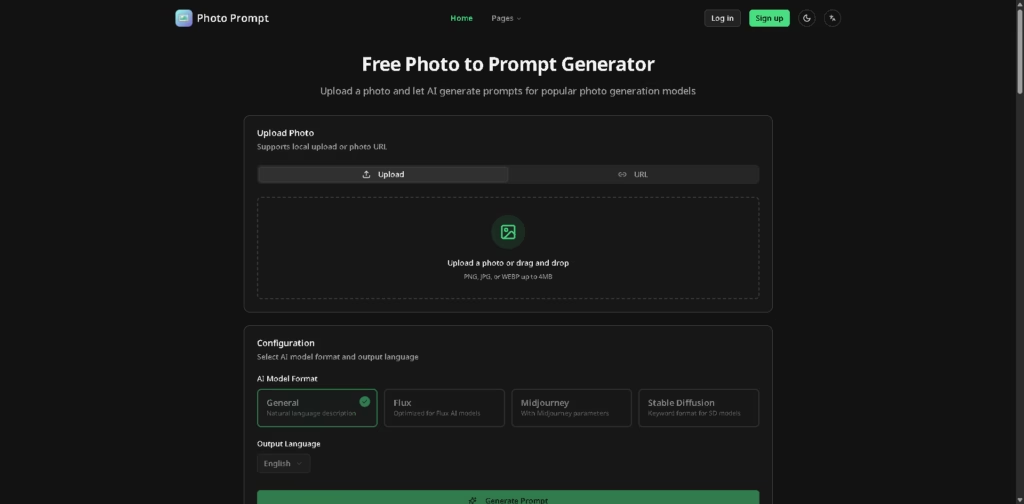
Photo Prompt is an AI photo-to-prompt generator that analyzes an uploaded image and converts its visual content into a detailed text prompt. It is designed for AI artists, designers, content creators, and other users who want to recreate or adapt an existing visual with an image-generation model.
A typical workflow is to upload a PNG, JPG, or WEBP image up to 4MB, select a model format such as Flux, Midjourney, or Stable Diffusion, choose the output language, and generate the prompt. The resulting text can then be copied into a compatible AI image-generation tool.
Quick Verdict
- Best for: Turning reference images into prompts for AI image generators
- Skip if: You need an AI image generator rather than a prompt-generation tool
- Key Advantage: Model-specific prompt formats
- Top Alternative: ImageToPrompt
At a Glance
| Feature | Details |
|---|---|
| Category | AI Prompt Generator |
| Pricing Model | Freemium |
| Free Tier | Yes |
| Platform | Web |
| API | Not specified |
| Primary Strength | Photo-to-prompt conversion |
| Supported Formats | Flux, Midjourney, Stable Diffusion |
Pricing & Plans
The supplied information confirms 3 free generations per day for anonymous users, but does not provide paid-plan prices or specific subscription tiers.
Note: Prices and plan limits may change. Check the official website for current pricing.
Key Features
- Converts uploaded photos into detailed AI image-generation prompts.
- Generates prompts optimized for Flux models.
- Produces Midjourney prompts with relevant parameters.
- Formats prompts as keywords for Stable Diffusion.
- Supports multiple output languages.
- Accepts local images or photo URLs.
Best For
- Reverse-engineering visual references into AI prompts
- Creating Midjourney prompts from existing images
- Converting photos into Flux-compatible descriptions
- Generating Stable Diffusion keyword prompts
- Analyzing reference images before recreating them with AI
Pros & Cons
Pros:
- Supports several popular AI image-generation formats.
- Offers three free anonymous generations per day.
- Accepts both uploaded photos and image URLs.
- Provides language selection for generated prompts.
Cons:
- Uploaded images are limited to 4MB.
- The supplied information does not specify API availability.
- Paid subscription pricing is not provided in the available product information.
Alternatives & Comparisons
| Alternative | Best For | Key Difference vs. This Tool |
|---|---|---|
| ImageToPrompt | Converting images into AI prompts | Offers a similar image-to-prompt workflow |
| CLIP Interrogator | Generating descriptive prompts from images | Uses an open-source image interrogation approach |
| Replicate | Accessing different AI models | Provides broader access to AI models rather than focusing specifically on photo-to-prompt conversion |
Photo Prompt is focused specifically on converting reference images into prompts tailored to several AI image-generation formats. Choose it when you need model-specific prompt output for Flux, Midjourney, or Stable Diffusion rather than a broader AI image platform.
Frequently Asked Questions
Which AI models does Photo Prompt support?
The interface provides four output formats: General, Flux, Midjourney, and Stable Diffusion.
Is Photo Prompt free?
Yes. Anonymous users receive 3 free generations per day. Paid subscription details are not specified in the supplied information.
What image formats can I upload?
Photo Prompt accepts PNG, JPG, and WEBP files up to 4MB.
Can I generate Midjourney prompts?
Yes. The Midjourney configuration generates prompts with Midjourney parameters.
Can I use a photo URL instead of uploading a file?
Yes. The tool supports both local photo uploads and photo URLs.
ToolsPedia Rating
- Performance & Speed: 4.2/5.0
- Ease of Setup: 4.6/5.0
- Feature Depth: 4.0/5.0
- Value for Price: 4.2/5.0
- ToolsPedia Score: 4.2/5.0
Final Thoughts
Photo Prompt is a focused tool for extracting detailed generation prompts from existing images, with useful formatting options for Flux, Midjourney, and Stable Diffusion. Its free daily allowance makes it practical for occasional prompt generation, while the model-specific formats reduce the need to manually adapt descriptions. Start with the free daily generations to see whether its prompt output fits your preferred image-generation workflow.
















