
What It Does
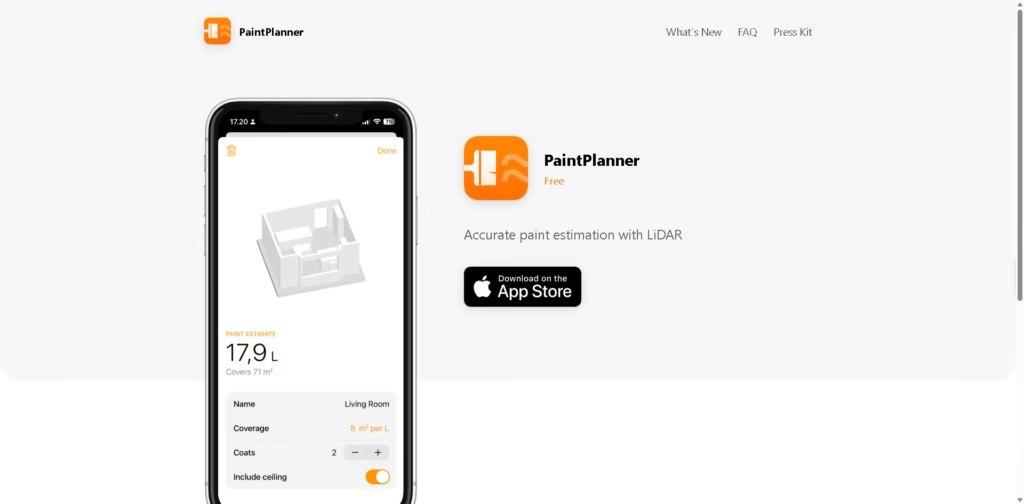
PaintPlanner is a specialized paint estimation app that uses a device’s LiDAR sensor to scan rooms and calculate paint requirements automatically. Instead of manually measuring walls and ceilings, users can capture a room and receive a paint estimate based on scanned dimensions.
The app focuses on a single workflow: estimating paint quantities more accurately while accounting for doors, windows, and other openings. It is aimed at homeowners, DIY painters, and professionals who want faster project planning without manual measurements.
A typical workflow involves scanning a room with a LiDAR-enabled device, reviewing the calculated paintable area, adjusting paint coverage or coat settings, and saving the estimate for later reference.
At a Glance
| Field | Details |
|---|---|
| Category | Paint Estimation App |
| Platform | Mobile App |
| Pricing | Free |
| Core Technology | LiDAR Room Scanning |
| Primary Use Case | Paint quantity estimation |
| Automatic Measurements | Yes |
| Opening Detection | Doors, windows, openings |
| Project Saving | Yes |
Key Features
- LiDAR-based room scanning.
- Automatic paintable surface calculations.
- Excludes doors, windows, and openings.
- Adjustable paint coverage settings.
- Supports multiple paint coats.
- Saves estimates for future projects.
Best For
- Estimating paint before purchasing supplies.
- Measuring rooms without tape measures.
- Planning multi-room painting projects.
- Calculating paint quantities for renovations.
- Reducing overbuying or underbuying paint.
Pros & Cons
| Pros | Cons |
|---|---|
| Eliminates manual room measurements. | Requires a LiDAR-enabled device. |
| Accounts for windows and doors automatically. | Focused on estimation only. |
| Free to use. | Not useful for non-LiDAR devices. |
| Simple project planning workflow. | Lacks broader renovation features. |
Alternatives & Comparisons
| Alternative | Best For | Key Difference |
|---|---|---|
| Magicplan | Floor plans and measurements | Broader construction and renovation workflows. |
| Measure (iOS) | Basic room measurements | General measurement tool, not paint-focused. |
| RoomScan Pro | Floor plan creation | Focuses on room mapping rather than paint estimation. |
| Paint Calculator by paint brands | Simple quantity estimates | Usually requires manual measurements. |
PaintPlanner occupies a narrow but practical niche focused specifically on paint estimation. Choose it when accurate paint calculations are more important than full renovation planning or floor-plan creation.
Frequently Asked Questions
Does PaintPlanner require LiDAR?
Yes. The app specifically relies on a LiDAR-supported device for room scanning.
Can PaintPlanner calculate around windows and doors?
Yes. The app states that it subtracts doors, windows, and other openings from calculations.
Is PaintPlanner free?
Yes. The app is presented as a free tool.
Can I adjust paint coverage rates?
Yes. Users can modify paint coverage and coat settings for estimates.
Is PaintPlanner suitable for professional painters?
It can be useful for generating quick estimates, though it is primarily an estimation tool rather than a complete contractor platform.
Overall Rating
| Category | Score |
|---|---|
| Performance | 4.6/5 |
| Ease of Use | 4.8/5 |
| Feature Set | 3.9/5 |
| Workflow Fit | 4.5/5 |
| Overall | 4.4/5 |
PaintPlanner delivers a focused solution for paint estimation and performs its core task well, though its feature set is intentionally narrower than broader renovation or construction apps.
Final Verdict
- Best for: Homeowners and painters needing fast paint quantity estimates.
- Avoid if: You need floor planning, renovation management, or design visualization.
- Biggest strength: LiDAR-based measurement eliminates manual calculations.
- Best alternative: Magicplan for broader property measurement and planning workflows.
















