
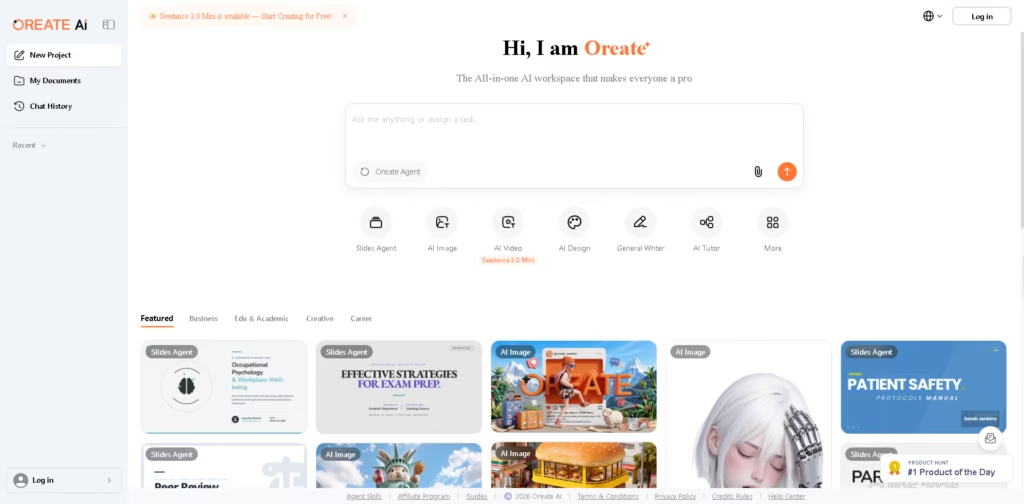
What It Does
Oreate AI is an all-in-one AI workspace that brings multiple AI-powered workflows into one platform. Its available tools cover writing, presentations, image creation, video generation, design, research, tutoring, and general AI assistance.
The platform is designed for users who want to switch between different creative, academic, and business tasks without using separate AI applications. For example, a user could research a topic with Deep Research, turn the findings into slides with Slides Agent, and create supporting visuals with AI Image.
At a Glance
| Field | Details |
|---|---|
| Category | All-in-one AI workspace |
| Core Tools | AI Image, AI Video, AI Design, Slides Agent, General Writer, AI Tutor |
| Research | Deep Research |
| Specialized Agent | Oreate Agent |
| Video Model | Seedance 2.0 Mini |
| File Management | My Documents |
| Workspace Features | Projects and Chat History |
Key Features
- Creates presentations through the Slides Agent.
- Generates images using the AI Image workspace.
- Produces AI-assisted video through the AI Video tools.
- Provides AI-powered writing with General Writer.
- Offers interactive learning through an AI Tutor.
- Supports deeper research workflows through Deep Research.
- Includes AI Design tools for visual creation and editing.
Best For
- Creating presentations without switching between multiple AI tools.
- Generating images and visual assets for creative projects.
- Producing AI-assisted videos from a centralized workspace.
- Drafting and developing written content with AI.
- Combining research, writing, design, and presentation workflows.
Pros & Cons
| Pros | Cons |
| Combines several AI workflows within one workspace. | The supplied information does not detail individual tool limitations. |
| Covers creative, academic, business, and career-oriented workflows. | Pricing and credit limits are not specified in the provided information. |
| Includes specialized tools instead of relying only on one general chatbot. | Detailed integrations and export capabilities are not established from the supplied material. |
| Provides project, document, and chat-history organization. | The breadth of tools may make the platform less focused than specialized applications. |
Alternatives & Comparisons
| Alternative | Best For | Key Difference |
| ChatGPT | General-purpose AI assistance | More focused as a conversational AI platform |
| Canva | Visual design and presentations | More established around design and visual editing workflows |
| Gamma | AI-powered presentations | More specialized around presentation creation |
| Adobe Firefly | Generative creative work | More focused on AI-assisted image and creative production |
Oreate AI sits in the multi-tool AI workspace category, combining creative, research, education, writing, and presentation capabilities. Choose it when consolidating several AI workflows into one workspace matters more than using a specialized tool for one task.
Frequently Asked Questions
What can Oreate AI be used for?
Oreate AI provides tools for presentations, images, videos, design, writing, research, tutoring, and general AI assistance.
Does Oreate AI include an AI presentation tool?
Yes. The platform includes a dedicated Slides Agent for presentation-related workflows.
Can Oreate AI generate images and videos?
Yes. Oreate AI lists separate AI Image and AI Video tools, along with Seedance 2.0 Mini as an available video option.
Does Oreate AI have research and education tools?
Yes. The platform lists Deep Research and AI Tutor among its available tools.
Can Oreate AI replace specialized AI applications?
It can reduce the need to switch between multiple applications for certain workflows, but specialized tools may still offer deeper functionality for individual tasks.
Overall Rating
| Category | Score |
| Performance | 4.3/5 |
| Ease of Use | 4.4/5 |
| Feature Set | 4.7/5 |
| Workflow Fit | 4.6/5 |
| Overall | 4.5/5 |
Oreate AI’s main advantage is breadth, making it particularly useful for users who regularly combine research, writing, presentations, design, images, and video.
Final Verdict
- Best for: Users who want multiple AI creative, research, writing, and productivity tools in one workspace.
- Avoid if: You need highly specialized functionality that a dedicated application may provide more deeply.
- Biggest strength: Brings diverse AI workflows into a single workspace with specialized agents.
- Best alternative: Canva for users primarily focused on visual design and presentation creation.
















