What It Does
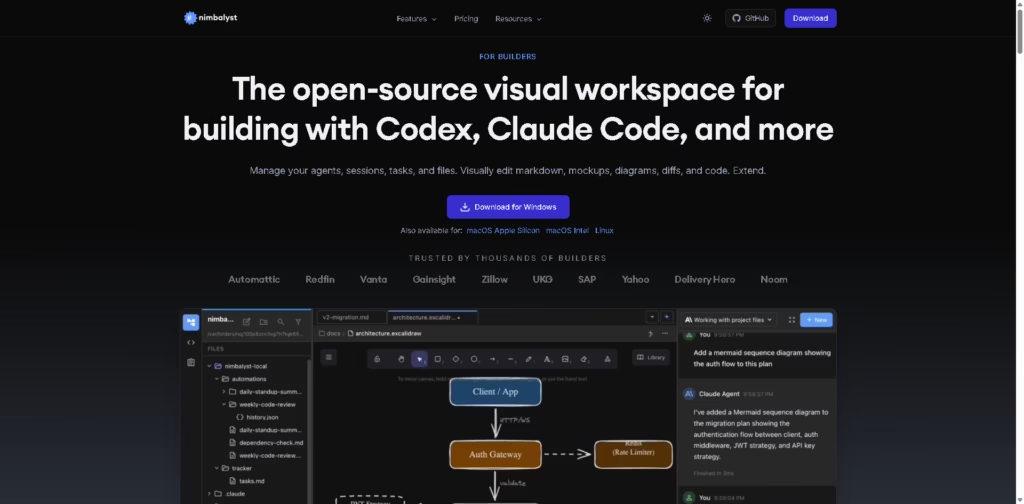
Nimbalyst is an open-source visual workspace designed for developers and AI-assisted builders working with tools like Claude Code, OpenAI Codex, and other coding agents.
Nimbalyst combines AI sessions, task management, file editing, visual reviews, and project organization into one collaborative desktop environment.
Key Features
- Visual Workspace for AI Coding – Manage AI coding sessions, files, and tasks from a unified interface.
- Claude Code & Codex Support – Built specifically to work with AI coding agents like Claude Code and OpenAI Codex.
- AI-Powered Visual Editors – Edit markdown, code, diagrams, mockups, CSVs, and data models with AI assistance.
- Inline AI Change Reviews – Review, approve, reject, or modify AI-generated edits before applying changes.
- Session Kanban Board – Organize AI sessions into stages like backlog, planning, implementing, and completed.
- Parallel AI Sessions – Run multiple coding sessions at the same time with workspace isolation support.
- Integrated Task Management – Track bugs, feature ideas, specs, research, and planning directly inside projects.
- Context-Aware AI Assistance – AI agents understand related files, project structure, and workflow context.
- Git & File Management – Monitor edited files, manage Git states, and generate AI-assisted commits.
- Mobile Companion App – Monitor sessions and interact with agents from iPhone while away from the desktop.
- Open Source Platform – Local app is MIT licensed, with collaboration layers under AGPL licensing.
- Cross-Platform Support – Available for Windows, macOS, Linux, and iOS.
Who Is Nimbalyst For?
- AI-Assisted Developers – Great for developers using Claude Code or Codex in daily workflows.
- Software Engineers – Useful for managing coding tasks, reviews, and AI-generated edits visually.
- Technical Product Teams – Helps organize specs, planning, and development sessions in one place.
- Open Source Builders – Ideal for developers who prefer customizable and transparent tools.
- Startup Teams – Helpful for managing fast-moving product development with AI collaboration.
- Technical Writers – Supports markdown editing and AI-assisted documentation workflows.
- Solo Developers – Makes handling multiple AI coding sessions easier and more organized.
- Productivity-Focused Coders – Great for developers who want less terminal clutter and better visibility.
Final Thoughts
Nimbalyst takes a different approach to AI coding tools by focusing heavily on visibility, organization, and workflow management.
Instead of treating AI agents like simple chatbots inside a terminal, it turns them into collaborative workspace partners that interact with files, tasks, sessions, and project context visually.
Its biggest strength is the balance between AI automation and developer control. Users can review edits, manage multiple sessions, organize workflows visually, and stay connected to projects without losing oversight.
The open-source foundation also makes it appealing for developers who value flexibility and transparency.
If you regularly work with AI coding agents and want a cleaner, more organized development environment, Nimbalyst is a tool worth exploring.