
What It Does
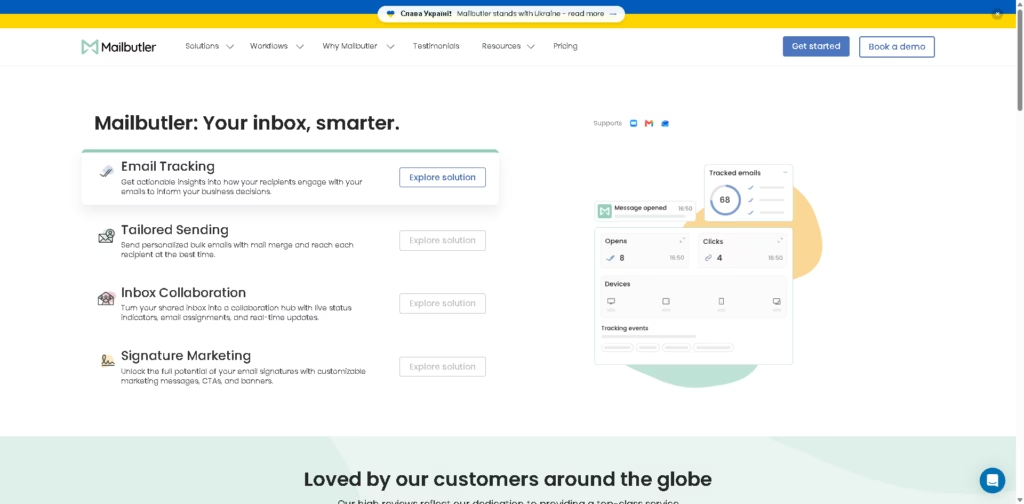
Mailbutler is an email productivity extension for Apple Mail, Gmail, and Outlook. It combines email tracking, personalized bulk sending, shared-inbox collaboration, and email signature marketing to help individuals and teams manage business communication from their existing inboxes.
A typical workflow can start with creating a personalized mail merge campaign, using Smart Timing to reach recipients at suitable times, then tracking engagement through notifications and recipient data. Teams can also assign emails, add notes and tasks, and use shared signatures or marketing elements for ongoing business communication.
Quick Verdict
- Best for: Business email tracking, outreach, and shared inbox workflows
- Skip if: You need an email tool outside Apple Mail, Gmail, or Outlook
- Key Advantage: Combines tracking, sending, collaboration, and signatures
- Top Alternative: Right Inbox
At a Glance
| Feature | Details |
|---|---|
| Category | Email Productivity & Outreach |
| Pricing Model | Freemium / Paid |
| Free Tier | Free Starter plan |
| Platform | Apple Mail, Gmail, Outlook |
| API | Not specified |
| Primary Strength | Email workflow management |
| Security | ISO/IEC 27001 certified |
| Free Trial | 14 days with all features |
Mailbutler supports Apple Mail, Gmail, and Outlook, and the vendor states that its extension adds features directly to these inboxes.
Pricing & Plans
Mailbutler offers a 14-day free trial with all features and does not require credit card information. The listed pricing supports USD and EUR billing, with yearly billing advertised at up to 25% off.
- Starter: $0/yearly billing or $4 per user/month on monthly billing.
- Professional: $7 per user/month.
- Smart: $11 per user/month.
- Business: $24 per user/month.
- Free Trial: 14 days with all features, with no credit card required.
Note: Prices and plan limits may change. Check the official website for current pricing.
Key Features
- Tracks email engagement with notifications and recipient activity data.
- Sends personalized bulk emails through mail merge.
- Uses Smart Timing to schedule messages for recipients’ optimal times.
- Supports shared inboxes with assignments, statuses, notes, and tasks.
- Adds customizable signatures, CTAs, banners, and marketing elements.
- Provides Smart Compose, Smart Improve, Smart Summarize, and Smart Task Finder.
Best For
- Tracking whether business emails receive engagement.
- Sending personalized outreach to multiple recipients.
- Coordinating messages inside shared team inboxes.
- Managing follow-ups and email-related tasks collaboratively.
- Adding marketing content to employee email signatures.
Pros & Cons
Pros:
- Supports three major email clients: Apple Mail, Gmail, and Outlook.
- Combines email tracking, sending, collaboration, and signature marketing.
- Includes team-oriented assignments, statuses, notes, and tasks.
- Offers a free Starter plan and a 14-day full-feature trial.
Cons:
- The Starter plan has fewer advanced capabilities than the paid tiers.
- Custom SMTP is listed as coming soon rather than currently available.
- API availability is not specified in the supplied information.
Alternatives & Comparisons
| Alternative | Best For | Key Difference vs. This Tool |
|---|---|---|
| Mailtrack | Email tracking | More narrowly focused on email tracking |
| Right Inbox | Gmail productivity | More focused on Gmail-based email productivity |
| Boomerang | Scheduling and inbox productivity | Emphasizes email scheduling and productivity workflows |
Mailbutler fits the broader email productivity market by combining outreach, tracking, collaboration, and signature management in one extension.
Choose Mailbutler when your workflow requires several of these functions across Apple Mail, Gmail, or Outlook rather than email tracking alone.
Frequently Asked Questions
Which email clients does Mailbutler support?
Mailbutler supports Apple Mail, Gmail, and Outlook.
Does Mailbutler offer a free trial?
Yes. Mailbutler provides a 14-day free trial with all features and does not require credit card information.
Can Mailbutler send personalized bulk emails?
Yes. Its Tailored Sending features include mail merge and personalized bulk email sending.
Can teams collaborate on a shared inbox?
Yes. Mailbutler’s Inbox Collaboration features include email assignments, collaborator status, notes, tasks, tags, and automations.
ToolsPedia Rating
These ratings are based on the supplied product information, not hands-on testing.
- Performance & Speed: 4.0/5.0
- Ease of Setup: 4.3/5.0
- Feature Depth: 4.6/5.0
- Value for Price: 4.0/5.0
- ToolsPedia Score: 4.3/5.0
Final Thoughts
Mailbutler is a broad email productivity platform that goes beyond basic tracking by adding personalized sending, shared inbox collaboration, and signature marketing. Its support for Apple Mail, Gmail, and Outlook makes it relevant for teams and professionals who want these capabilities inside their existing email workflow.
Start with the 14-day full-feature trial to determine whether its tracking, outreach, and collaboration features fit your email workflow before choosing a paid plan.
















