
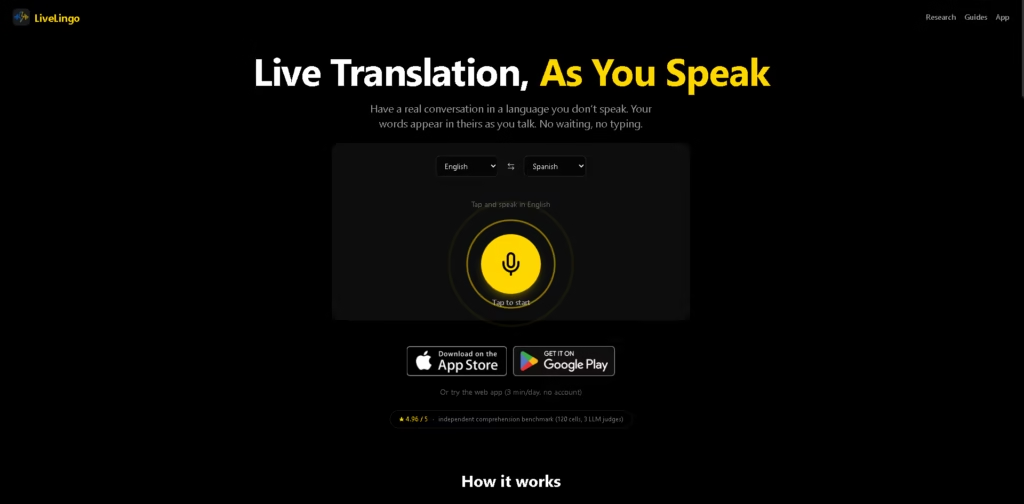
What It Does
LiveLingo is a real-time voice translation tool designed to help people communicate across language barriers without typing or waiting for a complete sentence to finish. It supports 35 languages and offers mobile apps for iOS and Android, alongside a web app.
Its main audiences include travelers, international businesses, expatriates, and families who speak different languages.
A typical workflow involves selecting the language you speak and the language you want to understand, then speaking naturally while translations appear during the conversation.
For example, a buyer negotiating with a Chinese supplier can speak in English, view the Chinese translation, and follow the supplier’s translated responses. The Pro offering also supports real-time phone-call translation and AI-generated memos after calls.
Quick Verdict
- Best for: Real-time voice translation during conversations and international calls.
- Skip if: You need confirmed offline translation or dedicated video-meeting integrations.
- Key Advantage: Streaming voice translation combined with phone-call translation.
At a Glance
| Feature | Details |
|---|---|
| Category | AI Voice Translation |
| Pricing Model | Freemium, with paid Pro features |
| Free Tier | Yes, limited web access |
| Platform | Web, iOS, Android |
| API | Not specified |
| Primary Strength | Real-time conversational voice translation |
Key Features
- Streaming voice translation: Displays translated speech while the speaker is talking.
- 35 supported languages: Provides multilingual communication across a range of language pairs.
- Saved conversation sessions: Keeps conversation transcripts available on the user’s device.
- PDF transcript export: Exports saved conversation transcripts as PDF files.
- Real-time phone-call translation: Lets users call mobile or landline numbers while communicating across languages.
- AI-generated call memos: Produces a memo after each translated phone call in the Pro offering.
Best For
- Translating conversations while traveling in countries where you do not speak the local language.
- Negotiating prices and product quantities with overseas suppliers.
- Communicating with relatives and in-laws who speak different languages.
- Handling everyday conversations with landlords, schools, and service providers abroad.
- Making international phone calls with translated speech and post-call summaries.
Pros & Cons
Pros
- Streaming translations are designed for conversations rather than translating only after speech ends.
- Mobile apps and a browser-based option provide multiple ways to access the service.
- The web app allows three minutes of daily use without an account.
- Pro combines international phone calls, real-time translation, and AI-generated memos.
Cons
- The free web experience is limited to three minutes per day.
- Pro pricing and the precise paid-plan limits are not specified in the provided information.
- Offline availability, group-conversation handling, and integrations with video-conferencing platforms are not confirmed by the supplied details.
Frequently Asked Questions
1. How is LiveLingo different from Google Translate?
LiveLingo emphasizes streaming voice translations and offers a Pro feature for translating phone calls. Google Translate provides a broader set of general-purpose translation tools; the better choice depends on whether you prioritize conversational streaming or varied translation tasks.
2. Can LiveLingo translate ordinary phone calls?
Yes. Its Pro offering lets users dial mobile or landline numbers worldwide, with the recipient answering a regular phone call without installing the app. The service also advertises an AI-generated memo after each call.
3. Does LiveLingo work without downloading an app?
Yes. LiveLingo provides a web app that can be used without an account for three minutes per day. Longer usage and additional features may require a different plan.
4. Does LiveLingo support offline translation?
Offline functionality is not confirmed in the supplied product information. If you need translation without an internet connection, verify this requirement with the provider before relying on the service while traveling.
5. Is LiveLingo suitable for business negotiations?
It is designed for conversations such as negotiating prices and communicating with overseas suppliers. The Pro phone-call feature and post-call memos may also help with international business calls, but translation accuracy for specialized terminology should be evaluated before using it for high-stakes negotiations.
ToolsPedia Rating
- Performance & Speed: 4.4/5.0
- Ease of Setup: 4.5/5.0
- Feature Depth: 4.1/5.0
- Value for Price: 3.8/5.0
- ToolsPedia Score: 4.2/5.0
Editorial note: These provisional ratings are based on the supplied product description, not independent hands-on testing. Translation latency, real-world accuracy, and paid-plan value have not been independently verified.
Final Thoughts
LiveLingo offers a practical approach to multilingual communication by combining streaming voice translation with phone-call translation and saved transcripts.
Its usefulness depends on real-world translation accuracy, supported language pairs, and the cost of Pro features, which require further verification.
Start with the free web app to assess the conversation experience before considering a paid plan.
















