
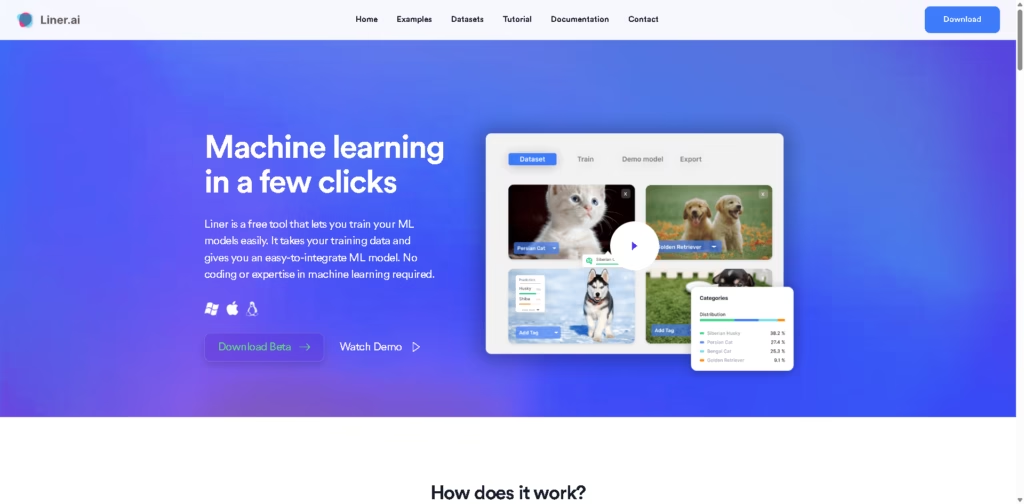
What It Does
Liner is a free, no-code machine learning tool for training models from user-provided data. It supports image, text, audio, and video classification, along with object detection, image segmentation, and pose classification, making it suitable for users who want to build ML models without programming or machine-learning expertise.
A typical workflow starts by importing a dataset or using a pre-labeled dataset in it. The user selects a project type, starts training with one click, and it automatically selects an appropriate model before producing an exportable model that can be integrated into an application.
Quick Verdict
- Best for: Training and deploying basic ML models without coding
- Skip if: You need advanced MLOps or extensive model-management features
- Key Advantage: Multiple ML tasks without coding
- Top Alternative: Teachable Machine
At a Glance
| Feature | Details |
|---|---|
| Category | No-Code Machine Learning |
| Pricing Model | Free |
| Free Tier | Yes |
| Platform | Windows, Mac |
| API | Not specified |
| Primary Strength | No-code model training |
| ML Tasks | Classification, detection, segmentation, pose |
Key Features
- Trains image, text, audio, and video classification models without coding.
- Supports object detection for identifying objects within images.
- Provides image segmentation for pixel-level image analysis.
- Includes pose classification for categorizing body positions.
- Automatically selects an appropriate model during training.
- Exports trained models to multiple development platforms.
Best For
- Training image classifiers without writing machine-learning code.
- Building object-detection models from custom datasets.
- Creating audio or video classification models.
- Developing segmentation models for image-analysis applications.
- Exporting trained models for integration into applications.
Pros & Cons
Pros:
- Completely free according to the vendor.
- Requires no coding or machine-learning expertise.
- Supports several different machine-learning project types.
- Offers exports including TensorFlow, TensorFlow.js, TensorFlow Lite, Core ML, Keras, and ONNX.
Cons:
- Only Windows and Mac downloads are specified.
- API availability is not specified.
- The supplied information does not describe advanced dataset management, experiment tracking, or model monitoring.
Alternatives & Comparisons
| Alternative | Best For | Key Difference vs. This Tool |
|---|---|---|
| Teachable Machine | Simple image, audio, and pose classification | Browser-based workflow focused on quick model creation |
| Roboflow | Building and deploying computer-vision applications | Provides broader computer-vision workflows and deployment infrastructure |
| Edge Impulse | Developing and deploying edge ML systems | Adds broader edge-device, sensor, optimization, and deployment workflows |
Liner fits the no-code ML market as a lightweight desktop tool for training several types of models from custom data. Choose it when you want a free desktop workflow with multiple ML task types and direct model exports without writing training code.
Frequently Asked Questions
Is Liner completely free?
Yes. The supplied vendor information states that it is completely free to use.
Does Liner require coding?
No. Liner is designed to train machine-learning models without coding or prior machine-learning expertise.
What types of models can Liner train?
Liner supports image, text, audio, and video classification, object detection, image segmentation, and pose classification.
Can Liner models be used in applications?
Yes. The vendor states that trained models can be exported and integrated into applications.
Which platforms can Liner export models to?
The supplied material shows exports for Keras, TensorFlow.js, TensorFlow Lite, Core ML, TensorFlow, and ONNX.
ToolsPedia Rating
- Performance & Speed: 4.0/5.0
- Ease of Setup: 4.5/5.0
- Feature Depth: 4.0/5.0
- Value for Price: 5.0/5.0
- ToolsPedia Score: 4.4/5.0
Rating note: These scores are based on the documented capabilities supplied by the vendor, not hands-on testing.
Final Thoughts
Liner provides a straightforward way to train several types of machine-learning models without requiring coding or specialized ML knowledge. Its combination of multiple project templates, automatic model selection, and model exports makes it useful for prototyping and smaller ML application projects. Download Liner if you need a free desktop-based starting point for custom model training.
















