
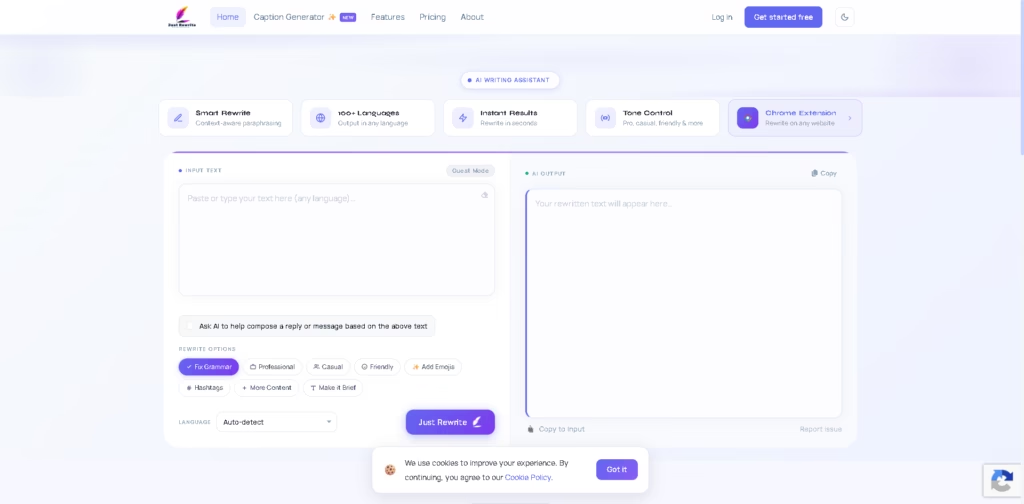
What It Does
Just Rewrite is an AI writing assistant for rewriting, paraphrasing, grammar correction, and caption creation. It supports more than 100 languages and provides tone controls for styles such as Professional, Casual, and Friendly. Its Chrome extension also lets users rewrite selected text directly on websites.
A typical workflow is to select text in an email or article, open Just Rewrite from the Chrome extension, choose a rewrite or grammar option and tone, then copy the generated version. Users can also paste text into the web-based editor, select a language and rewrite option, and generate revised text without changing tabs.
Quick Verdict
- Best for: Rewriting and paraphrasing text across multiple languages
- Skip if: You need unlimited rewriting without a paid subscription
- Key Advantage: 100+ language support with tone controls
- Top Alternative: QuillBot
At a Glance
| Feature | Details |
|---|---|
| Category | AI Writing Assistant |
| Pricing Model | Freemium |
| Free Tier | Yes |
| Platform | Web, Chrome, Edge |
| API | Not specified |
| Primary Strength | Multilingual AI rewriting |
| Languages Supported | 100+ |
| Browser Extension | Chrome and Edge |
Pricing & Plans
- Free: $0 forever. Includes 600 characters of rewriting per day, grammar fixes, three caption styles, emoji options, and 100+ languages. It does not include tone styles, all 12 caption styles, or unlimited rewrites.
- Premium Monthly: $10/month with a 14-day free trial. Includes unlimited AI rewriting, all tone styles, all 12 caption styles, rewrite options, custom AI caption instructions, private mode, and premium support and updates.
- Premium Yearly: $99/year with a 14-day free trial. Includes everything in Monthly, plus priority support and a stated 17% saving compared with monthly billing.
- Chrome Extension: Free to use, with no account required. The extension works on Chrome and Edge.
Note: Prices and plan limits may change. Check the official website for current pricing.
Key Features
- Rewrites and paraphrases text while accounting for context.
- Supports output across more than 100 languages.
- Provides Professional, Casual, Friendly, and other tone styles.
- Generates social captions in multiple predefined styles.
- Offers grammar correction alongside rewriting.
- Chrome extension rewrites selected webpage text without leaving the page.
Best For
- Rephrasing articles, emails, and other written content
- Correcting grammar before publishing or sending text
- Adapting writing tone for different audiences
- Creating social media captions in predefined styles
- Rewriting multilingual content across supported languages
Pros & Cons
Pros:
- Free plan includes 600 characters of rewriting per day.
- Supports more than 100 languages.
- Browser extension works directly on webpages.
- Premium plans add unlimited AI rewriting and tone controls.
Cons:
- Free rewriting is limited to 600 characters per day.
- Several tone and caption options require Premium.
- Unlimited rewriting requires a paid plan.
Alternatives & Comparisons
| Alternative | Best For | Key Difference vs. Just Rewrite |
|---|---|---|
| QuillBot | Paraphrasing and writing refinement | Offers a broader set of writing tools and paraphrasing modes |
| Wordtune | Rewriting and tone adjustments | Focuses heavily on sentence-level rewriting and writing suggestions |
| Grammarly | Grammar and writing assistance | Places greater emphasis on grammar, spelling, and writing feedback |
Just Rewrite fits the AI writing assistant market by combining multilingual rewriting, grammar correction, caption generation, and browser-based rewriting. Choose it when 100+ language support and direct rewriting through a Chrome or Edge extension are central to your workflow.
Frequently Asked Questions
Does Just Rewrite have a free plan?
Yes. The Free plan costs $0 forever and includes 600 characters of rewriting per day, grammar fixes, three caption styles, emojis, and 100+ languages.
Does Just Rewrite offer unlimited rewriting?
Yes. Unlimited AI rewriting is included with both Premium Monthly and Premium Yearly plans.
Can Just Rewrite rewrite text directly on websites?
Yes. Its Chrome extension allows users to select webpage text and rewrite it without leaving the page.
Does the Chrome extension require an account?
The vendor states that its Chrome and Edge extension requires no account and is free to use.
Does Just Rewrite support multiple languages?
Yes. The service supports more than 100 languages, including English, Bengali, Hindi, Arabic, French, German, Spanish, Japanese, and Chinese.
ToolsPedia Rating
- Performance & Speed: 4.0/5.0
- Ease of Setup: 4.5/5.0
- Feature Depth: 3.8/5.0
- Value for Price: 4.0/5.0
- ToolsPedia Score: 4.1/5.0
Final Thoughts
Just Rewrite provides a focused combination of AI rewriting, grammar correction, multilingual output, tone controls, and social caption generation. The free plan is useful for light rewriting, while Premium removes the daily rewriting limit and adds the complete set of writing and caption options. Start with the free plan to determine whether its rewriting workflow fits your regular content needs.
















