What It Does:
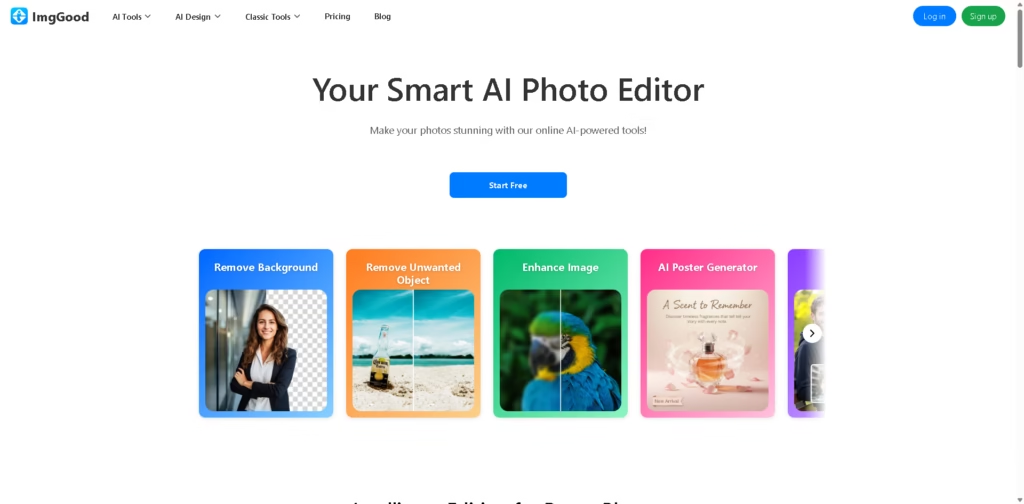
ImgGood is an AI-powered online photo editor that helps users enhance, edit, and transform images with simple tools. It allows users to remove backgrounds, fix image quality, generate posters, and even create product-style visuals using AI.
Key Features:
- Background removal: Instantly removes or replaces image backgrounds
- Object removal tool: Deletes unwanted objects or people from photos
- Image enhancement: Improves sharpness, clarity, and overall quality
- AI image upscaling: Converts low-resolution images into higher quality versions
- Photo colorization: Adds color to black-and-white images automatically
- AI poster generator: Creates marketing posters from product photos
- Face swap & hairstyle tools: Modifies facial features and hairstyles creatively
- Image extender: Expands photos beyond original borders with AI-generated content
- Product photography AI: Generates studio-style product images for e-commerce
- Batch editing tools: Supports bulk background removal and image processing
- Classic editing tools: Includes crop, resize, convert, and basic photo editing
Who Is ImgGood For?
- E-commerce sellers needing product photos and marketing visuals
- Content creators making social media graphics
- Photographers doing quick edits and cleanup
- Marketers and designers are creating posters and ads
- Casual users improving personal photos easily
Final Thoughts:
ImgGood is a versatile AI photo editing platform that combines basic editing tools with advanced AI features like background removal, object removal, and poster generation. Its strength is simplicity—users can create polished visuals quickly without professional editing skills.
It’s especially useful for marketing, product photography, and social media content, though advanced designers may still prefer dedicated professional software for detailed creative control.