
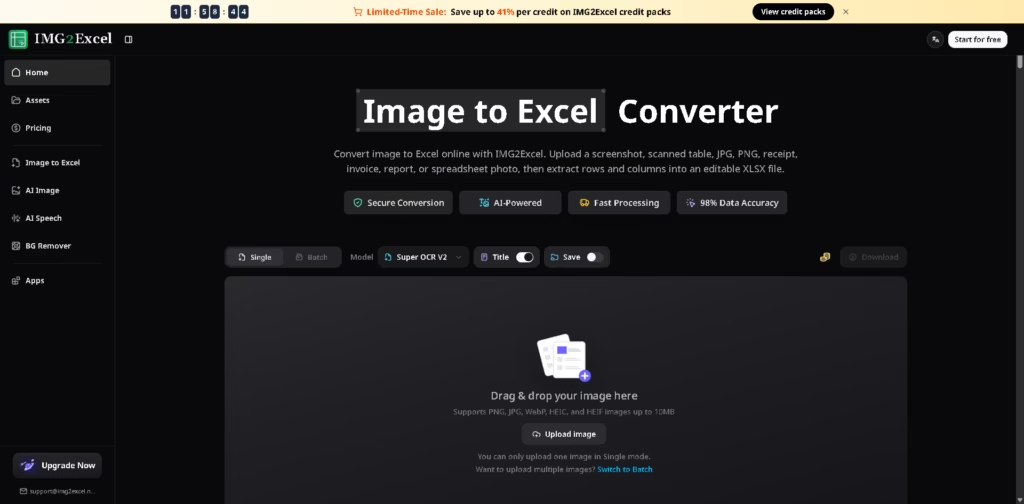
What It Does
IMG2Excel is a web-based AI image-to-Excel converter that extracts tables from screenshots, scanned documents, receipts, invoices, reports, and spreadsheet photos into editable XLSX files. It is built for situations where tabular data exists only as an image and would otherwise need manual retyping.
TIMG2Excel supports both single-image and batch workflows, with a preview step before download so users can review extracted rows. A typical workflow is uploading an invoice image, checking the detected table, then exporting an editable Excel file or opening it later in Google Sheets.
At a Glance
| Field | Details |
|---|---|
| Category | AI image-to-Excel converter |
| Platform | Web browser |
| Input Formats | JPG, PNG, WebP, HEIC, HEIF |
| Output Format | XLSX |
| Processing Modes | Single and batch |
| AI Features | Table detection and OCR |
| Privacy | Encrypted storage with 24-hour deletion |
| Best For | Converting image-based tables into spreadsheets |
Key Features
- Convert screenshots and scanned tables into editable Excel files.
- Detect rows and columns automatically.
- Preview extracted tables before downloading.
- Process multiple images with batch conversion.
- Support common image formats, including HEIC.
- Open exported files in Excel or Google Sheets.
Best For
- Converting invoice tables into spreadsheets.
- Extracting receipt data for bookkeeping.
- Recovering tables from scanned reports.
- Digitizing research tables from images.
- Reducing repetitive spreadsheet data entry.
Pros & Cons
| Pros | Cons |
|---|---|
| Strong focus on table extraction instead of generic OCR | Free usage is credit-based |
| Preview helps catch extraction errors | Single mode allows one upload at a time |
| Supports modern image formats like HEIC | Complex merged cells may still need review |
| Privacy policy includes encrypted storage and timed deletion | Specialized enterprise OCR platforms offer broader automation |
Alternatives & Comparisons
| Alternative | Best For | Key Difference |
|---|---|---|
| Img2Sheet | Multi-platform document extraction | Broader export and workflow options |
| Nanonets | Enterprise document automation | More advanced workflow automation |
| Docparser | Template-based extraction | More customizable parsing rules |
| Adobe Acrobat AI | PDF workflows | Broader PDF editing capabilities |
IMG2Excel fits users whose primary goal is recovering tables from images into Excel without installing software. It is a stronger fit than broader OCR platforms when spreadsheet-ready output is the main priority.
Frequently Asked Questions
Can IMG2Excel convert screenshots to Excel?
Yes. Screenshot-to-Excel conversion is one of its primary use cases.
Does it support JPG and PNG files?
Yes. It supports JPG, PNG, WebP, HEIC, and HEIF image formats.
Can I convert multiple images at once?
Yes. Batch mode allows multiple image uploads.
Will the exported file work in Google Sheets?
Yes. The exported XLSX file can be opened in Google Sheets.
How does IMG2Excel handle uploaded files?
The service states that files are encrypted and deleted within 24 hours.
Overall Rating
| Category | Score |
|---|---|
| Performance | 4.7/5 |
| Ease of Use | 4.8/5 |
| Feature Set | 4.6/5 |
| Workflow Fit | 4.8/5 |
| Overall | 4.7/5 |
IMG2Excel provides a streamlined table extraction workflow with strong Excel-focused features, although users should still review OCR results before relying on critical data.
Final Verdict
- Best for: Converting screenshots, receipts, and scanned tables into editable Excel spreadsheets.
- Avoid if: You need enterprise document automation beyond table extraction.
- Biggest strength: Accurate table detection with preview before Excel export.
- Best alternative: Img2Sheet for broader document extraction workflows and export options.
















