
What It Does
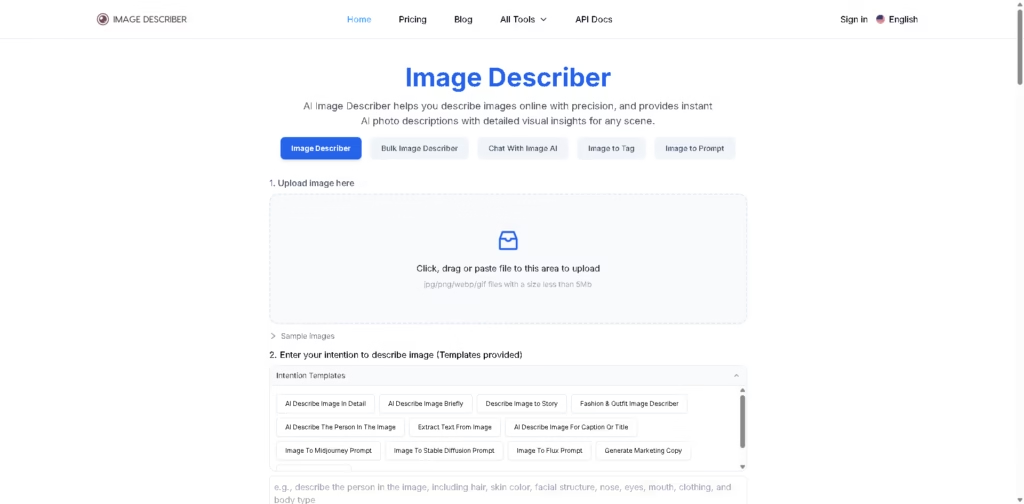
Image Describer is an AI-powered online tool that turns images into clear, detailed text.
Upload a photo, choose what you want (a summary, caption, story, marketing copy, or prompt), and Image Describer analyzes the image to generate a tailored description in seconds. It’s built to help you better understand, reuse, or repurpose visual content without overcomplicating the process.
Key Features
- Detailed or Brief Descriptions – Get either a quick summary or an in-depth breakdown of objects, mood, and scene details.
- Custom Intention Templates – Choose from presets like story mode, person description, fashion analysis, marketing copy, and more.
- Text Extraction (AI OCR) – Pull text from images while keeping formatting like line breaks and alignment.
- Caption & Hashtag Generator – Create social-ready captions with relevant hashtags.
- Image to AI Art Prompt – Convert images into prompts for tools like Midjourney, Stable Diffusion, and Flux.
- Marketing Copy Generator – Turn product images into persuasive descriptions to support sales.
- Bulk & Chat Mode – Describe multiple images at once or interact with the AI for deeper analysis.
- Privacy Control – Images and descriptions are not stored unless you choose to share them.
Who Is Image Describer For?
- Content Creators – Quickly generate captions, descriptions, or creative story ideas.
- E-commerce Sellers – Turn product photos into ready-to-publish product descriptions.
- Marketers – Create ad-ready copy from visuals without hiring extra help.
- Students & Researchers – Analyze and summarize visual content for projects.
- AI Artists – Convert reference images into structured prompts.
- Accessibility Users – Transform visual content into readable descriptions for better understanding.
Final Thoughts
Image Describer keeps things simple: upload, select your goal, and get results. It’s especially useful if you regularly work with images and need structured, usable text fast.
Whether you’re writing captions, extracting text, or generating AI art prompts, it saves time and removes guesswork.
If you rely on visual content in your workflow, it’s worth trying out to see how it fits into your daily tasks.















