
What It Does
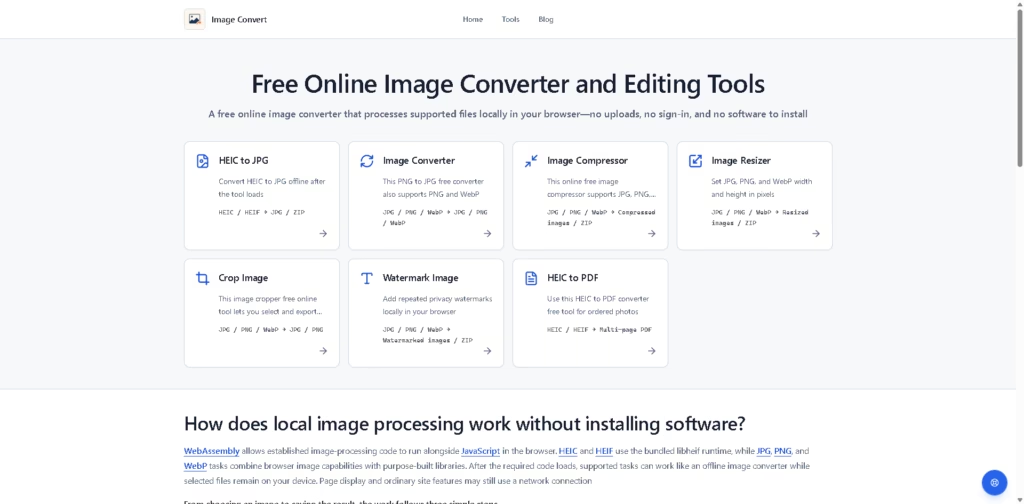
Image Convert is a free browser-based image conversion and editing toolkit for converting, compressing, resizing, cropping, and watermarking images. It supports HEIC, HEIF, JPG, PNG, and WebP workflows, along with HEIC-to-PDF conversion.
The main workflow runs locally in the browser. Users choose files from their device, process them with the selected tool, and save the resulting images, PDFs, or ZIP files. The site states that source files, decoded content, intermediate data, generated files, PDFs, and ZIP files are not sent off the device for processing.
Quick Verdict
Best for: Users who need free image conversion and editing without uploading files.
Skip if: You need advanced cloud-based image editing or AI-powered editing features.
Key Advantage: Local browser processing keeps image files on the user’s device.
Top Alternative: Squoosh
At a Glance
| Field | Details |
|---|---|
| Category | Image Conversion & Editing |
| Pricing Model | Free |
| Free Tier | Fully free |
| Platform | Web browser |
| API | Not specified |
| Primary Strength | Local image processing |
| Supported Formats | HEIC, HEIF, JPG, PNG, WebP |
Key Features
- Converts HEIC, HEIF, JPG, PNG, and WebP images.
- Compresses JPG, PNG, and WebP files.
- Resizes images using pixel-based dimensions.
- Crops images and exports selected areas.
- Adds repeated privacy watermarks locally.
- Converts ordered HEIC images into multi-page PDFs.
Best For
- Users converting HEIC photos to JPG without uploading files.
- Website owners compressing and converting image assets.
- Users resizing images to specific pixel dimensions.
- People cropping personal or application-related images locally.
- Users creating PDFs from ordered HEIC photos.
Pros & Cons
Pros
- Free to use.
- No sign-in is required.
- Image processing happens locally in the browser.
- No software installation is required.
- Supports multiple common image formats.
Cons
- API availability is not specified.
- Advanced AI editing features are not described.
- Processing depends on the required browser code loading first.
Alternatives & Comparisons
| Alternative | Best For | Key Difference vs. Image Convert |
|---|---|---|
| Squoosh | Image compression and format conversion | More focused on image compression and optimization |
| CloudConvert | Cloud-based file conversion | Processes files through an online conversion service |
| iLoveIMG | Online image editing | Provides a broader collection of web-based image utilities |
Image Convert focuses on browser-local processing for common image conversion and editing tasks. It is suited to users who want simple image utilities without uploading their files to a remote processing service.
Frequently Asked Questions
Is Image Convert free to use?
Yes. The website describes the service as free to use and states that no sign-in is required.
Do I need to install software?
No. Image Convert works in a web browser without requiring software installation.
Are my images uploaded for processing?
The source states that image processing takes place on the user’s device and that files do not need to leave the device.
Which image formats are supported?
The listed tools support HEIC, HEIF, JPG, PNG, and WebP, depending on the selected tool.
Can Image Convert work offline?
The source states that supported tasks can work like an offline image converter after the required code loads. However, ordinary site features and page display may still require a network connection.
ToolsPedia Rating
| Dimension | Score |
|---|---|
| Performance & Speed | 4.3/5 |
| Ease of Setup | 4.8/5 |
| Feature Depth | 3.9/5 |
| Value for Price | 4.8/5 |
| ToolsPedia Score | 4.5/5 |
Final Thoughts
Image Convert is a straightforward free toolkit for everyday image conversion and editing directly in the browser. Its local-processing approach is particularly relevant for users who prefer not to upload personal or sensitive images to a remote service. Users looking for AI-powered editing or more advanced design capabilities may need a broader platform.
















