
What It Does
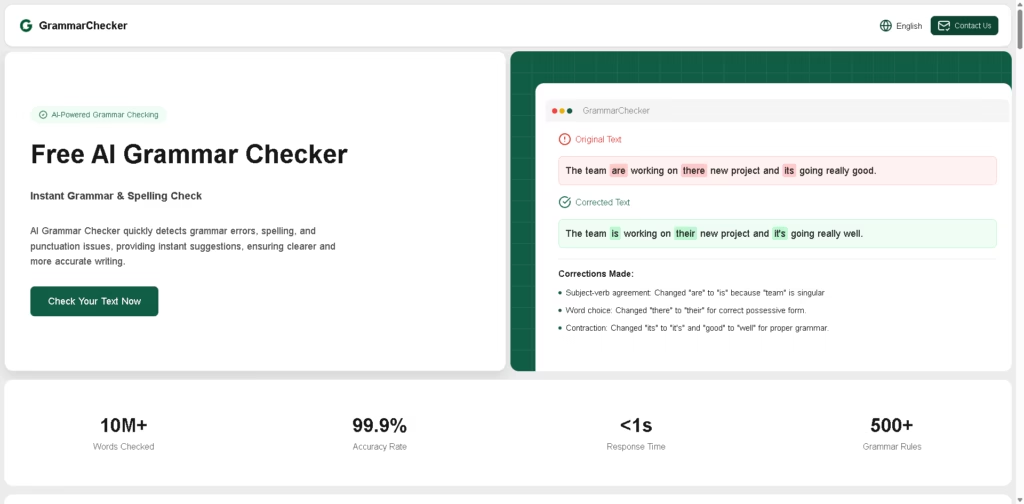
GrammarChecker is a free AI-powered grammar and spelling checker that identifies grammar, spelling, punctuation, and sentence-structure issues. It supports direct text input and file uploads, then provides corrections, explanations, and rewriting suggestions designed to make writing clearer and more natural.
The workflow is straightforward: paste text or upload a document, run the grammar check, review highlighted issues and explanations, and apply the suggested corrections. The tool can also provide explanations in multiple languages and preserve domain-specific terminology while checking the rest of the text.
Quick Verdict
- Best for: Free grammar, spelling, and writing correction
- Skip if: You need advanced document collaboration or professional editing workflows
- Key Advantage: Free AI grammar checking with contextual corrections
- Top Alternative: Grammarly
At a Glance
| Feature | Details |
|---|---|
| Category | AI Grammar Checker |
| Pricing Model | Free |
| Free Tier | Yes, all stated features are free |
| Platform | Web |
| API | Not specified |
| Primary Strength | Grammar, spelling, and contextual correction |
| Input Methods | Text paste and file upload |
| Language Support | Multiple languages |
Pricing & Plans
GrammarChecker states that its AI grammar checker is completely free to use.
- Free: $0. The site states that users can access all features at no cost, including grammar checking, spelling detection, contextual corrections, expression suggestions, terminology protection, and multi-language explanations.
- Usage: No paid plans, subscription fees, or usage limits are specified in the supplied information.
- Privacy: The site states that text is not stored after checking.
Note: Prices and plan limits may change. Check the official website for current pricing.
Key Features
- Detects grammar, spelling, punctuation, and sentence-structure problems.
- Provides contextual corrections based on surrounding text.
- Suggests clearer and more natural alternative expressions.
- Accepts pasted text and uploaded files for checking.
- Provides explanations and suggestions in multiple languages.
- Protects domain-specific terminology from inappropriate corrections.
Best For
- Checking grammar and spelling in academic assignments
- Polishing resumes, cover letters, and professional emails
- Improving articles, blogs, and social media content
- Learning from explanations of grammar and writing corrections
- Reviewing longer text through file-upload workflows
Pros & Cons
Pros
- The site states that the tool is completely free.
- Supports grammar, spelling, punctuation, and sentence-level corrections.
- Provides contextual suggestions instead of simple word replacement.
- Offers multi-language explanations and terminology protection.
Cons
- API availability is not specified.
- Advanced collaboration and document-management features are not described.
- The stated 99.9% accuracy rate is a vendor claim rather than independently verified testing.
- Supported file formats and upload limits are not specified.
Alternatives & Comparisons
| Alternative | Best For | Key Difference vs. GrammarChecker |
|---|---|---|
| Grammarly | Comprehensive writing assistance | Offers a broader writing-assistance ecosystem |
| LanguageTool | Multilingual grammar checking | Provides broader language and editing options |
| QuillBot | Paraphrasing and writing improvement | Places more emphasis on rewriting and paraphrasing |
GrammarChecker focuses on free AI-based grammar correction with contextual explanations and rewriting suggestions. It is particularly relevant for users who want basic writing correction without a stated subscription or paid usage requirement.
Frequently Asked Questions
Is GrammarChecker free?
Yes. The website states that its AI grammar checker is completely free and that users can access all listed features at no cost.
What does GrammarChecker check?
It checks grammar, spelling, punctuation, sentence structure, verb tense, subject-verb agreement, and other writing issues.
Can GrammarChecker rewrite sentences?
Yes. The tool can provide structured rewriting suggestions for long sentences, repetitive wording, vague expressions, and other clarity issues.
Can I upload a document?
Yes. The tool supports both direct text input and document uploads. The supplied information does not specify supported file formats or upload limits.
Does GrammarChecker support multiple languages?
Yes. The platform states that users can view explanations and suggestions in their preferred language. The exact list of supported languages is not specified in the supplied information.
Who can use GrammarChecker?
The platform identifies students, teachers, researchers, and content creators as potential users. It can also be used for professional writing such as resumes, cover letters, and formal emails.
Does GrammarChecker store uploaded text?
The website states that text is not stored after checking. Users should review the current privacy policy for the latest data-handling terms.
ToolsPedia Rating
- Performance & Speed: 4.6/5.0
- Ease of Setup: 4.8/5.0
- Feature Depth: 3.9/5.0
- Value for Price: 4.8/5.0
- ToolsPedia Score: 4.4/5.0
Final Thoughts
GrammarChecker provides a straightforward way to check grammar, spelling, punctuation, and sentence structure without a stated subscription cost. Its contextual corrections, rewriting suggestions, terminology protection, and multi-language explanations make it more useful than a basic spellchecker. Users looking for advanced editing, collaboration, or specialized writing workflows may need a broader writing platform.
















