
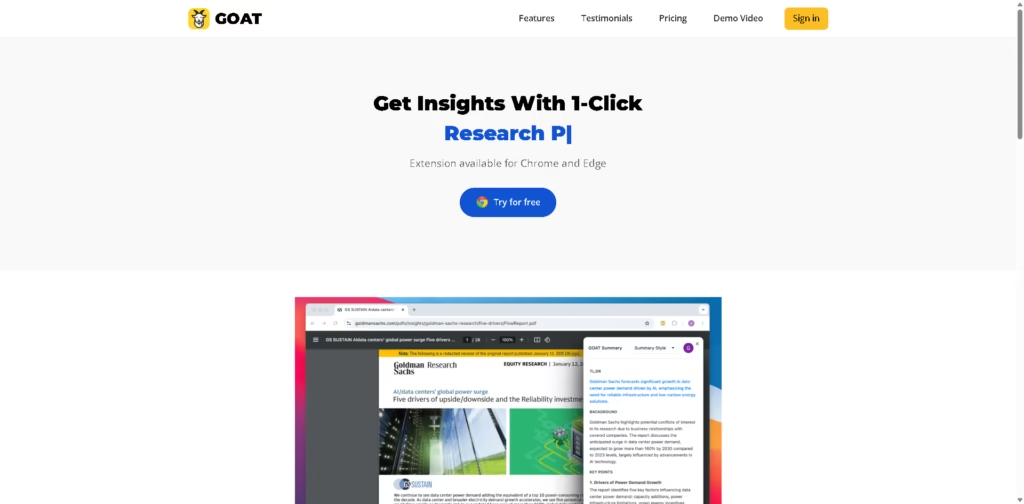
What It Does
GOAT AI is an AI summarization tool designed to help professionals, students, and other information-heavy users process long-form content faster. It can summarize research papers, articles, and YouTube videos, with a Chrome and Edge extension for accessing the tool during normal browsing.
The platform is positioned around reducing the time required to consume saved or newly discovered information. For example, a research analyst could use GOAT AI to turn a lengthy report into a short summary, identify its important points, and review the material without reading every page first.
At a Glance
| Field | Details |
|---|---|
| Category | AI Content Summarizer |
| Primary Use | Summarizing articles, research papers, and YouTube videos |
| Supported Browsers | Chrome and Edge |
| Free Plan | 10 summaries per month |
| Premium Plan | $14.99/month |
| Premium Usage | Unlimited summaries |
| Target Users | Professionals, research analysts, executives, students |
| Key Strength | Fast summarization of information-heavy content |
Key Features
- Summarizes research papers and long-form reports into shorter reads.
- Generates summaries for articles and YouTube videos.
- Provides a browser extension for Chrome and Edge.
- Offers unlimited summaries on the Premium plan.
- Provides advanced AI summarization on Premium.
- Designed for quick information review by professionals and students.
Best For
- Quickly reviewing long research papers before deeper reading.
- Turning lengthy reports into concise information for initial analysis.
- Getting the main points from YouTube videos without watching everything.
- Processing large amounts of online content during research workflows.
- Reducing the time spent reviewing saved or read-later material.
Pros & Cons
| Pros | Cons |
| Supports multiple content types, including articles, papers, and YouTube videos | Free plan is limited to 10 summaries per month |
| Chrome and Edge extensions support browser-based workflows | Premium costs $14.99/month |
| Premium provides unlimited summaries | The supplied information does not specify supported AI models |
| Targets practical research and information-consumption workflows | Accuracy, citation handling, and summary customization are not detailed |
| No credit card is required for the free trial | Advanced summarization is restricted to Premium |
Alternatives & Comparisons
| Alternative | Best For | Key Difference |
| YouTube-focused AI summarizers | Summarizing video content | More narrowly focused on video summarization |
| General AI assistants | Flexible summarization and analysis | Broader capabilities beyond dedicated summarization |
| Read-it-later summarizers | Managing saved content | More focused on organizing and revisiting saved material |
| Research-focused AI tools | Academic literature analysis | More specialized for research workflows and scholarly sources |
GOAT AI fits the market as a dedicated summarization tool for users who regularly process articles, research papers, reports, and YouTube content. Choose it when fast cross-format summarization and browser access matter more than advanced research-specific features.
Frequently Asked Questions
What content can GOAT AI summarize?
The supplied information specifically mentions research papers, articles, and YouTube videos.
Does GOAT AI work in a browser?
Yes. GOAT AI provides extensions for Google Chrome and Microsoft Edge.
How many summaries can I create for free?
The Free plan includes 10 summaries per month.
Is GOAT AI Premium unlimited?
Yes. The Premium plan is listed at $14.99 per month and includes unlimited summaries.
Does GOAT AI provide citations or references?
The supplied information does not specify citation generation or reference management, so users needing those capabilities should verify them separately.
Overall Rating
| Category | Score |
| Performance | 8.2/10 |
| Ease of Use | 8.6/10 |
| Feature Set | 8.0/10 |
| Workflow Fit | 8.7/10 |
| Overall | 8.4/10 |
GOAT AI is a strong fit for fast, browser-based content summarization, but its research depth and customization options are less clearly documented.
Final Verdict
- Best for: Professionals and students who need quick summaries of articles, research papers, reports, and YouTube videos.
- Avoid if: You need detailed citation analysis, advanced research tools, or extensively documented customization.
- Biggest strength: Combines multiple content types with convenient Chrome and Edge browser access.
- Best alternative: A research-focused AI tool may be better for scholarly analysis and citation-heavy workflows.
















