What It Does
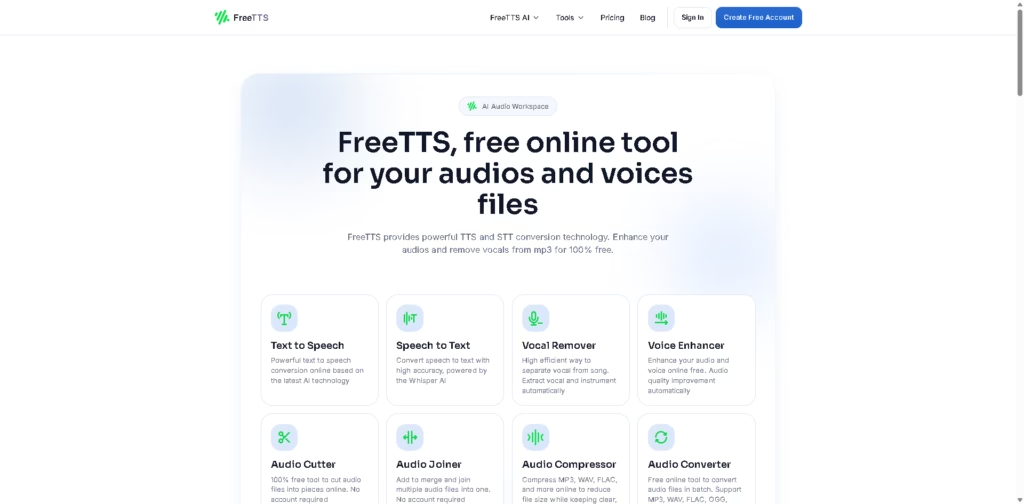
FreeTTS is an AI-powered online audio workspace that helps users create, convert, edit, and improve audio files directly in the browser.
It combines text-to-speech, speech-to-text, vocal remover, voice enhancer, audio converter, audio cutter, audio joiner, and audio compressor tools in one place.
Whether you need voiceovers, transcription, karaoke tracks, or cleaner podcast audio, FreeTTS offers a simple all-in-one solution without requiring expensive software.
Key Features
- Text to Speech (TTS) – Convert written text into natural-sounding voiceovers using advanced AI technology.
- Speech to Text (STT) – Turn spoken audio into editable text with high accuracy powered by Whisper AI.
- AI Vocal Remover – Separate vocals and instruments automatically for karaoke, remixes, and music production.
- Voice Enhancer – Improve voice clarity, reduce noise, and upgrade audio quality for podcasts and recordings.
- Audio Converter – Convert files between MP3, WAV, FLAC, OGG, M4A, and other popular formats.
- Audio Compressor – Reduce file size while keeping clear and balanced sound quality.
- Audio Cutter – Trim unwanted parts and split audio files into smaller sections quickly.
- Audio Joiner – Merge multiple audio tracks into one seamless file for podcasts or music mixes.
- Batch Processing – Handle multiple files at once for faster workflow and productivity.
- Browser-Based Access – No installation needed—everything works online.
- Free to Use – Core tools are available without subscriptions or hidden charges.
- Secure & Private – Files are automatically deleted after around 12 hours for better privacy protection.
Who Is FreeTTS For?
- Content Creators – Perfect for YouTubers, podcasters, and video editors who need voiceovers and cleaner audio.
- Students – Useful for transcribing lectures, editing study recordings, and creating learning materials.
- Musicians – Great for extracting vocals, creating karaoke versions, and remixing tracks.
- Freelancers – Helpful for handling client voiceovers, transcription, and audio editing tasks faster.
- Businesses – Useful for presentations, training materials, voice notes, and customer communication.
- Everyday Users – Ideal for anyone needing quick audio tools without downloading software.
Final Thoughts
FreeTTS stands out because it brings multiple useful AI audio tools into one simple platform. Instead of switching between different apps for voiceovers, transcription, audio cutting, and vocal removal, users can manage everything in one browser tab.
The fact that it offers free access with batch processing and privacy-focused file handling makes it even more practical.
If you regularly work with audio files and want a fast, reliable, and beginner-friendly solution, FreeTTS is definitely worth trying. It saves time, reduces workflow stress, and helps creators get professional-looking results without extra costs.