
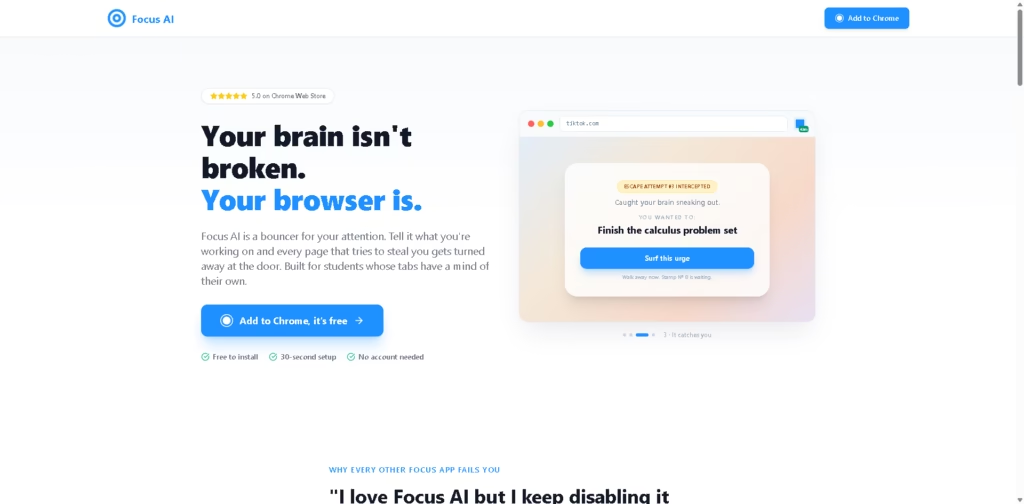
What It Does
Focus AI is a Chrome extension that helps users stay on task by blocking distracting content based on the work they are currently doing. Instead of relying only on fixed website blocklists, it uses AI to judge whether a page matches the user’s stated goal, allowing productive content while blocking unrelated distractions.
The extension is aimed at students and knowledge workers who struggle with browser-based distractions during focused work sessions. A typical workflow is entering a goal like “finish my calculus problem set,” choosing a lock level, then letting Focus AI filter distracting pages throughout the session.
At a Glance
| Field | Details |
|---|---|
| Category | AI focus extension |
| Platform | Google Chrome |
| AI Blocking | Context-aware page filtering |
| Setup Time | About 30 seconds |
| Account Required | No |
| Lock Modes | Standard, Quit Wall, stronger lock options |
| Primary Strength | Goal-based distraction blocking |
Key Features
- Block pages based on your current task.
- Allow relevant work content while blocking distractions.
- Increase friction before disabling the extension.
- Track reclaimed focus time and completed focus sessions.
- Display persistent focus status across browser tabs.
- Install without creating an account.
Best For
- Studying without social media interruptions.
- Writing assignments while allowing research tabs.
- Staying focused during browser-based work.
- Reducing impulsive distraction switching.
- Creating stronger commitment during deep work sessions.
Pros & Cons
| Pros | Cons |
|---|---|
| AI distinguishes work-related pages from distractions | Chrome-only availability limits cross-browser users |
| No account required for setup | Effectiveness depends on Chrome usage habits |
| Multiple lock levels suit different focus needs | Advanced features may require a Founding Member plan |
| Progress tracking reinforces productive sessions | Local desktop apps remain outside its scope |
Alternatives & Comparisons
| Alternative | Best For | Key Difference |
|---|---|---|
| StayFocusd | Simple website blocking | Rule-based blocking instead of AI context |
| Freedom | Cross-device focus | Supports multiple devices and platforms |
| Cold Turkey | Strong desktop blocking | System-level blocking beyond Chrome |
| One Sec | Interrupting impulsive app use | Mobile-first behavior interruption |
Focus AI occupies a distinctive position among browser blockers by evaluating pages against a user’s current goal rather than relying solely on predefined blocklists. It is especially appealing for students who need educational content from sites like YouTube while avoiding distracting feeds on the same platforms.
Frequently Asked Questions
Does Focus AI block websites automatically?
Yes. It evaluates pages against your current task and blocks distractions that do not fit.
Does it work with YouTube?
Yes. The platform describes allowing relevant content like educational videos while blocking distracting sections such as Shorts.
Do I need an account?
No. The extension can be installed and used without creating an account.
Can I easily disable Focus AI?
Not always. Depending on the selected lock mode, disabling requires additional friction, such as manually typing a confirmation phrase.
Is Focus AI free?
Yes. The extension is free to install, while the site also references a Founding Member plan for additional benefits.
Overall Rating
| Category | Score |
|---|---|
| Performance | 4.6/5 |
| Ease of Use | 4.8/5 |
| Feature Set | 4.5/5 |
| Workflow Fit | 4.8/5 |
| Overall | 4.7/5 |
Focus AI stands out by combining goal-aware AI filtering with stronger commitment mechanisms, making it particularly effective for browser-heavy study and work sessions.
Final Verdict
- Best for: Students and professionals who need AI-based distraction blocking while working in Chrome.
- Avoid if: You need cross-browser or full desktop-level distraction blocking.
- Biggest strength: Context-aware blocking that allows relevant work content while filtering distractions.
- Best alternative: Freedom for users wanting multi-device focus sessions beyond Chrome.
















