
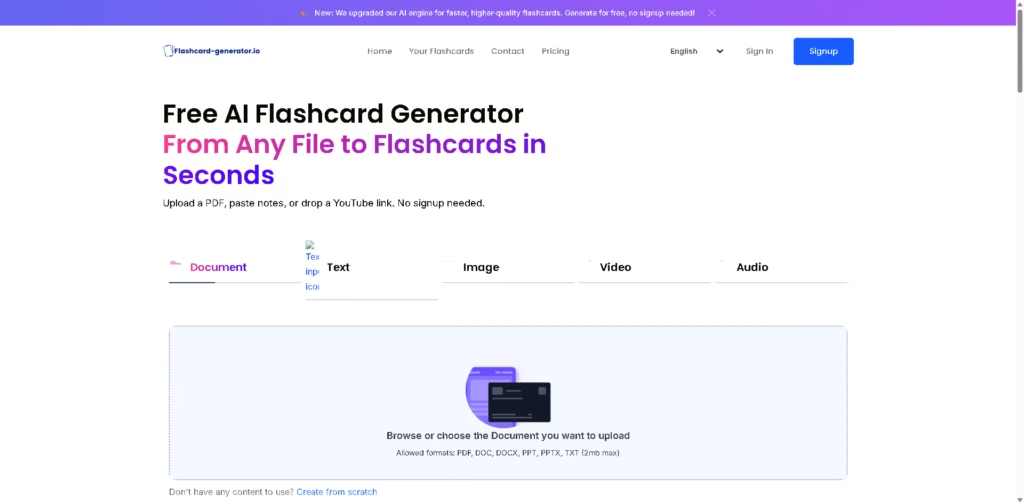
What It Does
Flashcard Generator is a browser-based AI study tool that converts PDFs, Word documents, PowerPoint files, text, images, audio, and videos into question-and-answer flashcards. It is designed for students who want to turn existing study material into review cards without manually creating each card.
The service supports editing generated cards and sharing decks with classmates. For example, a student can upload lecture notes, let the AI generate flashcards, correct or rewrite cards, and then share the finished deck for group study.
At a Glance
| Field | Details |
|---|---|
| Category | AI flashcard generator |
| Supported inputs | PDF, DOC, DOCX, PPT, PPTX, TXT, images, audio, video, YouTube links |
| AI engine | Google Gemini |
| File size limit | 2 MB for listed document formats |
| Account required | No signup required to start |
| Editing | Generated flashcards can be edited |
| Sharing | Decks can be shared via link |
| Pricing | Free to start |
Key Features
- Generates Q&A flashcards automatically from uploaded study materials.
- Converts handwritten notes and images into flashcards.
- Supports YouTube videos and multimedia sources.
- Lets users edit, remove, or rewrite generated cards.
- Uses Google Gemini for AI-powered flashcard generation.
- Allows flashcard decks to be shared with classmates.
Best For
- Turning lecture PDFs into quick revision cards.
- Converting handwritten notes into active-recall material.
- Creating flashcards from YouTube educational content.
- Quickly reviewing long study documents without rereading everything.
- Sharing generated decks with classmates for collaborative study.
Pros & Cons
| Pros | Cons |
|---|---|
| No signup needed to generate cards | Listed document uploads are limited to 2 MB |
| Supports documents, images, audio, video, and YouTube | Flashcard quality depends on the source material and AI output |
| Cards can be manually customized | No advanced spaced-repetition system is described |
| Deck sharing supports group study | The provided information does not detail offline/mobile apps |
Alternatives & Comparisons
| Alternative | Best For | Key Difference |
|---|---|---|
| AnkiDecks | Advanced flashcard workflows | Adds spaced repetition, Anki export, and image occlusion |
| Memo | Source-grounded studying | Combines flashcards with notes, chat, tests, mind maps, and citations |
| Lecha | Multimedia study conversion | Combines notes, transcripts, quizzes, flashcards, and tutoring |
| Cogent | All-in-one AI studying | Adds file chat and AI-generated simulated exams |
Flashcard Generator fits best as a quick, low-friction flashcard creation tool rather than a complete learning-management platform. Choose Flashcard Generator when you mainly need to convert varied study materials into editable cards quickly; choose an alternative when advanced retention tools or broader study workflows matter more.
Frequently Asked Questions
Does Flashcard Generator require an account?
No signup is required to start generating flashcards according to the provided product information.
What file formats does it support?
The listed document formats are PDF, DOC, DOCX, PPT, PPTX, and TXT, alongside images, audio, video, and YouTube links.
Can I edit AI-generated flashcards?
Yes. Users can edit cards after generation, including adding, removing, or rewriting questions.
Can I share flashcards with other students?
Yes. The platform provides link-based sharing for generated flashcard decks.
Is there a file-size limitation?
Yes. The listed document upload limit is 2 MB, which could be restrictive for larger lecture materials.
Overall Rating
| Category | Score |
|---|---|
| Performance | 8.0/10 |
| Ease of Use | 9.0/10 |
| Feature Set | 7.8/10 |
| Workflow Fit | 8.4/10 |
| Overall | 8.3/10 |
Overall, Flashcard Generator is a strong choice for fast AI flashcard creation, especially when simplicity and broad input support matter most.
Final Verdict
- Best for: Students who need quick flashcards from PDFs, notes, multimedia, or YouTube.
- Avoid if: You need advanced spaced repetition, detailed analytics, or sophisticated study management.
- Biggest strength: Broad content support combined with no-signup flashcard generation.
- Best alternative: AnkiDecks for users who want deeper flashcard and spaced-repetition capabilities.
















