
What It Does
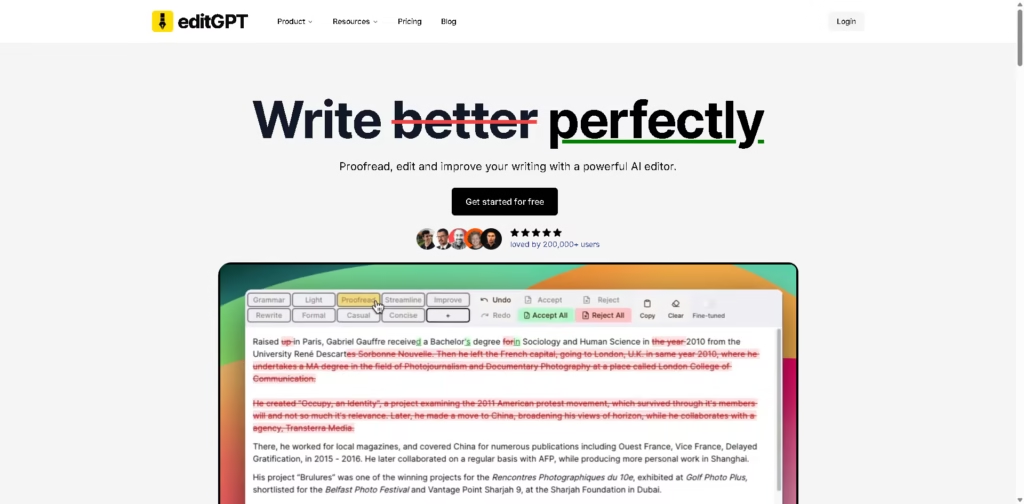
editGPT is an AI writing editor designed to proofread, edit, improve, and rewrite text while preserving rich-text formatting. It supports more than 80 languages and targets writers, students, researchers, and other users who need structured AI-assisted editing.
A typical workflow is to import a Microsoft Word document, select an editing level such as Grammar, Proofread, Natural, Improve, or Rewrite, review the suggested changes, and export the edited document back to .docx with track changes. Custom prompts, revision history, and formatting preservation support more controlled editing workflows.
Quick Verdict
- Best for: AI-assisted editing of Word documents with track changes
- Skip if: You need a broader productivity platform beyond writing and document editing
- Key Advantage: AI editing with Word track-change support
- Top Alternative: Grammarly
At a Glance
| Feature | Details |
|---|---|
| Category | AI Writing Assistant |
| Pricing Model | Paid |
| Free Tier | Yes |
| Platform | Web |
| API | Not specified |
| Primary Strength | Word editing with track changes |
| Language Support | 80+ languages |
| Document Format | Microsoft Word (.docx) |
Pricing & Plans
- Pro: $5/month, or $60 billed annually. Includes 500,000 words/month, 200,000 words per document, Docx Express, suggestions panel, custom prompts, Word import/export, revision history, and data privacy features.
- Elite: $12/month, or $144 billed annually. Includes 3,000,000 words/month and 200,000 words per document, plus the Pro features.
- Business: $60/month, or $720 billed annually. Includes unlimited words, unlimited requests, four team seats, a team management dashboard, and all Pro and Elite features.
- The vendor states that existing customers’ prices will not increase and that plans can be cancelled anytime.
- A free sign-up option is available, but specific free-tier limits are not provided in the supplied pricing information.
Note: Prices and plan limits may change. Check the official website for current pricing.
Key Features
- Supports AI editing across more than 80 languages with automatic language detection.
- Imports and exports Word documents while maintaining track changes.
- Provides five editing levels from grammar fixes to full rewrites.
- Lets users create and save custom editing prompts.
- Maintains formatting such as bold and italics during document editing.
- Provides revision history for reviewing previous document changes.
Best For
- Editing academic papers while preserving document formatting
- Reviewing Microsoft Word documents with track changes
- Proofreading multilingual documents in more than 80 languages
- Applying custom editing instructions to recurring writing workflows
- Rewriting documents at different levels of editing depth
Pros & Cons
Pros:
- Supports Word import and export with track changes.
- Offers five distinct editing levels for different revision needs.
- Supports more than 80 languages and automatic language detection.
- Custom prompts allow users to control recurring editing instructions.
Cons:
- The supplied information does not specify API availability.
- The listed Pro and Elite plans impose monthly word limits.
- Business features are considerably more expensive than individual plans.
Alternatives & Comparisons
| Alternative | Best For | Key Difference vs. This Tool |
|---|---|---|
| Grammarly | General writing assistance | Broader writing assistance with tone and style features |
| ChatGPT | Flexible AI writing and editing | General-purpose AI rather than a dedicated document editor |
| ProWritingAid | Detailed writing analysis | More focused on in-depth writing analysis and feedback |
editGPT fits the AI proofreading and writing-editing market with a particular focus on document editing, custom prompts, and Word track changes. Choose it when maintaining Word document revisions and formatting is more important than using a broader general-purpose AI workspace.
Frequently Asked Questions
Can editGPT edit Microsoft Word documents?
Yes. editGPT supports importing and exporting Word documents while maintaining track changes.
How many languages does editGPT support?
editGPT supports more than 80 languages and can automatically detect the language.
Can users create custom editing instructions?
Yes. The service provides custom prompts and allows users to save those prompts on its paid plans.
What is the difference between editGPT’s editing levels?
The available levels are Fix Grammar, Proofread, Natural, Improve, and Rewrite, with increasing levels of editing depth.
Does editGPT provide revision history?
Yes. Revision history is included in the Pro, Elite, and Business plans.
ToolsPedia Rating
- Performance & Speed: 4.0/5.0
- Ease of Setup: 4.2/5.0
- Feature Depth: 4.3/5.0
- Value for Price: 4.1/5.0
- ToolsPedia Score: 4.2/5.0
Final Thoughts
editGPT is primarily suited to users who want AI-assisted proofreading and rewriting while retaining Word-compatible document workflows. Its combination of editing levels, custom prompts, multilingual support, and track changes makes it particularly relevant to document-heavy editing tasks. Users can start with the available free option to assess whether its editing workflow fits their needs before choosing a paid plan.
















