
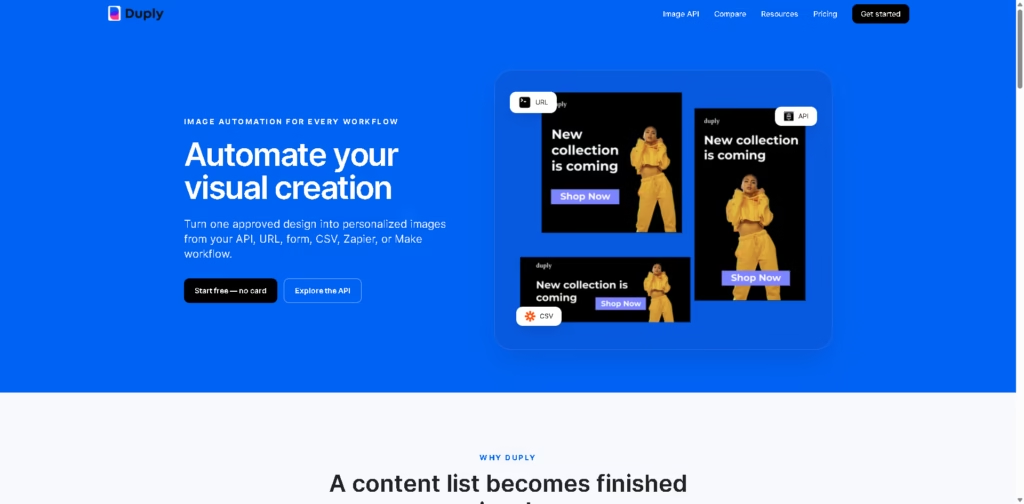
What It Does
Duply is a visual automation platform for turning reusable designs and structured data into finished images. It is designed for creators, marketers, ecommerce teams, and businesses that repeatedly produce personalized social posts, email graphics, product visuals, event assets, blog images, certificates, or other template-based content.
A typical workflow starts with one branded template. A user marks elements such as the headline, price, name, photo, or badge as dynamic fields, then sends values through a CSV, API, dynamic URL, form, Zapier, or Make workflow.
Duply generates the corresponding image without requiring the user to reopen the design editor for every variation.
Quick Verdict
- Best for: Automating repeated, data-driven image production
- Skip if: You mainly need manual image editing or freeform creative design
- Key Advantage: Multiple automated input methods
- Top Alternative: Bannerbear
At a Glance
| Feature | Details |
|---|---|
| Category | Image automation |
| Pricing Model | Paid with free starting balance |
| Free Tier | Yes, one-time free generation balance |
| Platform | Web |
| API | Yes |
| Primary Strength | Data-driven image generation |
| Key Integrations | Zapier, Make |
Pricing & Plans
Duply’s supplied pricing snapshot shows monthly and yearly billing, with a limited promotional discount of 20% off monthly or 30% off yearly billing through August 31, 2026.
- Mini: $12.80/month for the first month, then $16/month. Includes 200 generation credits, 20 Copilot requests, 3 templates, 2 public links, 1 brand font, 200 MB storage, and 1 team member.
- Starter: $23.20/month for the first month, then $29/month. Includes 1,000 generation credits, 100 Copilot requests, 20 templates, 20 public links, 5 brand fonts, 10 GB storage, and 2 team members.
- Professional: $45.60/month for the first month, then $57/month. Includes 5,000 generation credits, 500 Copilot requests, unlimited templates, 100 public links, 20 brand fonts, 50 GB storage, and 5 team members.
- Business: $103.20/month for the first month, then $129/month. Includes 25,000 generation credits, 2,000 Copilot requests, unlimited templates, unlimited public links, unlimited brand fonts, 50 GB storage, and 20 team members.
- Free starting balance: Duply states that users can create an account and start with a one-time free generation balance.
- Billing promotion: The supplied pricing page states that yearly billing provides 2 months free, while the limited offer provides 20% off monthly or 30% off yearly billing through August 31, 2026.
Note: Prices and plan limits may change. Check the official website for current pricing.
Key Features
- Creates reusable templates with dynamic text, images, prices, names, and other fields.
- Generates visuals from CSV data without reopening the design editor.
- Supports image generation through API, dynamic URLs, forms, Zapier, and Make.
- Produces repeated visuals for social media, email, ecommerce, blogs, and events.
- Includes Copilot requests alongside template-based visual generation.
- Supports reusable brand fonts and shared public links.
Best For
- Automating personalized product promotion images from catalog data
- Generating repeated social media visuals from campaign spreadsheets
- Creating personalized email campaign graphics at scale
- Producing standardized event, podcast, or blog visuals
- Delivering automated images through API or no-code workflows
Pros & Cons
Pros:
- Supports both developer-based and no-code generation workflows.
- CSV input can turn structured campaign data into multiple visuals.
- Reusable templates reduce repeated manual design work.
- Higher plans provide substantial generation-credit increases and larger workspaces.
Cons:
- Generation is credit-based, so higher-volume workflows require paid capacity.
- The supplied data does not specify detailed export-format or rendering controls.
- The free access described is a one-time generation balance rather than an unlimited free plan.
Alternatives & Comparisons
| Alternative | Best For | Key Difference vs. This Tool |
|---|---|---|
| Bannerbear | API-based image and media automation | Offers image and video automation, 50+ native integrations, and batch rendering capabilities. |
| Canva | Broad visual design and collaboration | Provides a wider visual workspace, while Duply focuses specifically on converting approved templates and structured data into repeated image variations. |
| Adobe Photoshop | Detailed image editing and creative control | Focuses on precision editing and generative image workflows rather than template-driven production automation. |
Duply fits the market between general-purpose design software and specialized image-generation APIs, with an emphasis on repeatable visual production.
Choose Duply when your main requirement is turning structured data into many consistent branded images through API, URL, CSV, forms, or no-code automation.
Frequently Asked Questions
Can Duply generate images from spreadsheet data?
Yes. Duply supports CSV input, allowing rows of structured data to populate dynamic template fields and generate corresponding visuals.
Does Duply require coding?
No. Duply supports forms, CSV, dynamic URLs, Zapier, and Make in addition to its API, so coding is not required for every workflow.
Is Duply suitable for ecommerce image automation?
Yes. Ecommerce product images are explicitly listed as a use case, including templates that can dynamically populate product information and imagery.
How is Duply different from Canva?
Duply is focused on repeatedly generating image variations from approved templates and structured data, while Canva serves as a broader visual design workspace.
Is Bannerbear a better choice than Duply?
It depends on the workflow. Bannerbear may be more suitable when an image or video API, extensive integrations, batch rendering, and broader media automation are priorities.
ToolsPedia Rating
- Performance & Speed: 3.8/5.0
- Ease of Setup: 4.3/5.0
- Feature Depth: 4.2/5.0
- Value for Price: 4.0/5.0
- ToolsPedia Score: 4.1/5.0
Final Thoughts
Duply is primarily useful when image production follows a predictable template but the underlying content changes frequently. Its combination of CSV, API, URL, form, Zapier, and Make inputs makes it particularly relevant for marketing and ecommerce workflows that need repeatable branded visuals without manually editing each variation.
For occasional graphics or detailed image manipulation, a broader design application may be a better fit. For recurring data-driven visual production, start with Duply’s free generation balance and evaluate whether its template and credit model match your expected monthly volume.
















