
What It Does
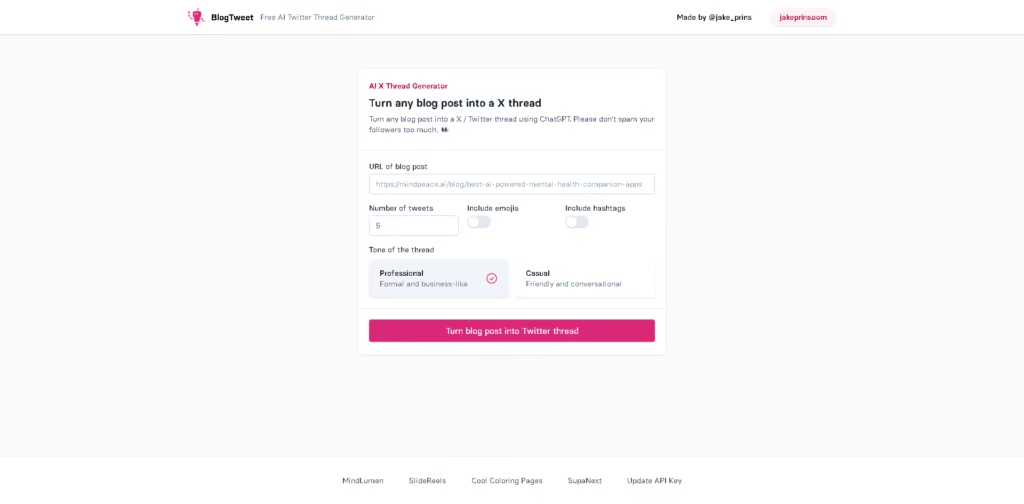
BlogTweet is a free AI tool that converts a blog post URL into an X (formerly Twitter) thread using ChatGPT. It is designed for bloggers, marketers, creators, and social media users who want to repurpose existing long-form content into shorter social posts.
A typical workflow is simple: paste a blog post URL, choose the desired number of tweets, decide whether to include emojis and hashtags, select either a Professional or Casual tone, and generate the thread. The resulting content can then be reviewed and prepared for posting on X.
Quick Verdict
- Best for: Repurposing existing blog posts into X threads
- Skip if: You need scheduling, analytics, or broader social-media management
- Key Advantage: Focused blog-to-thread conversion
- Top Alternative: Typefully
At a Glance
| Feature | Details |
|---|---|
| Category | AI social media content generator |
| Pricing Model | Free |
| Free Tier | Yes |
| Platform | Web |
| API | Not specified |
| Primary Strength | Blog-to-thread conversion |
| AI Model | ChatGPT |
| Input Method | Blog post URL |
Key Features
- Converts blog post URLs into structured X threads using ChatGPT.
- Lets users specify the desired number of tweets.
- Supports Professional and Casual thread tones.
- Provides optional emoji inclusion for generated threads.
- Provides optional hashtag inclusion for generated threads.
- Includes an option to update the OpenAI API key.
Best For
- Repurposing published articles into X threads.
- Turning long-form marketing content into social summaries.
- Creating professional threads from business blog posts.
- Producing casual threads for creator-focused audiences.
- Reusing existing website content for social distribution.
Pros & Cons
Pros:
- The core blog-to-thread generator is free.
- Users can control thread length before generation.
- Professional and Casual tones support different communication styles.
- Emoji and hashtag controls provide basic output customization.
Cons:
- The tool focuses primarily on thread generation rather than social-media management.
- No scheduling or analytics functionality is specified in the provided information.
- The workflow depends on having an existing blog post URL.
Alternatives & Comparisons
| Alternative | Best For | Key Difference vs. This Tool |
|---|---|---|
| Typefully | Writing and scheduling social content | Provides broader publishing, scheduling, analytics, and content-management capabilities. |
| Tweet Hunter | X content creation and audience growth | Combines AI writing with content ideas, scheduling, analytics, and growth-focused tools. |
BlogTweet occupies the lightweight end of the X content-repurposing market, focusing on converting existing articles into threads. Choose it when you primarily need a free blog-to-thread workflow without the broader publishing and analytics features of larger platforms.
Frequently Asked Questions
Can BlogTweet turn a blog post into an X thread?
Yes. BlogTweet is specifically designed to convert a blog post URL into an X thread using ChatGPT.
Can I control the number of tweets?
Yes. Users can specify the number of tweets they want in the generated thread.
Can I choose the writing style?
Yes. Users can specify the number of tweets they want in the generated thread.
Can BlogTweet add hashtags and emojis?
Yes. Users can independently choose whether generated threads include hashtags and emojis.
Does BlogTweet provide social-media scheduling?
Scheduling is not specified in the provided product information. Its documented primary function is generating X threads from blog posts.
ToolsPedia Rating
- Performance & Speed: 4.0/5.0
- Ease of Setup: 4.8/5.0
- Feature Depth: 2.8/5.0
- Value for Price: 4.8/5.0
- ToolsPedia Score: 4.1/5.0
Final Thoughts
BlogTweet is a narrowly focused tool for turning existing blog content into X threads with minimal setup. Its free access and basic customization make it suitable for occasional content repurposing, while users needing scheduling, analytics, or advanced social management should consider a more comprehensive platform. Try it with an existing blog post to see whether its generated threads fit your publishing workflow.
















