
Quick Verdict
Beatmo is an AI photo and video effects platform focused on turning still images into animated, stylized, and social-ready content.
- Best for: Creating quick AI photo animations, dance clips, couple videos, avatars, and visual effects.
- Skip if: You need advanced video editing, detailed motion control, or a documented professional production workflow.
- Key Advantage: Large library of ready-to-use AI effects and motion templates.
- Top Alternative: Dreamina offers deeper prompt-based image-to-video control and broader generation workflows.
What It Does
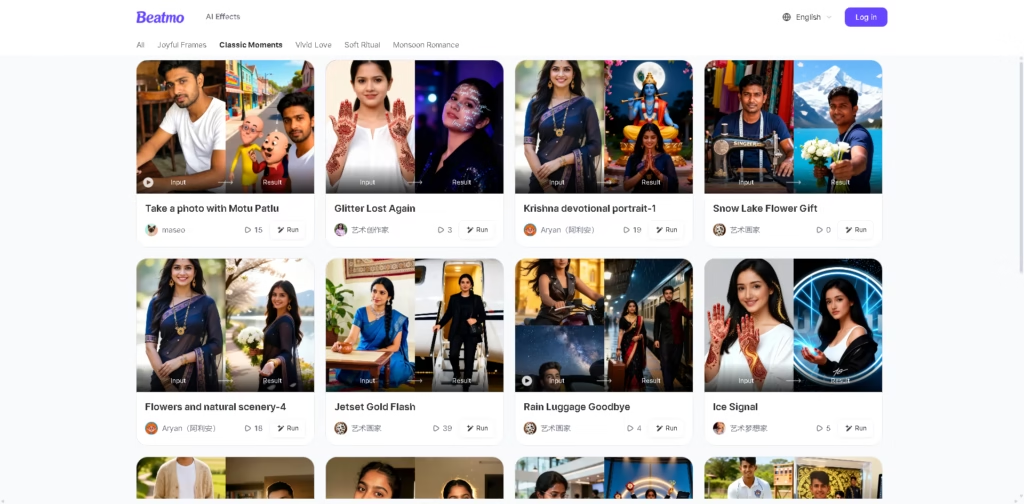
Beatmo is an AI creative platform that transforms photos into animated videos, stylized images, avatars, and other visual effects. Its core workflow is designed around selecting a ready-made effect rather than building an animation manually, making it particularly relevant to casual creators and social media users. The platform also offers specialized effects for couples, portraits, avatars, figures, invitations, and image-to-video generation.
A typical workflow starts by uploading a portrait or other photo, selecting an AI effect or motion template, and generating the result. For example, a user can upload a couple photo, choose a couple-video effect, generate an animated clip, and then save or share the resulting content. The same general workflow applies to Beatmo’s avatar, figure, and image-to-video effects.
At a Glance
| Feature | Details |
|---|---|
| Category | AI Photo & Video Effects |
| Pricing Model | Not specified |
| Free Tier | Yes |
| Platform | Web, Android |
| API | Not specified |
| Primary Strength | Ready-made AI effects and templates |
Key Features
- Converts still photos into short AI-generated motion videos.
- Provides ready-made dance and motion templates for portrait animation.
- Generates AI avatars from uploaded photos in multiple visual styles.
- Creates specialized couple, figure, invitation, and image-to-video effects.
- Offers a browsable library organized into visual categories and effects.
- Supports mobile creation through the Beatmo app.
Best For
- Animating portrait photos into short social media clips.
- Creating AI dance videos from selfies and portraits.
- Turning couple photographs into romantic animated videos.
- Generating stylized avatars from personal photos.
- Exploring ready-made AI effects without manual video editing.
Pros & Cons
Pros:
- Large selection of ready-made AI effects reduces the need for detailed prompting.
- Covers both photo transformation and image-to-video workflows.
- Specialized effects support portraits, couples, avatars, figures, and other creative formats.
- Mobile-focused workflows make quick creation practical.
Cons:
- Detailed pricing, credit limits, and subscription plans are not clearly specified in the supplied product information.
- API availability is not specified.
- The documented workflow emphasizes templates and effects rather than advanced manual motion control.
Alternatives & Comparisons
| Alternative | Best For | Key Difference vs. This Tool |
| Dreamina | Prompt-driven image-to-video creation | Provides more detailed control over motion, camera direction, references, duration, and generation models. |
| CapCut | AI generation plus full video editing | Combines AI image-to-video generation with captions, timing, overlays, transitions, and broader editing controls. |
| Runway | More advanced AI video production | Better suited to creators seeking a production-oriented AI video workflow and greater creative control. |
Beatmo fits the market as an effect-first AI creation platform aimed at fast photo animation and stylized social content. Choose Beatmo when ready-made effects and simple photo-to-video creation matter more than detailed generation controls or advanced editing.
Frequently Asked Questions
Is Beatmo free to use?
Beatmo’s website and individual effect pages advertise free trials or free creation options, but the supplied information does not specify exact usage limits or credit allowances.
Does Beatmo support image-to-video generation?
Yes. Beatmo provides an Image To Video AI effect that turns uploaded photos into moving videos and also lists several specialized video-generation effects.
Can Beatmo create AI avatars?
Yes. Beatmo’s AI Avatar Generator can transform uploaded photos into stylized or realistic avatars and supports avatar video creation.
Does Beatmo have an API?
API availability is not specified in the supplied product information or the reviewed official pages.
ToolsPedia Rating
- Performance & Speed: 4.5 / 5.0
- Ease of Setup: 4.8 / 5.0
- Feature Depth: 3.0 / 5.0
- Value for Price: 4.0 / 5.0
- ToolsPedia Score: 4.1 / 5.0
Final Thoughts
Beatmo is a practical choice for users who want to turn ordinary photos into animated clips and stylized AI creations without learning traditional animation software. Its strongest differentiator is the breadth of ready-made effects, while more advanced creators may prefer tools with stronger prompt and editing controls.
Start with Beatmo’s free options to determine whether its available effects match the type of content you want to create.
















